Proof of delivery
A proof of delivery app that ends the “where is my order” call
A proof of delivery app records that the order reached the right door, and when. In pickup.kitchen a driver cannot mark a stop Delivered without taking a photo. You see it on the live board, and the guest gets it by text or email.
- A photo is required before a stop can be marked Delivered
- Time, driver, and note saved with every handover
- Guests get the photo by text or email
Free onboarding. Pay as you use. No monthly fee for ordering.
Real screens
See it in the app
Real screens from pickup.kitchen, the same ones you and your guests use.
1Your driver
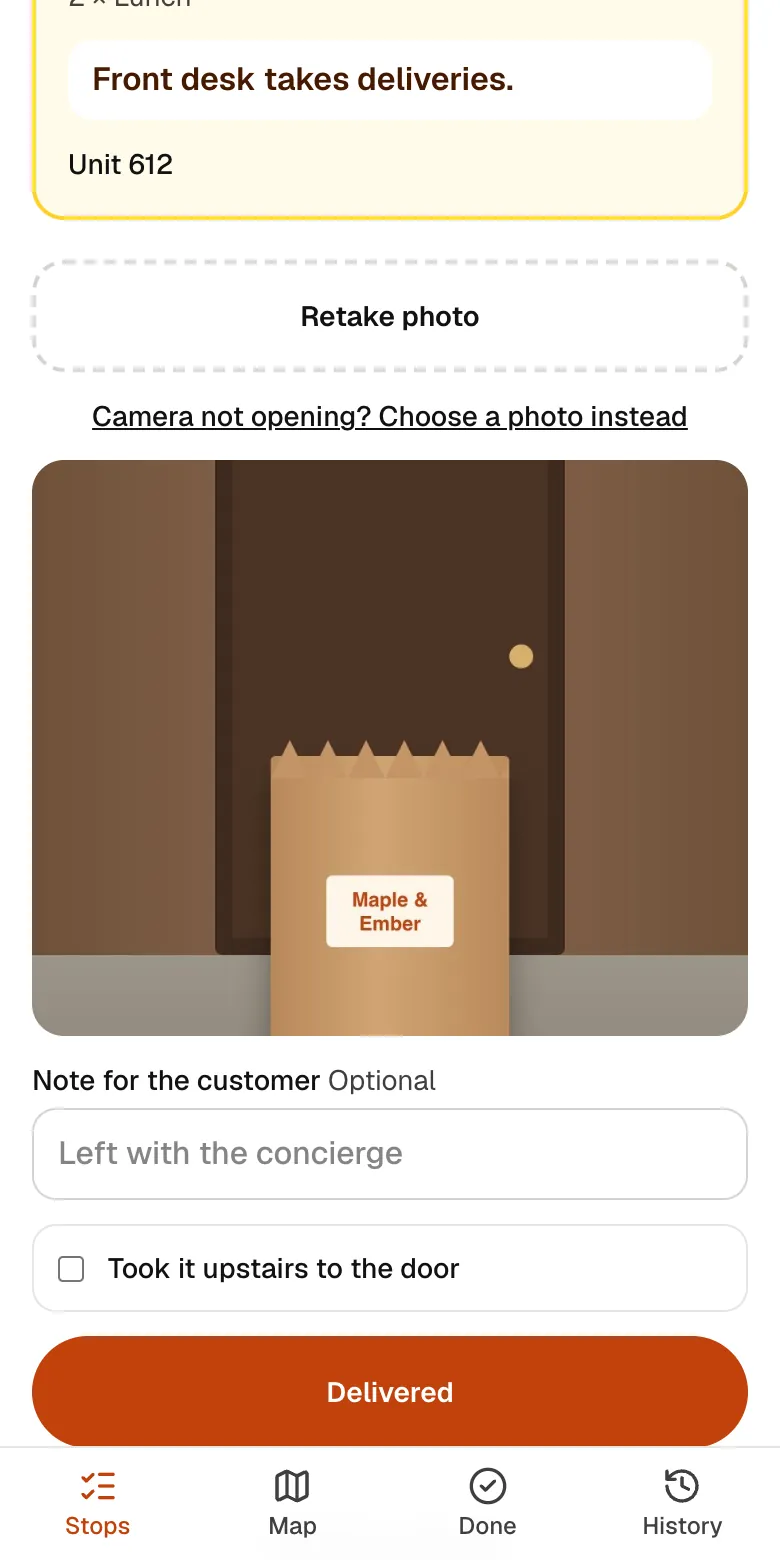
A photo at every door
The driver takes a photo of the drop, so you and the customer both know it arrived.
2Your driver
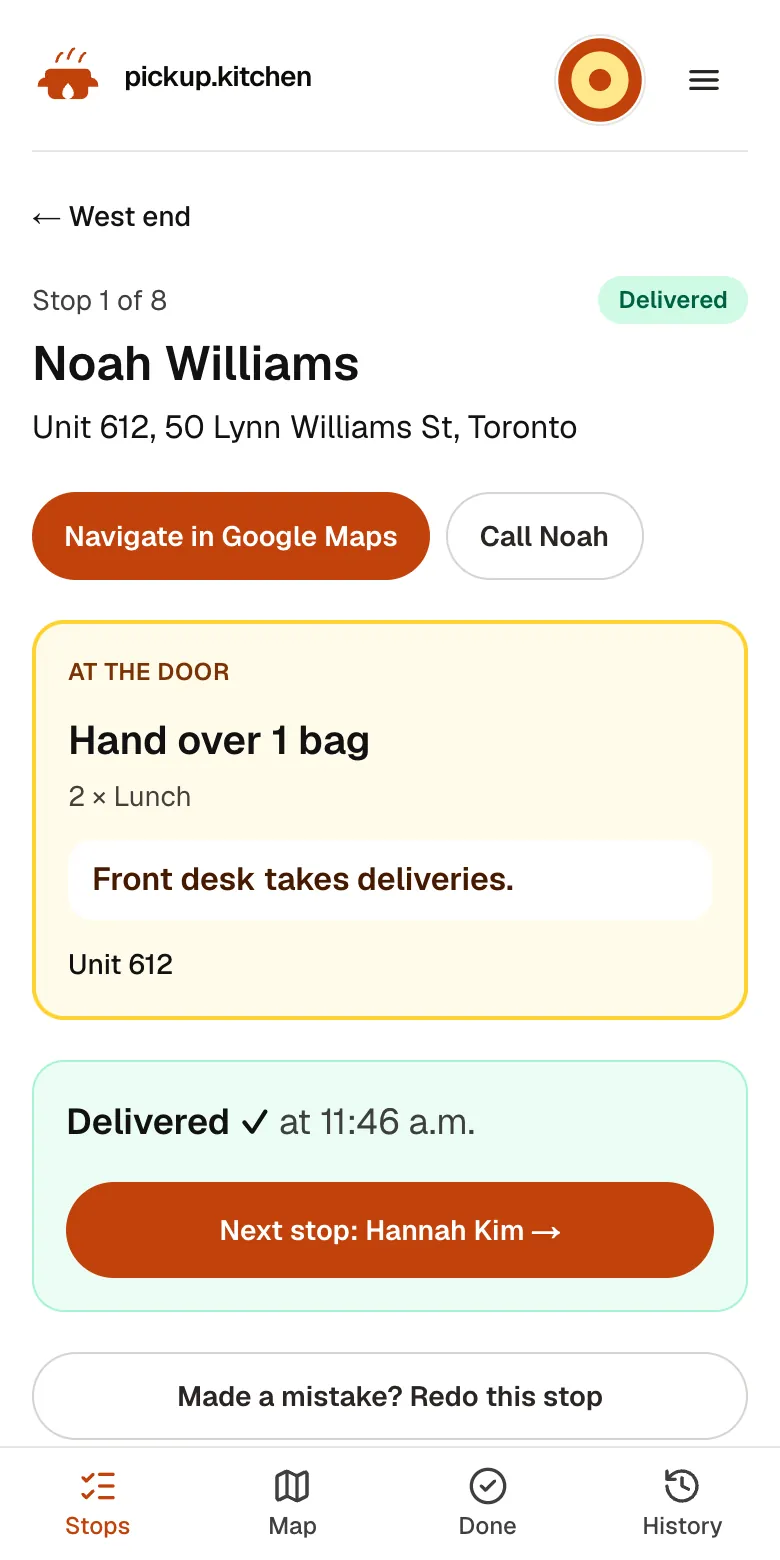
Delivered, then the next stop
One tap marks it delivered with the time, and opens the next address.
3Your guests
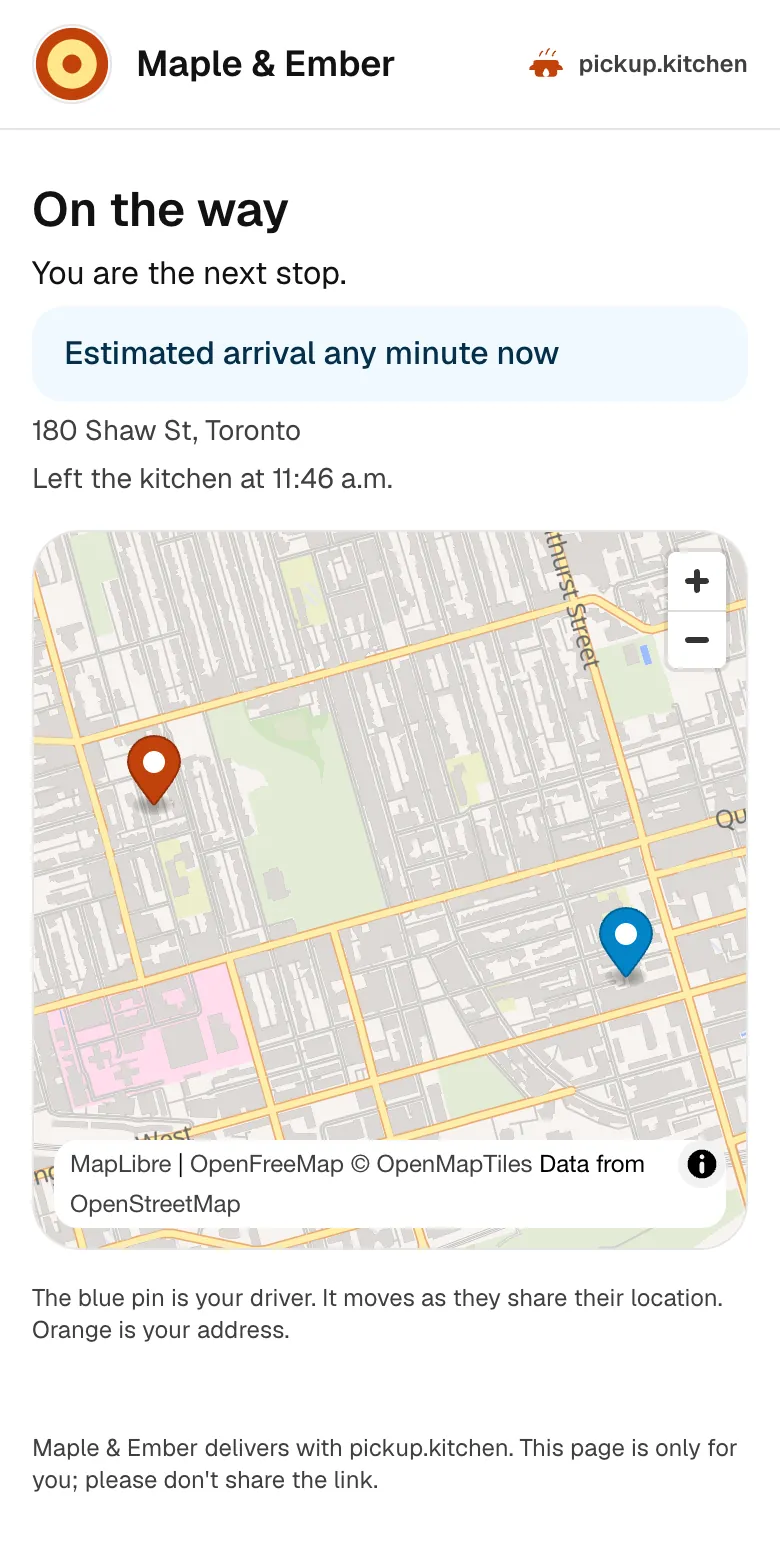
Guests follow their delivery
A live link shows the driver on the way, then the photo at the door. Fewer calls asking where the food is.
In one login
What you get
- Required photoThe Delivered button works only after the driver takes a photo.
- One photo per doorSeveral boxes at one address share a single photo.
- Driver noteA short note for the customer, plus an upstairs tick.
- Failure reasonsFive set reasons and a note, with a retry at the end of the route.
- Guest delivery pagePhoto, time, and note on a private page, linked from the message.
- 90-day recordPhotos are kept 90 days so you can answer a claim.
What is proof of delivery?
Proof of delivery is a record that an order was handed over: what, where, and when. For food it is usually a photo of the bag at the door, with the time it was taken.
Electronic or digital proof of delivery means the driver makes that record on a phone at the moment of delivery. There is no paper slip to lose and no photo to find later in a group chat.
What the driver records at the door
On the last step of a stop the driver takes a photo. The Delivered button stays off until there is one. If the camera will not open, the driver can pick a photo from the phone instead.
When one address has several boxes, one photo covers them all, and the app says how many boxes it is for. The driver can add a note for the customer, like “left with the concierge”. They can tick Took it upstairs if they carried the order to the door.
The app saves the time and the driver's name with the photo. A stop saved with no signal stays on the phone and sends when signal returns.
What makes a good proof photo
Tell your drivers the same thing every time. Get the bag and the door number in one frame. Stand back far enough to show where it was left. Keep faces out of it.
A photo of a bag on a doormat with the unit number in the corner settles almost any question later. A photo of a bag in a car does not.
What you see
On the live board, each finished stop shows delivered or not delivered, the time, and a Photo link. When a guest says “it never came”, you open the photo, check the address and the time, and answer in a minute.
A failed stop shows its reason: can't find the address, no one answered, can't get into the building, food damaged or spilled, or customer refused. The driver's note shows with it.
Photos are kept for 90 days, then deleted.
What the guest sees
Guests who ordered on your site get a message when the box is at the door. It links to a page called Delivered to your door, with the photo, the time, and the driver's note.
The email says the photo link works for 30 days. The page is private to that guest. It uses a long link, and search engines are told not to index it.
Before that, the guest has already followed a live page with the driver's pin and an arrival window. See the delivery software page for the messages that come first.
When something goes wrong
If the driver cannot deliver, the stop is marked not delivered with a reason, and the guest's tracking page says it could not be delivered. The driver can send it to the end of the route and try again.
If a driver taps Delivered by mistake, you can reopen the stop from the live board. It goes back on the driver's route. If the guest already received a delivered message, they are sent a correction that says it is still on the way.
Handling a missed-delivery claim in three steps
Open the stop on the live board and look at the photo and the time. Check the address on the stop against the address the guest gave. Reply to the guest with what you see, and offer a remake or a refund if the order did not arrive.
The record is there to help you answer in a minute. The decision about the refund stays yours.
Proof that also keeps pay honest
In driver pay, only stops delivered with a photo count as a paid delivery. A stop that could not be delivered is not paid as one. The same photo that settles a customer question settles the pay report.
The pay report also shows errors, which are added when you reopen a stop the driver had finished. You set the rate for each.
What it is not
pickup.kitchen does not collect a signature, and it does not scan an ID. It records a photo, a time, a note, and who drove. How a card dispute or an insurer treats a delivery photo is up to them. Check with your payment provider if you rely on it.
Stops you add by hand are photographed too. They do not send a message to the customer, because there is no order behind them.
FAQ
Questions
What is proof of delivery?
A record that an order was handed over, showing what, where, and when. In pickup.kitchen that is a photo, a time, a note, and the driver's name.
Does pickup.kitchen capture signatures?
No. It takes a photo at the door with a time and an optional note. There is no signature pad.
How long are delivery photos kept?
Photos are kept for 90 days and then deleted. The link in a guest's email works for 30 days.
Does the guest see the proof of delivery?
Yes, if they ordered on your site. They get a message with a link to a page showing the photo, the time, and the driver's note.
Can I use it as proof of delivery software without taking orders on pickup.kitchen?
Yes. The driver app is sold on its own, pay as you use (100 stops free, then CA$0.10 a stop), and you add stops by hand. You see every photo on the live board. Customers are not messaged for hand-added stops.
What if the guest is not home?
The driver leaves the order where you allow, takes the photo, and adds a note like “left with the front desk”. If they cannot deliver, they report a reason instead.
Does pickup.kitchen provide the drivers?
No. You use your own drivers: your staff, family, or a driver you hire. pickup.kitchen gives them the app, with the route in order, each address and door note, Navigate, and a photo at every door, and gives you the dispatch side. We don't supply drivers or take a cut of their pay.
Keep reading
- ProductDelivery driver appA delivery driver app for businesses that deliver: route on the phone, photo proof at the door, live tracking, dispatch. Free with pickup.kitchen orders.
- ProductRestaurant delivery softwareRestaurant delivery software for your own drivers: plan drops, send routes to phones, follow every stop live, and pay drivers. Free with your orders.
- ProductDelivery route optimizationDelivery route optimization for food businesses: split drops between drivers, order stops by drive time, and re-optimize before they go. Free with orders.
- CompareShipday alternatives for food businessesShipday alternatives for food businesses: Shipday's free, US$49 and US$99 plans against 100 free stops then CA$0.10 a stop, plus where Shipday is stronger.
- Productpickup.kitchen pricing: 10% per order, no monthly feepickup.kitchen pricing: free onboarding, no monthly fee, 10% per order. Delivery tools come with ordering. The driver app on its own is pay as you use.
Free onboarding. Pay as you use.
Put your kitchen on pickup.kitchen
No monthly fee for ordering. Send us your menu and we set it up with you, then you pay as you use.