Guide
How to start a meal prep business, step by step
How to start a meal prep business: decide what you cook, check the rules, price each plan, plan delivery, then find buyers. This guide gives nine steps, with the numbers to check and the official pages to read before you cook for the public.
Free onboarding. Pay as you use. No monthly fee for ordering.
The short version
- Official food safety numbers for cold storage and reheating
- A pricing formula with a worked example
- A break-even sum you can do on one sheet of paper
Step 1: Decide what you sell and to whom
Start narrow. Pick one customer and one promise: lunches for office workers, high-protein dinners for gym members, family dinners for busy parents. A narrow promise is easier to cook, to describe and to price.
Then decide the shape. How many meals a day? Which weekdays do you pack? Boxes by delivery or by pickup? Two or three recipes a week, packed on two days, is a sensible start. Choose the schedule you can repeat when you are tired. Before you build anything, cook one week of meals for five people you know. Ask what they would pay and what they would change.
Step 2: Can you start a meal prep business from home?
Maybe, but do not assume it. Meal prep is cooked food that must stay cold, and the rules for home sellers are mostly written for foods that do not.
In Ontario, home businesses that make only low-risk foods get some exemptions. The Eastern Ontario Health Unit describes low-risk foods as non-hazardous ones that need no time and temperature control, such as breads, cookies, granola and cakes. Ask your health unit how it classes cooked meals that must be chilled. Toronto Public Health says a home kitchen used for commercial purposes counts as a food premises, and the operator must notify it before starting.
In the United States, cottage food laws differ by state. Texas now allows some refrigerated foods under registration. Its page still excludes meat, poultry and seafood, and those are the base of many meal prep menus. FDA says to contact your local health department to learn which state and local laws apply.
Many meal prep businesses will need a licensed commercial or shared kitchen and a permit from the local health authority. Ask yours first. Our guide to cottage food laws shows how those rules differ.
Questions to ask your health department
Call before you spend money on equipment. Ask these, and write down the answers with the date and the name of the person you spoke to.
- Does my kind of meal need a permit, and which one?
- Can I cook in my home kitchen, or must it be a commercial or shared kitchen?
- Do I need a food handler certificate, and who gives it?
- What must the label say, and what must it say about storage?
- Does selling by delivery change anything?
- How often will you inspect, and what will you check?
Step 3: Build your food safety plan
Health Canada and the Public Health Agency of Canada give plain numbers. Use them as your starting point, and add anything your health authority requires.
- Keep cold food at or below 4 °C (40 °F). Put a thermometer in every fridge.
- Refrigerate or freeze cooked food within two hours of cooking.
- Cooked meat, stews, and egg or vegetable dishes keep 3 to 4 days in a fridge at 4 °C. Soups keep 2 to 3 days. Those fridge times are for safety.
- Freeze or eat leftovers within four days of cooking. Reheat them until steaming hot, to 74 °C (165 °F).
- Label every box with the cook date and its allergens.
Plan the week around the clock
If you cook on Sunday and deliver on Monday and Tuesday, Thursday's meals are already past day three. Cook twice a week, or freeze later boxes and tell customers to keep them frozen.
Know the allergen list for your country. Canada names eleven priority allergens: eggs, milk, mustard, peanuts, crustaceans and molluscs, fish, sesame seeds, soy, sulphites, tree nuts, and wheat and triticale. The United States names nine: milk, eggs, fish, crustacean shellfish, tree nuts, peanuts, wheat, soybeans and sesame. Print the allergens on every label.
Packaging and labels
Choose containers that survive the reheat method your customers will use, and that stack in a delivery bag. Buy a sample of each before you buy a case.
A label should carry the meal name, the cook date, the allergens and a reheating line. What a label must legally say depends on your authority and on how you sell. Ask your local health authority what applies to food sold directly to the customer.
Step 4: Price each plan from food cost
A Johnson & Wales University pricing article gives 28% to 35% as the food cost range for profitable restaurants. It prices a dish by dividing its cost by the target percentage. A meal with $6 of food in it, at a 30% target, sells for $20.
Meal prep carries more than food. Add the container, the label, the bag, delivery and card fees. Stripe charges 2.9% plus CA$0.30 on domestic cards in Canada.
Price by plan length. Example: a 5-day plan at $20 a meal is $100. A 20-day plan at $18 a meal is $360, and still has food cost at 33%. Write each recipe's cost per portion once, and update it when prices move.
Step 5: Write a one-page meal prep business plan
A meal prep business plan fits on one page if it answers these:
- Who you sell to, and the one promise you make them.
- Weekly capacity: the most meals you can cook, pack and deliver.
- Price per meal, food cost per meal, and the plans you sell.
- Fixed costs per month: kitchen, permit, insurance, software.
- Break-even: monthly fixed costs divided by what each meal leaves after food, packaging and card fees.
A break-even example
Say fixed costs are $1,800 a month. A meal sells at $20. Food is $6, packaging $1 and card fees about $1, so each meal leaves $12. Then $1,800 divided by $12 is 150 meals a month, or about 35 a week.
Those numbers are an example. Replace them with yours. If your break-even is more than you can cook in a week, change the price, the menu or the kitchen before you launch.
Step 6: Set the weekly rhythm
A weekly rhythm keeps you sane. Choose an order cutoff, cook days, pack days and delivery days. Here is one shape that cooks twice a week:
The cutoff protects you. Without one, you cook for a number that keeps changing. Count the meals you can cook, pack and label in one day. That is your cap. Stop selling at it.
- Thursday 9 p.m.: orders for next week close.
- Friday and Saturday: order ingredients, shop and prep.
- Sunday: cook, chill and pack Monday and Tuesday's boxes. Deliver Monday and Tuesday.
- Tuesday: cook, chill and pack Wednesday to Friday's boxes. Deliver them as they come due.
Step 7: Decide how boxes reach customers
Pickup is cheapest. Delivery sells more. If you deliver, group stops by neighbourhood, pack boxes cold in insulated bags, and tell customers to refrigerate on arrival.
A photo at the door settles every “it never came” message. Use your own drivers or a courier you trust, and write the plan for a driver who is off sick.
Count delivery as a cost. Example: a route of 20 stops that takes two hours of driver time at $20 an hour costs $40, or $2 a stop. Add that to the price or charge a delivery fee.
Starting a meal prep delivery business
A meal prep delivery business is the same kitchen with one more job: a list of doors for each packing day. Plan it before your first subscriber asks for delivery.
Decide the area you will drive to and the fee, the time window you promise, and who drives. Print the address on each label. On delivery days, put the stops in order before the driver leaves, and take a photo at each door so a missing box is a two-minute conversation, not an argument.
When a subscriber skips a day or sends one day to another address, the route for that day changes, not the whole plan. Software that keeps the plan and the route together saves you from rebuilding the list every morning.
Step 8: Take orders and payments on a page you control
A group chat and e-transfers work for ten customers and break at thirty. Use a page where a customer chooses a plan, pays by card and gets a confirmation.
pickup.kitchen is one way. A plan is a menu item with weekdays, a start date and an end date. It handles skips and pauses, prints the morning pack list and labels, and plans delivery routes. Onboarding is free, there is no monthly fee, and you pay 10% per order. See the meal prep software page for what it does and does not do.
Step 9: Find your first ten customers
Ask ten people you know to try one week. Post the weekly menu with daylight photos on Instagram. Offer a tasting box to one office or gym. Keep a waiting list when you reach your cap.
Ask every customer for one referral. Email next week's menu on Thursday, before the cutoff. Then keep score: meals sold, food cost per meal, skips and pauses, renewals and delivery minutes per box.
Real screens
Do it on pickup.kitchen
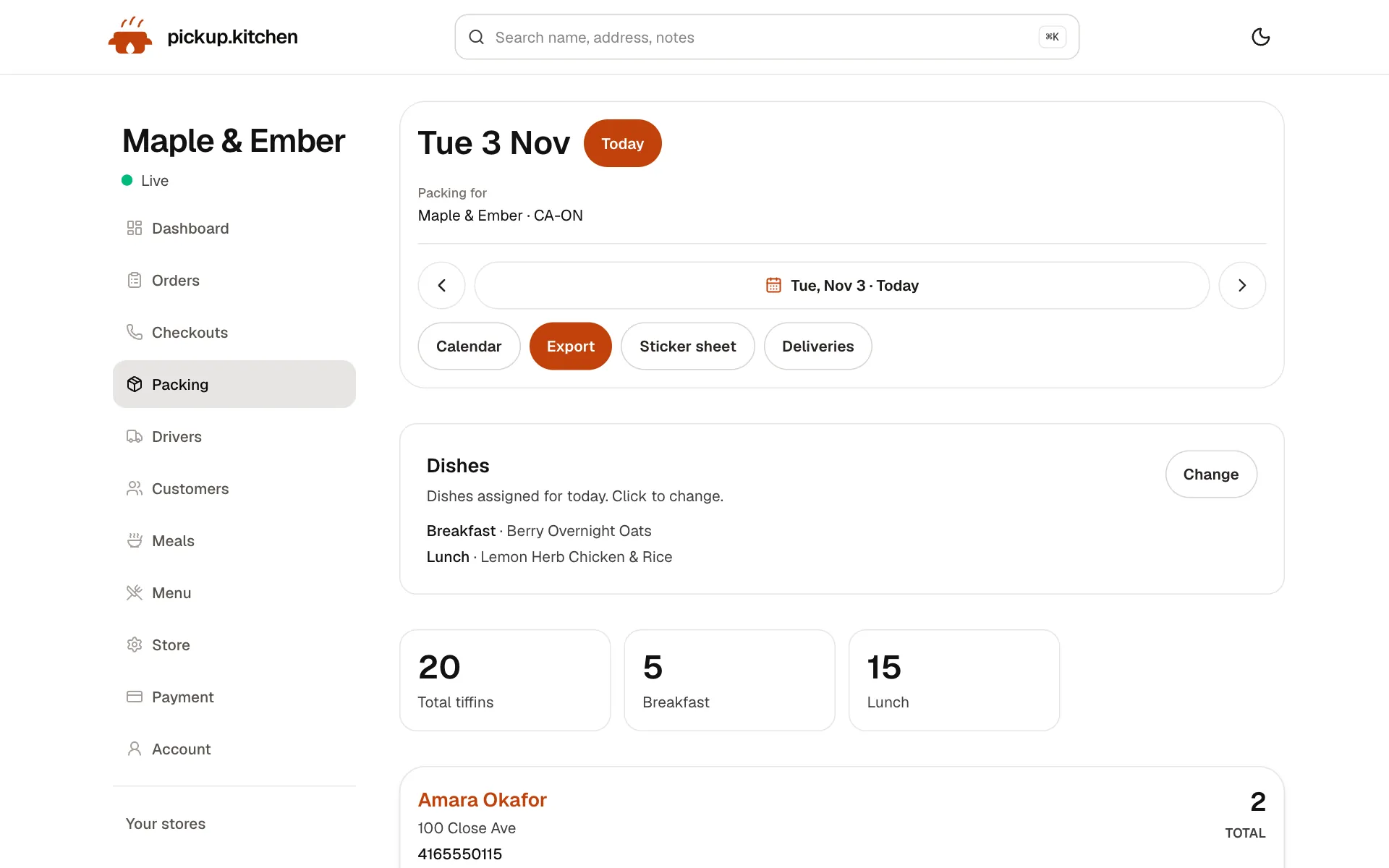
1Meal plans
Meal plans that count themselves
Weekly plans with skips and pauses, and tomorrow's list counted for you: how many to make and for whom.
See how it works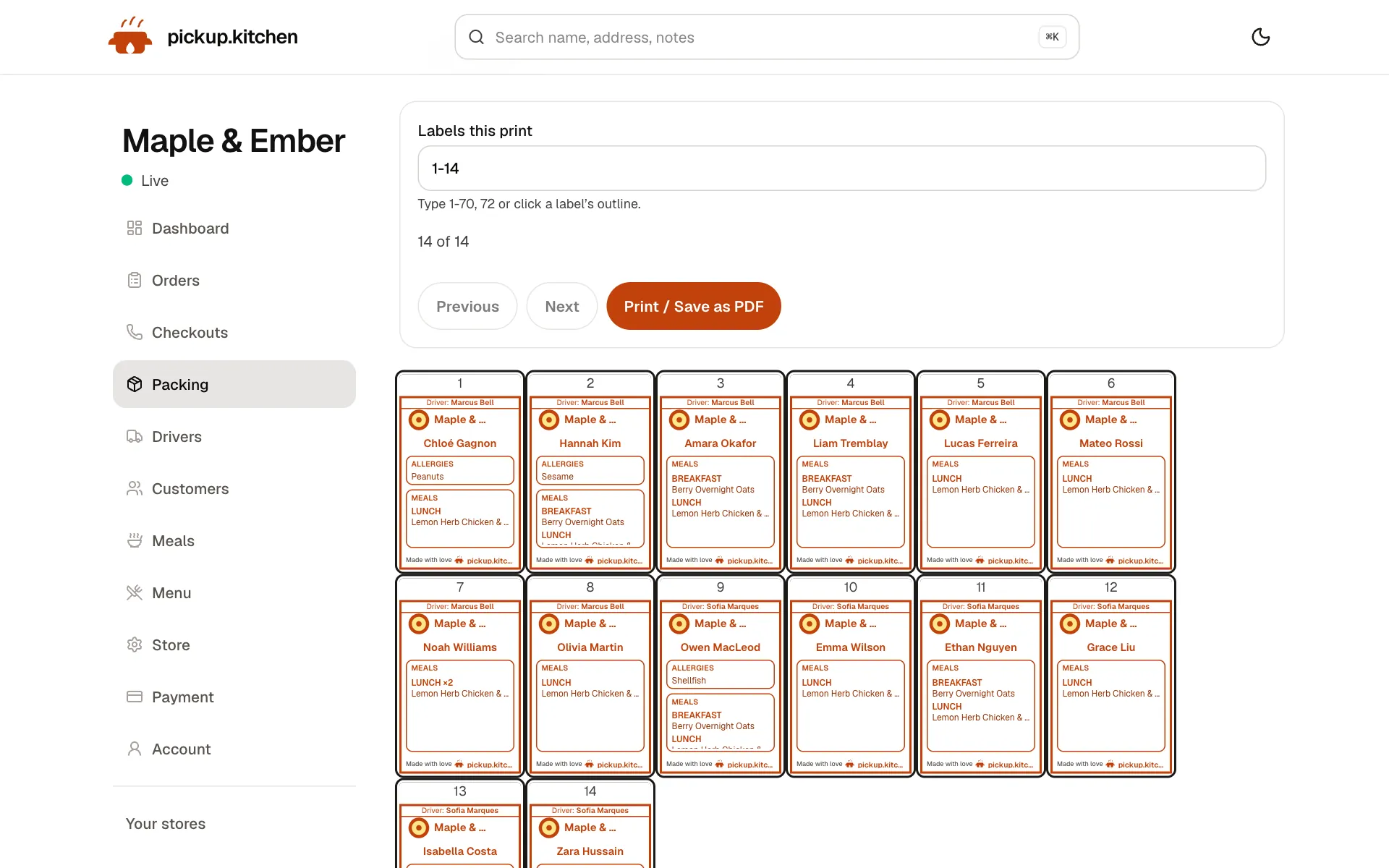
2Meal plans
A label for every box
Name, meal, day and allergies, printed for each box, so the right box reaches the right door.
See how it works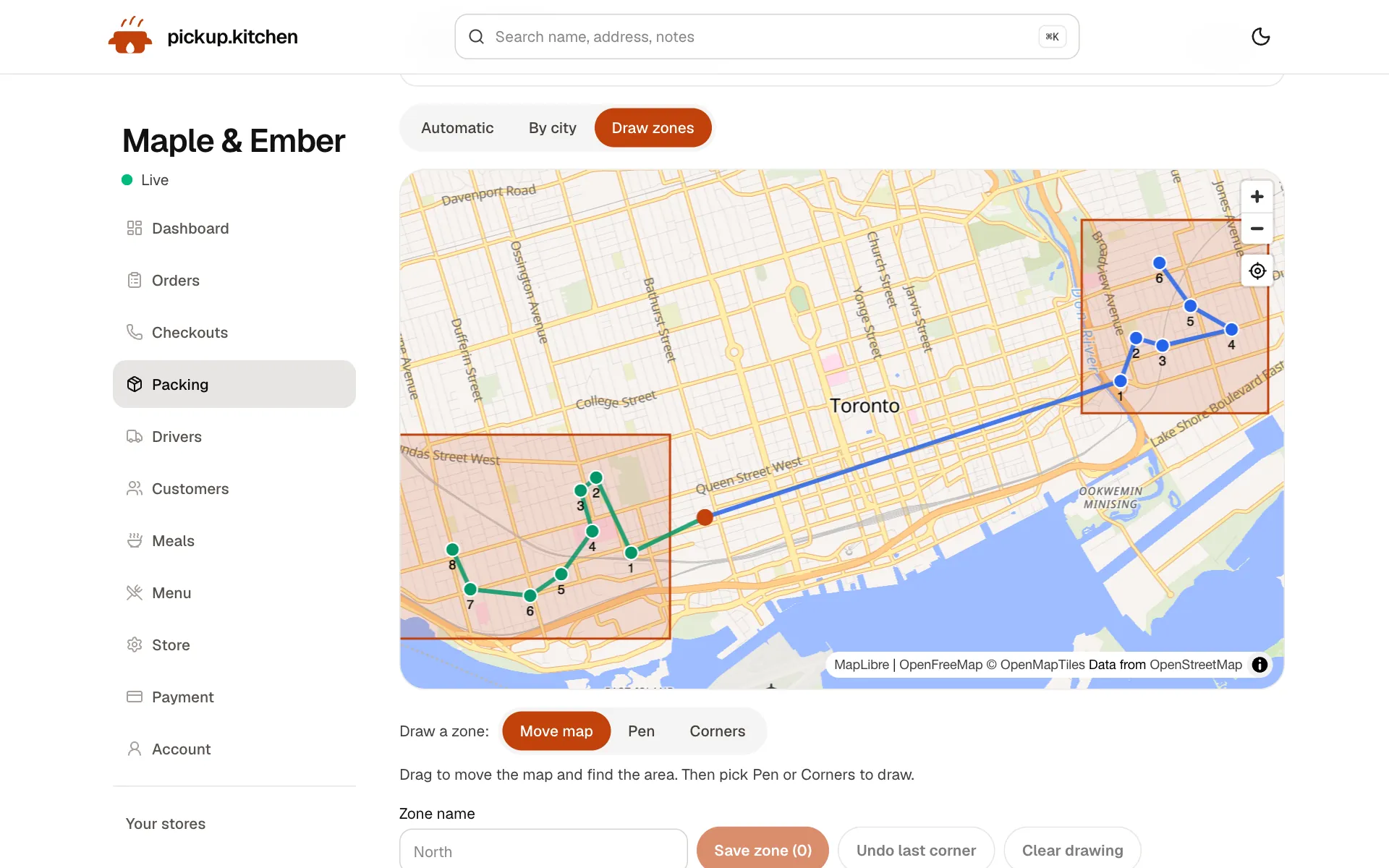
3Delivery
Your routes on a map
Stops come from your orders, or you add them by hand. Optimize puts them in order for the roads.
See how it works
FAQ
Questions
How much does it cost to start a meal prep business?
It depends on your kitchen, permit and insurance. Write each cost in a one-page plan. The biggest variable is whether you cook at home, rent a shared kitchen or lease your own.
Do I need a licence to sell meal prep?
Often, yes. Meal prep is cooked food that must stay cold, so expect to deal with your local health authority. Contact them before you sell.
Can I start a meal prep business from home?
It depends on where you live and what you cook. Many home-business exemptions cover only low-risk foods. Ask your local health authority how it classes chilled cooked meals.
How do I price meal prep?
Divide the food cost per meal by your target percentage, such as 30%. Then add packaging, delivery and card fees. Price longer plans a little lower per meal.
How many customers do I need to break even?
Divide your monthly fixed costs by what each meal leaves after food, packaging and card fees. With $1,800 fixed and $12 left per meal, that is 150 meals a month.
What software does a meal prep business need?
Something that stores each plan's dates, builds the daily pack list, prints labels and handles skips and pauses. pickup.kitchen does this and takes the orders.
Keep reading
- ProductMeal prep business softwareMeal prep business software that turns paid plans into tomorrow's pack list: skips, pauses, extra days, labels, and delivery in one login. 10% per order.
- ProductRestaurant delivery softwareRestaurant delivery software for your own drivers: plan drops, send routes to phones, follow every stop live, and pay drivers. Free with your orders.
- GuideCottage food laws by state: caps, permits, online salesCottage food laws explained: what they are, the rules most states share, how to start selling from home, and a 15-state table of caps and permits.
- Productpickup.kitchen pricing: 10% per order, no monthly feepickup.kitchen pricing: free onboarding, no monthly fee, 10% per order. Delivery tools come with ordering. The driver app on its own is pay as you use.
Sources
- Health Canada: Safe food storage (checked November 2026)
- Public Health Agency of Canada: general food safety guidance (checked November 2026)
- Health Canada: Food allergies, priority allergens (checked November 2026)
- FDA: Food allergies, major allergens (checked November 2026)
- FDA: How to start a food business (checked November 2026)
- Eastern Ontario Health Unit: Home-based food premises (checked November 2026)
- Toronto Public Health: Starting a food business (checked November 2026)
- Texas DSHS: Texas cottage food production (checked November 2026)
- Johnson & Wales University: how to price a restaurant menu for profitability, updated July 2026 (checked November 2026)
- Stripe Canada pricing (checked November 2026)
Free onboarding. Pay as you use.
Ready to take orders?
Your own ordering site with pickup, delivery and meal plans. No monthly fee for ordering.