For restaurants
Restaurant software for kitchens that live on takeout and delivery
Restaurant software for takeout and delivery has two jobs: put every order you control on one list, and stop orders when the kitchen is full. pickup.kitchen does both from your own site, with the kitchen screen, the counter, your customers and your drivers in the same login. Onboarding is free, there is no monthly fee, and you pay 10% per order.
- Your own site at yourname.pickup.kitchen, plus a free listing on pickup.kitchen
- Tickets chime on the kitchen screen, and full slots close on their own
- Free onboarding, no monthly fee, 10% per order
Free onboarding. Pay as you use. No monthly fee for ordering.
Real screens
What it looks like for you
Real screens from pickup.kitchen, the same ones you and your guests use.
1Your guests
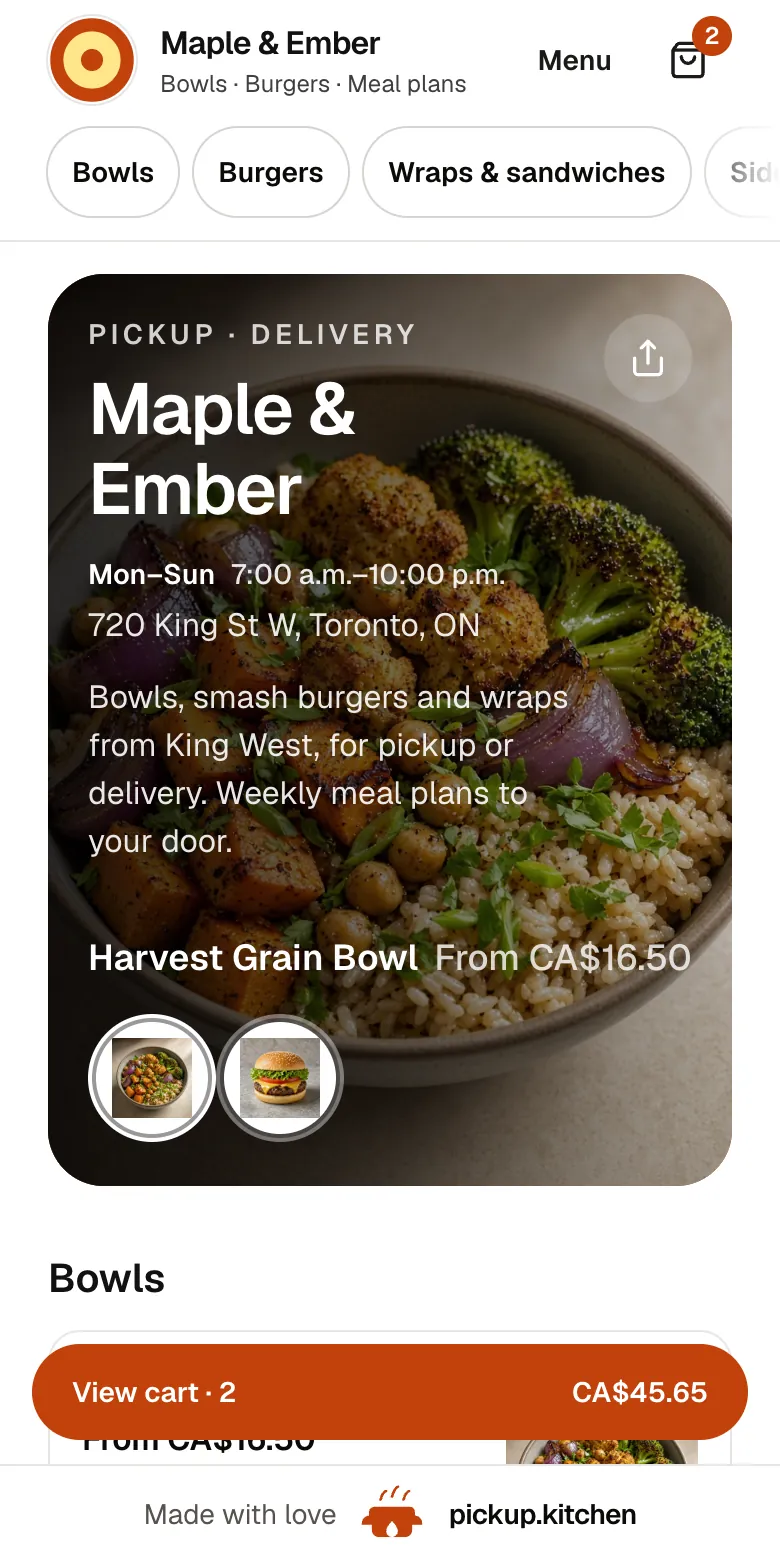
Your menu, on your own site
yourname.pickup.kitchen shows your dishes with photos and prices, and each guest picks pickup or delivery.
See how it works2Your kitchen
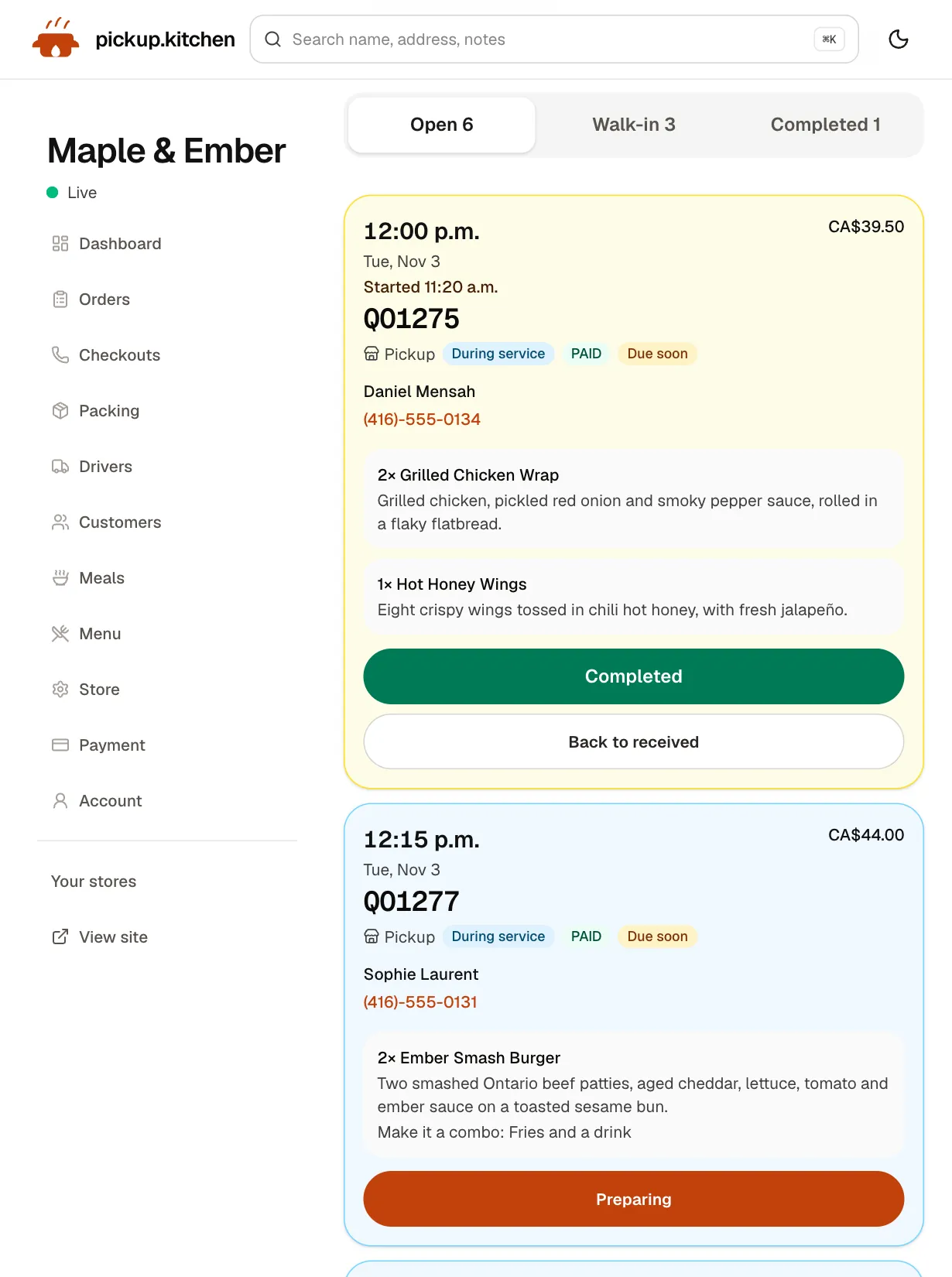
Tickets on the kitchen screen
Online orders, walk-ins and finished tickets in their own lanes, each with its QO number and the time it is due.
See how it works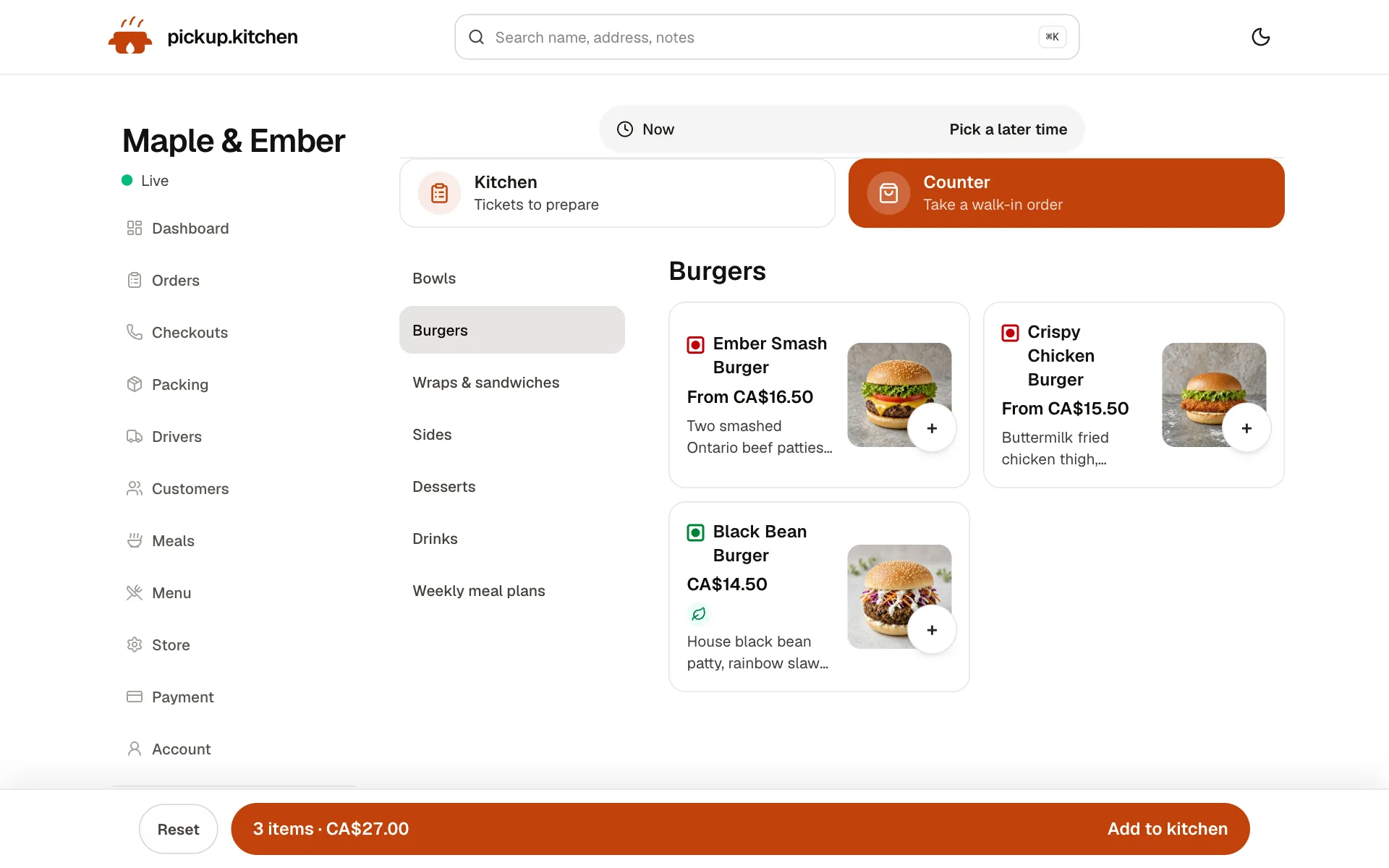
3Your counter
Ring up walk-ins at the counter
Tap the dishes, take cash or card, and the ticket joins the same board as the online orders.
See how it works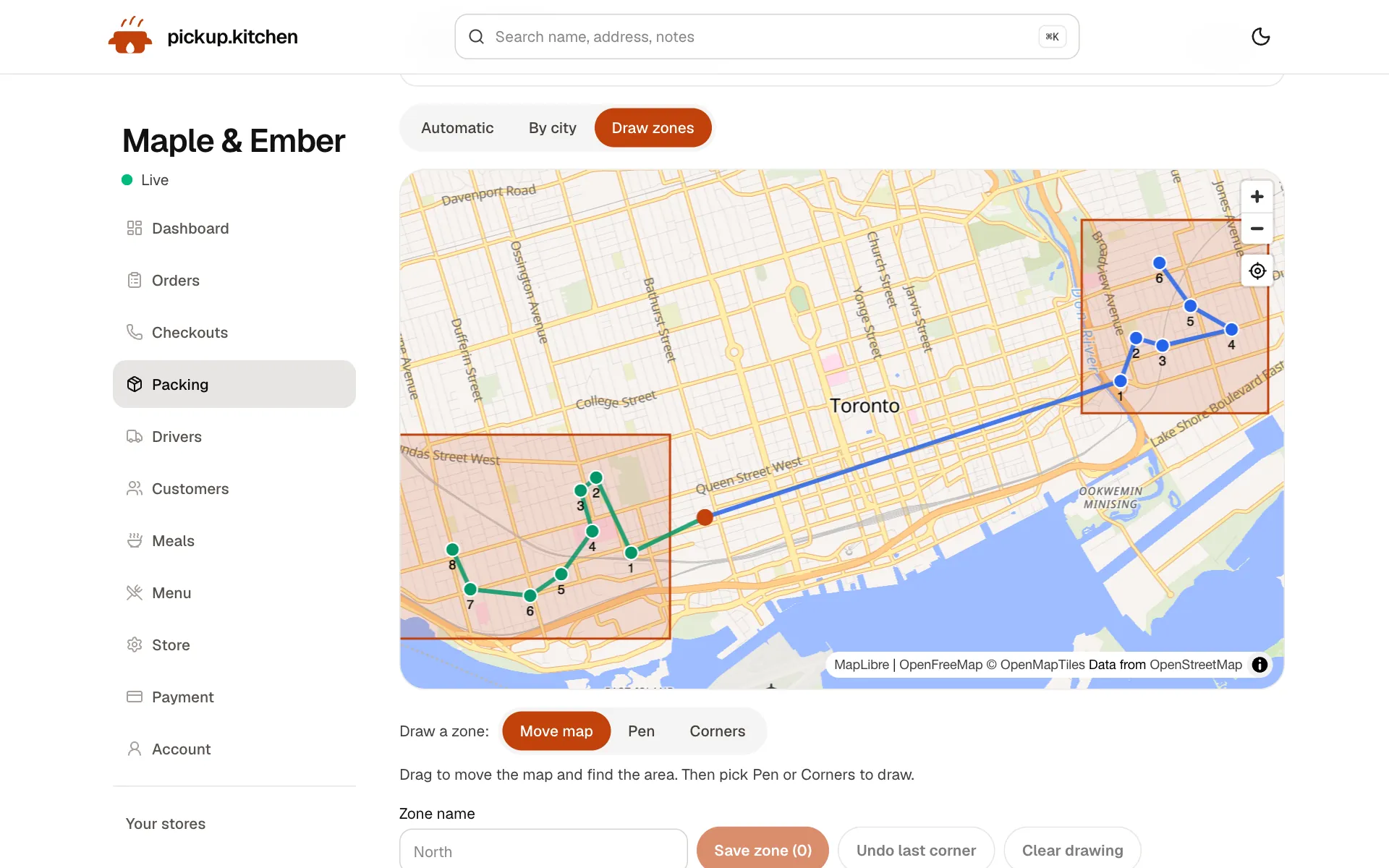
4Delivery
Your routes on a map
Stops come from your orders, or you add them by hand. Optimize puts them in order for the roads.
See how it works
In one login
What you get
- Your own siteyourname.pickup.kitchen with your menu, photos, hours and checkout on one page.Learn more
- Time slotsSlot length, orders per slot, cutoff, closed dates and sold-out days.Learn more
- Kitchen screenNew tickets arrive with a sound. The cook starts them and completes them.Learn more
- CounterWalk-in and phone orders on the same menu, marked Cash or Card.Learn more
- Delivery toolsRoutes, Send to driver, live tracking and a photo at the door.Learn more
- Customer listEvery guest saved with their orders, ready for your next email.Learn more
Friday, 5:40 p.m.
The phone is ringing. A tablet is chirping with a delivery-app order. Someone at the counter wants to know how long. The cook is reading a paper ticket that printed ten minutes late.
That is a restaurant with orders arriving from four directions and no single list. Online ordering only helps if every order you control lands in one place, with a time on it.
What your guests do
They open your link, tap a dish, pick options, and add a note such as “no onions”. They choose pickup or delivery, pick a time, and pay by card. No app to download. No account to create first.
Their name and phone stay on your customer list. After paying, they get an order page and an email, then another message when the order is “Ready for pickup” or “On the way”.
One screen for the cook
Every paid order becomes a ticket on the kitchen screen, with a chime. The cook taps Preparing, then Completed. Completed is what tells the guest it is ready. Tickets turn amber when due soon and red when late.
The screen runs in a browser on a tablet, phone or laptop. The kitchen display system page shows what is on a ticket.
Say no before the kitchen has to
Most bad nights start with a site that promised more than the line could cook. So you set the limits yourself.
- Slots: choose a slot length from 10 minutes to an hour, and how many orders one slot holds. A full slot closes on the site.
- Cutoff: stop taking orders for a day at a time you choose, such as 8 p.m. the night before.
- Sold out today: one tap, and nobody can book today. Tomorrow stays open.
- Closed dates: mark a holiday or a week away, and those days leave checkout.
- Dish stock: a dish with tracked stock stops selling at zero.
Walk-ins and phone orders on the same menu
The kitchen app has a Counter button next to Kitchen. Staff tap the dishes, add a note and the guest's name, choose Cash or Card, and send it. The order lands in the Walk-in lane, beside your online orders but not mixed in with them.
A phone order needs a time. Staff pick a pickup time, or choose delivery, enter the address and pick a slot. Orders you enter yourself are not blocked by the cutoff. See the POS page for the counter.
Delivery with the drivers you already have
Switch delivery on and guests choose pickup or delivery at checkout. Drops appear on the Deliveries page. You split them between drivers, tap Optimize, check the order, and tap Send to driver.
Drivers open the route on their phone and photograph each handover. Guests follow a live link. pickup.kitchen does not supply couriers, so bring your own people. The delivery software page covers the whole day.
What the marketplace cut costs on a $40 order
In Canada, Uber Eats lists 20%, 25% or 30% on delivery orders, depending on the plan. DoorDash lists 20%, 25% or 29% (both checked November 2026). On a $40 delivery order at 30%, $12 goes to the app.
pickup.kitchen charges 10% per order, with no monthly fee. On card orders your menu shows each price with the 10% already in it, and the guest pays it at checkout. You receive your menu price, before Stripe's own card fee.
You can keep an app for discovery and send your regulars to your own site. Orders from other apps do not appear in pickup.kitchen, so the two run side by side.
Guests who come back
An order on your own site puts the guest on your customer list. From the same login you can email them about a new dish or a closed Monday. The restaurant CRM and restaurant email marketing pages cover both.
Orders that arrive through a marketplace's app do not put the guest on your list. That is the main reason to run a direct channel next to any app.
The tools a restaurant uses
You do not have to switch everything on day one. Most restaurants start with the first two and add the rest when they need them.
- Online ordering: your site, slots, cutoffs and order updates for guests.
- Kitchen display system: tickets, three lanes, a chime, and a ready message to the guest.
- Counter (POS): walk-in and phone orders on the same menu, marked Cash or Card.
- Delivery software and the driver app: routes, Send to driver, a photo at the door, driver pay.
- Restaurant CRM and email marketing: your guest list and the emails you send to it.
Who this is not for
pickup.kitchen is built for orders that leave the building: pickup, delivery and weekly plans. It does not handle tables, reservations or tabs, and it does not pull in orders from other delivery apps.
If most of your sales are dine-in, keep your current till and add pickup.kitchen for takeout and delivery.
Go live in a day
Create your account, send a photo of your menu or paste the text, and check each dish and price. Set your hours and slots, connect Stripe, and switch the store live. Free onboarding means we can load the menu for you.
Before you share the link, place a test order from your own phone. Watch the ticket arrive, mark it Preparing and Completed, then cancel it.
Step by step
How to get started
- 1Step 1: Create your accountName your kitchen and pick your address. Your site goes up at yourname.pickup.kitchen.
- 2Step 2: Add your menuSend a photo of your menu or paste the text, then check each dish and price.
- 3Step 3: Set hours and slotsChoose open days, slot length, orders per slot and a cutoff.
- 4Step 4: Connect Stripe and go liveConnect Stripe for card payments, place a test order, then switch the store live.
FAQ
Questions
What restaurant software does a takeout restaurant need?
Four things that share one list: an ordering site guests can pay on, a kitchen screen, a counter for walk-ins and phone orders, and delivery for your own drivers. pickup.kitchen has all four in one login, with your customer list next to them.
Can I take online orders without paying 20% to 30% to a delivery app?
Yes. Orders on your own site at yourname.pickup.kitchen cost 10% per order, with no monthly fee. On card orders the guest pays the 10% at checkout.
Do I need a POS to take online orders?
No. Ordering and the kitchen screen are enough to start. Add the counter when you want walk-in and phone orders on the same screen.
Can I use it alongside DoorDash or Uber Eats?
Yes. Orders from those apps stay in those apps. pickup.kitchen takes the orders that come through your own site, and it does not import tickets from other apps.
Is this restaurant software for dine-in service?
No. It is built for pickup, delivery and weekly plans. It does not handle tables, reservations or tabs, so dine-in restaurants keep their current till.
What does it cost?
Onboarding is free and there is no monthly fee. You pay 10% per order. Stripe charges its own card fee to your Stripe account.
Keep reading
- ProductOnline ordering system for restaurantsAn online ordering system for restaurants: your own site at yourname.pickup.kitchen, time slots that close when full, and a kitchen screen. 10% per order.
- ProductKitchen display system for restaurantsA kitchen display system that runs in the browser: tickets arrive with a sound, cooks tap Preparing and Completed, and guests hear when it is ready.
- ProductRestaurant POS systemsRestaurant POS systems differ. This one takes walk-in and phone orders on your online menu and sends them to your kitchen screen. No hardware to buy.
- ProductRestaurant delivery softwareRestaurant delivery software for your own drivers: plan drops, send routes to phones, follow every stop live, and pay drivers. Free with your orders.
- ProductRestaurant CRMA restaurant CRM that fills itself: every guest who orders on your site is saved with their orders and details, and you can email them from the same login.
Free onboarding. Pay as you use.
Run your business on pickup.kitchen
Your own ordering site, the kitchen screen, the counter, your customers, meal plans and the driver app. One login.