Delivery software
Restaurant delivery software that runs the whole delivery day
Restaurant delivery software has to cover more than a map. It starts when the order is paid and ends when the driver is paid. pickup.kitchen handles the drops, the routes, the drivers, the guest's messages, the photo at the door, and the weekly pay, all from one login.
- From paid order to photo at the door in one place
- Your own drivers, on their own phones
- No extra cost for stops from your pickup.kitchen orders
Free onboarding. Pay as you use. No monthly fee for ordering.
Real screens
See it in the app
Real screens from pickup.kitchen, the same ones you and your guests use.
1Delivery
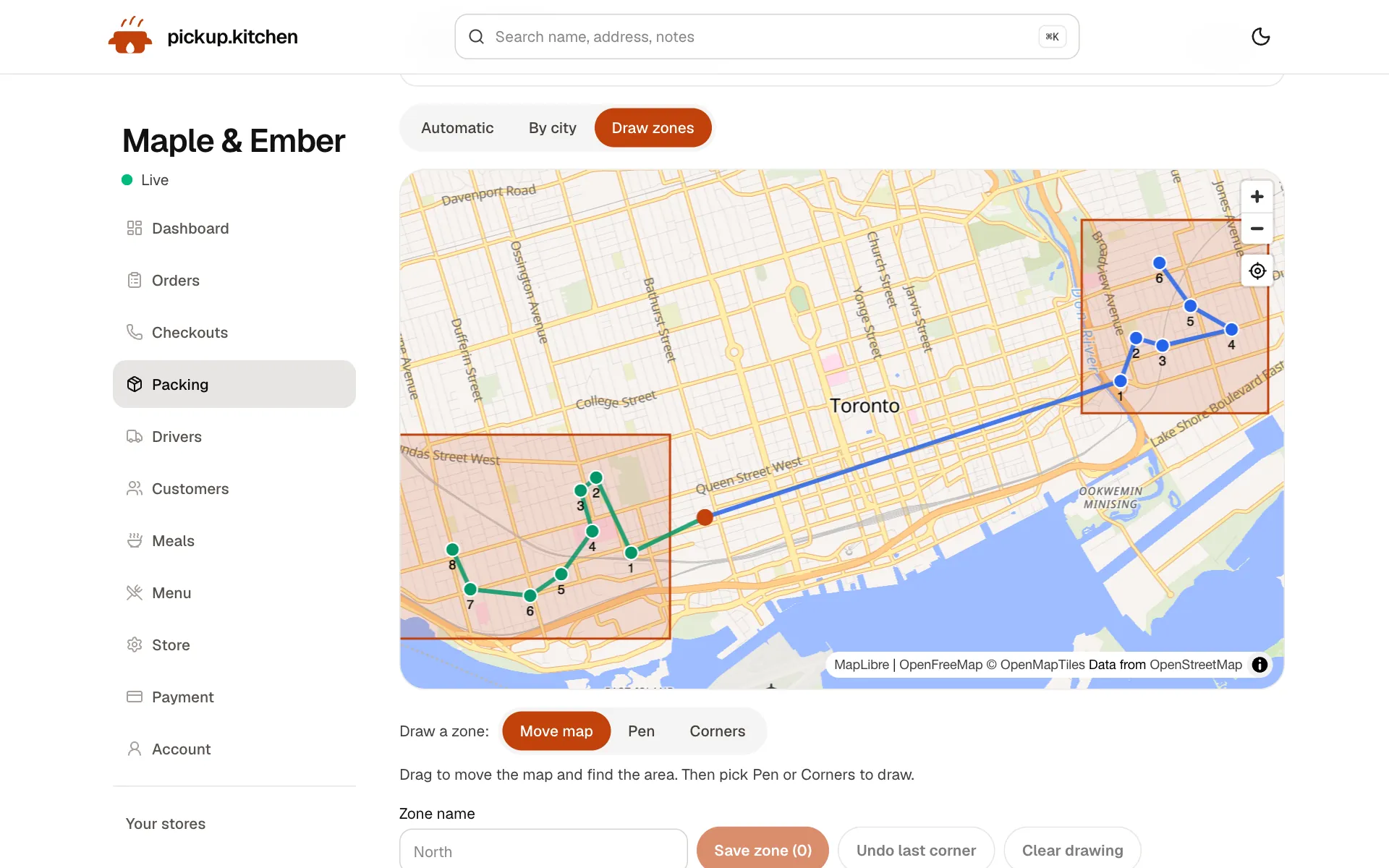
Your routes on a map
Stops come from your orders, or you add them by hand. Optimize puts them in order for the roads.
See how it works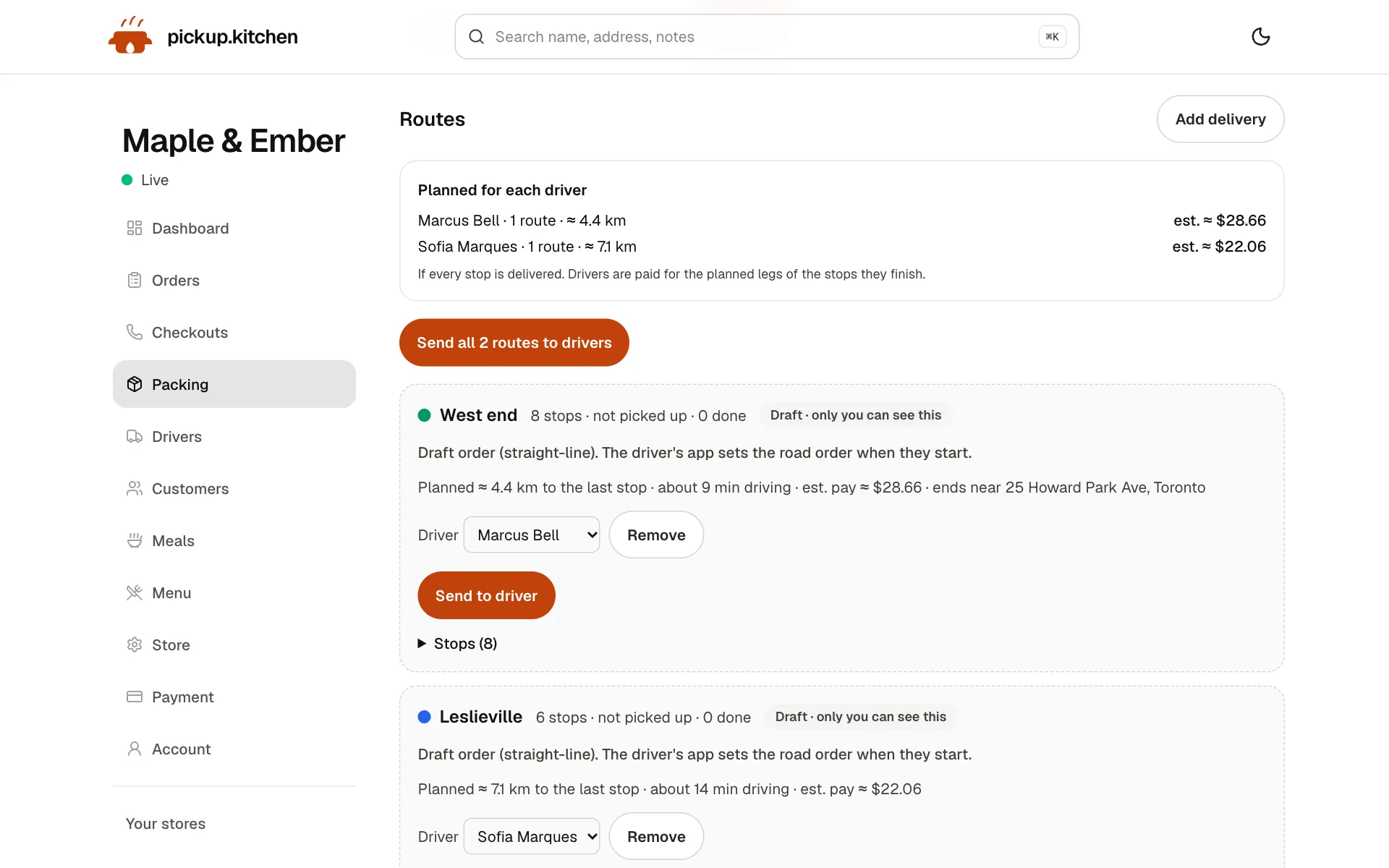
2Delivery
Send the route to your driver
One tap and the route opens on your driver's phone. They can start it the night before.
3Your driver
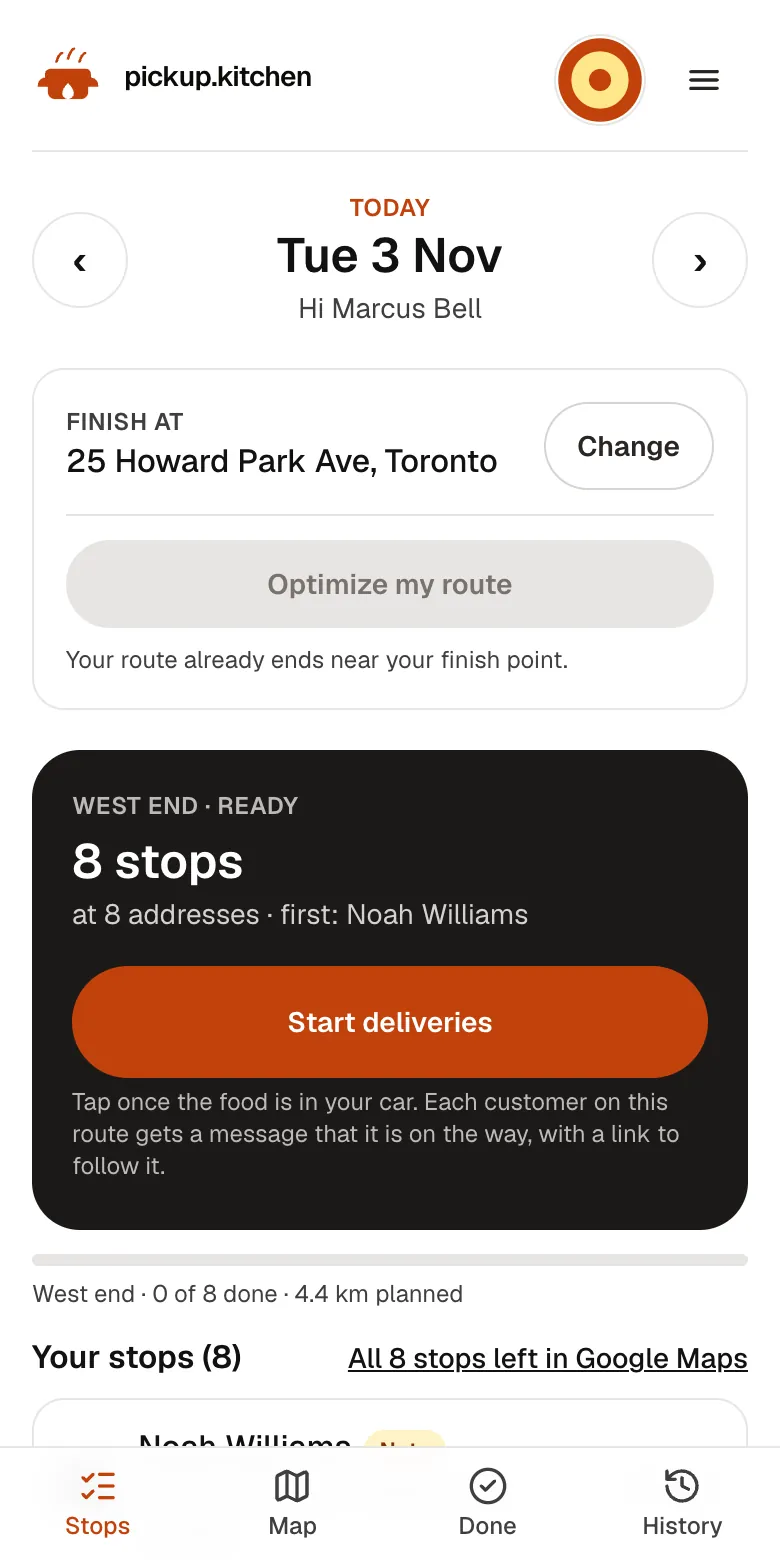
The route, in order
Your driver sees every stop numbered for the roads, with Navigate and the next stop always on top.
See how it works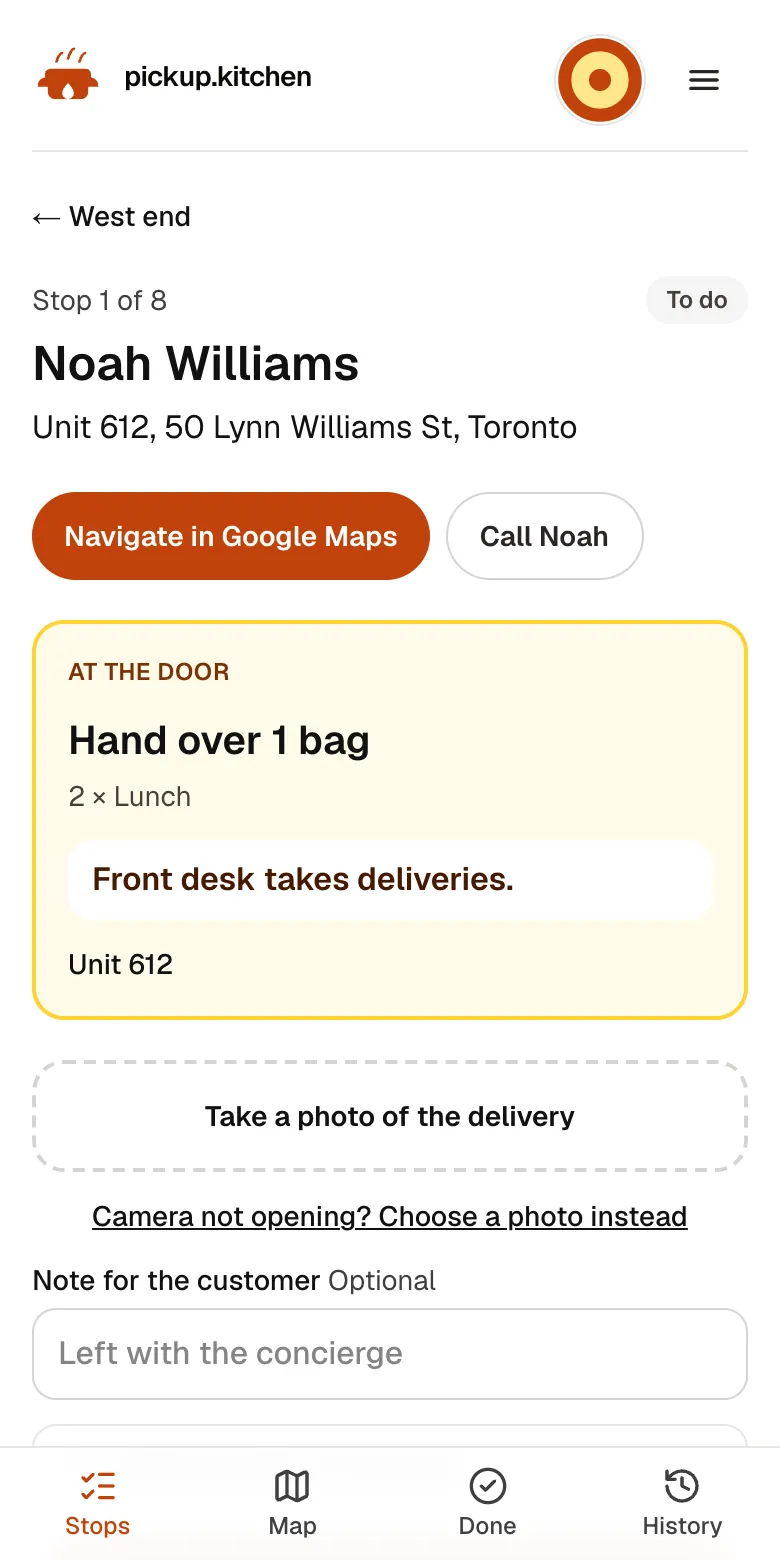
4Your driver
Each stop on one screen
The address, the door note, what to hand over and a Call button. Nothing to remember.
See how it works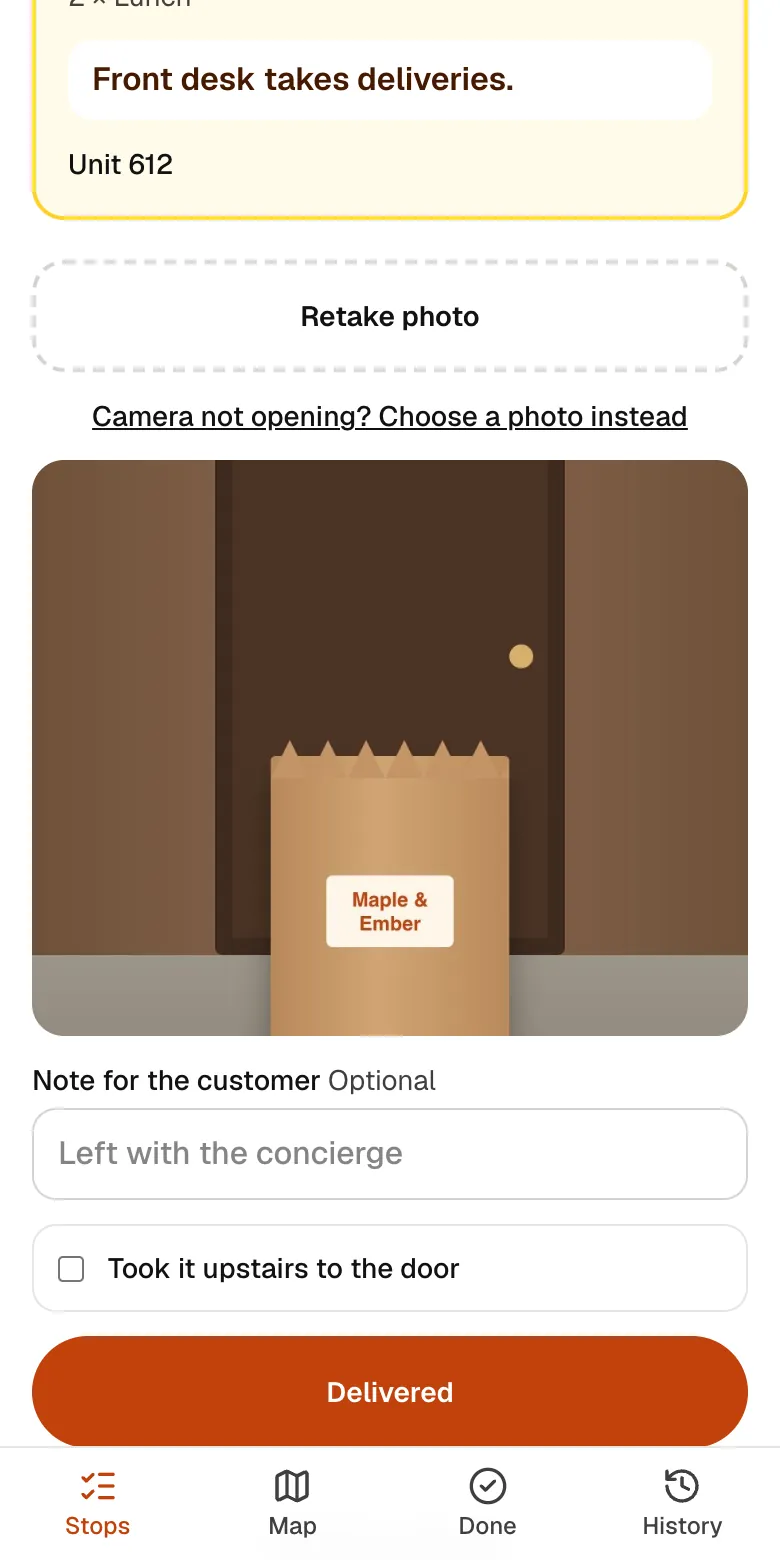
5Your driver
A photo at every door
The driver takes a photo of the drop, so you and the customer both know it arrived.
See how it works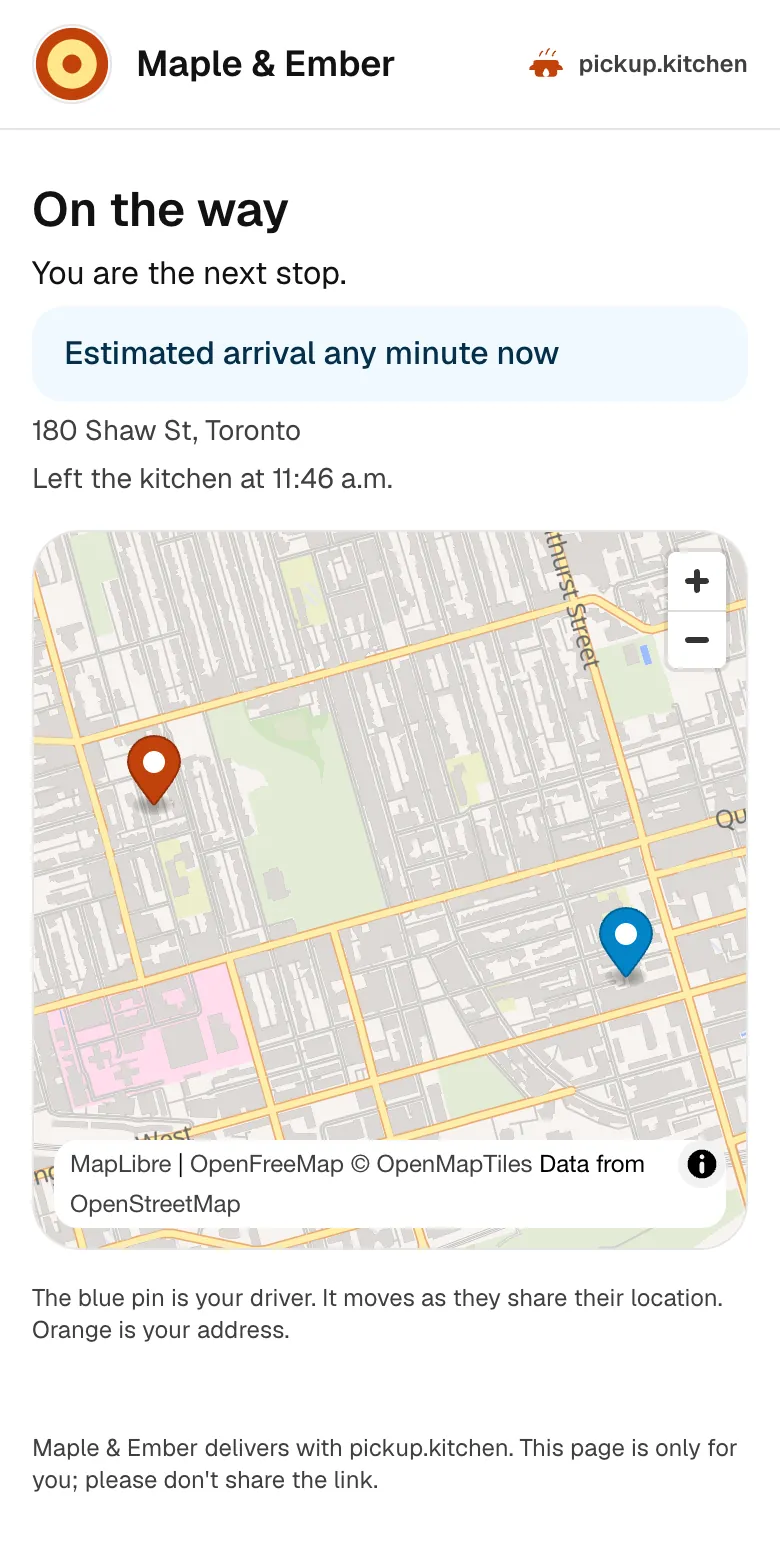
6Your guests
Guests follow their delivery
A live link shows the driver on the way, then the photo at the door. Fewer calls asking where the food is.
See how it works
In one login
What you get
- Deliveries boardPlan the day's drops and routes, then switch to Live once drivers start.
- Send to driverDrivers get a push notification and open the route on their phone.
- Hand-added stopsAdd a delivery with a name, address, and driver note when it did not come from an order.
- Customer messagesOn the way, you're next, a live tracking page, and the delivery photo.
- Live boardSee each driver's progress, failed stops, and the last place they shared.
- Driver payWeekly and monthly pay with your rates, extras, deductions, and a printable statement.
What a delivery day looks like
Here is the day for a kitchen with two drivers and 40 drops. Orders and meal-plan days come in from your site. You open the Deliveries page the afternoon before and see every drop on a map.
You give each driver an area, tap Optimize, check the order of stops, and tap Send to driver. Each driver's phone buzzes. They open the route, drive it, and photograph each handover. You watch it all on a live board.
Every drop on one board
Deliveries has two tabs. Plan is for the night before: who drives where. Live is for the day: how it is going. The page opens on Live once a driver has started.
Drops come from delivery orders and meal-plan delivery days on your pickup.kitchen site. Anything else goes on by hand. Add a delivery with a name, an address, an optional phone, and a note for the driver, such as “side door, buzz 2”.
Addresses are placed on the map for you. A few will not match, such as a new building. Those wait in a list called Needs a pin, and you fix each address in a few taps.
Your drivers, not a marketplace's
pickup.kitchen does not supply couriers. You bring the drivers you already use: staff, a cousin with a car, or contractors. Add each one with a name, email, and phone, and they get their own login for the driver app.
A driver's login never opens your admin or your kitchen screen. One driver can drive for more than one kitchen with the same login.
The driver app page covers what drivers see on their phones.
Plan once, change when you must
Routes are built from your drops and your drivers. The route optimization page explains how the order of stops is worked out.
Things change. Remove an order from today's deliveries and the order stays as it is, so you can add it back. A stop you added by hand is deleted instead. Hand a route to another driver and the stops the first driver already finished stay theirs.
If you change a route after sending it, the board says “Changed since sent, driver not told yet”. Send again and the driver's phone shows the update.
The guest is never left guessing
For guests who ordered on your site, the messages go out without you. They hear when the driver is on the way, with an estimated arrival window. They hear again when they are next. They get a link to a live page where a pin follows the driver.
When the box is at the door, the guest gets the photo the driver took, the time, and any note the driver left. That ends most “where is my order” calls.
Stops you add by hand do not send messages. The driver and you see them, but the guest is not texted.
Know what happened at every stop
The live board shows each route: when it started, which stop it is heading to now, and when the driver last shared a location.
Each stop shows delivered or not delivered. When a stop fails, the driver picks a reason. The choices are can't find the address, no one answered, can't get into the building, food damaged, or customer refused. They can send it to the end of the route to try again, and you see the retry count.
If a driver tapped Delivered too early, you can reopen that stop and it goes back on their route.
Pay drivers from the same data
Pay is worked out from what each driver did: deliveries with a photo, kilometres to the last delivery, and upstairs drops. You add extra pay or deductions with a note. Set your own rates, or a different rate for one driver.
Each week or month you open the Drivers page, check the numbers, and print a statement to hand over or save as a PDF.
Who this delivery software is for
It suits any food business that delivers with its own people. Think of restaurants with a driver or two, bakeries with a morning run, and meal-prep companies with a fixed weekly route. It does not hire couriers for you, and it does not take over orders from marketplace apps.
Before your first run: five checks
A delivery day goes smoothly when the setup is done the week before. Run through these once.
- Set where routes start. For most kitchens this is the kitchen's own address.
- Add every driver, and ask each one to turn on Notifications in the driver app. The Drivers page shows who has them on.
- Open the Needs a pin list and clear it, so every drop is on the map before you plan.
- Look at the pay rates and change the suggested ones to yours.
- Walk each driver through adding the app to their Home Screen, so it opens like any other app.
Step by step
How to get started
- 1Step 1: Turn on deliverySwitch delivery on and set where routes start, usually your kitchen.
- 2Step 2: Add your driversInvite each driver by email. They set a password and add the app to their phone.
- 3Step 3: Plan the dayGive each driver an area, tap Optimize, and check the stops.
- 4Step 4: Send and watchSend to driver, then follow the route and the photos on the live board.
FAQ
Questions
What is restaurant delivery software?
It is the system that turns paid delivery orders into routes, gets them to drivers, shows you progress, and proves each handover. pickup.kitchen also pays your drivers from the same records.
Does pickup.kitchen supply drivers?
No. You use your own drivers. We give them the app, the routes, and the pay report.
Is there delivery software for a food business that only does a few drops a day?
Yes. Two or three drops a day is the same board and the same driver app. Stops from your pickup.kitchen orders cost nothing extra.
What does it cost?
The delivery tools are part of ordering, and stops from your pickup.kitchen orders cost nothing extra. Ordering has free onboarding, no monthly fee, and 10% per order.
Can I use it without taking orders on pickup.kitchen?
Yes. The driver app is sold on its own, pay as you use (100 stops free, then CA$0.10 a stop), and you add the stops by hand. The driver app page has the tiers.
How do guests follow their delivery?
They get a text or email with a tracking link. The page shows a pin for the driver and an estimated arrival window.
Does pickup.kitchen provide the drivers?
No. You use your own drivers: your staff, family, or a driver you hire. pickup.kitchen gives them the app, with the route in order, each address and door note, Navigate, and a photo at every door, and gives you the dispatch side. We don't supply drivers or take a cut of their pay.
Keep reading
- ProductDelivery driver appA delivery driver app for businesses that deliver: route on the phone, photo proof at the door, live tracking, dispatch. Free with pickup.kitchen orders.
- ProductDelivery route optimizationDelivery route optimization for food businesses: split drops between drivers, order stops by drive time, and re-optimize before they go. Free with orders.
- ProductProof of delivery appA proof of delivery app for food businesses: drivers take a photo at the door, you see it live, and guests get it by text or email. Free for your orders.
- ProductOnline ordering system for restaurantsAn online ordering system for restaurants: your own site at yourname.pickup.kitchen, time slots that close when full, and a kitchen screen. 10% per order.
- Productpickup.kitchen pricing: 10% per order, no monthly feepickup.kitchen pricing: free onboarding, no monthly fee, 10% per order. Delivery tools come with ordering. The driver app on its own is pay as you use.
Free onboarding. Pay as you use.
Put your kitchen on pickup.kitchen
No monthly fee for ordering. Send us your menu and we set it up with you, then you pay as you use.