For cafes
A cafe POS system for the morning rush and the pre-order line
A cafe POS system has to survive 8 a.m., when the line is out the door and your phone is full of pre-orders. pickup.kitchen takes counter orders and online pre-orders on one menu and sends both to one kitchen screen. It runs in a browser on devices you already own.
- Counter orders and online pre-orders on one menu and one screen
- Pre-orders go into pickup slots, so 8:10 does not get thirty cups at once
- Runs in a browser. No hardware to buy.
Free onboarding. Pay as you use. No monthly fee for ordering.
Real screens
What it looks like for you
Real screens from pickup.kitchen, the same ones you and your guests use.
1Your guests
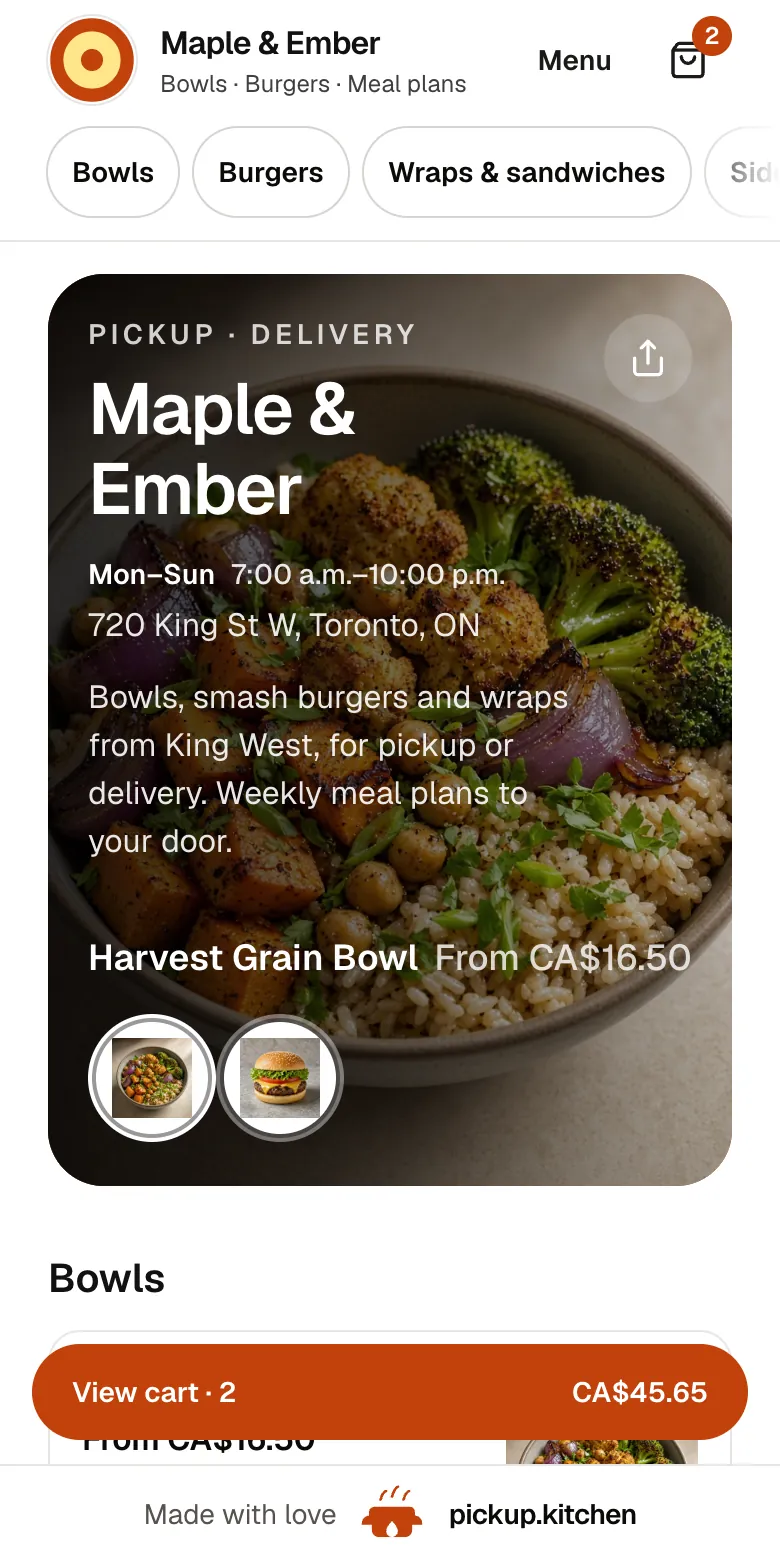
Your menu, on your own site
yourname.pickup.kitchen shows your dishes with photos and prices, and each guest picks pickup or delivery.
See how it works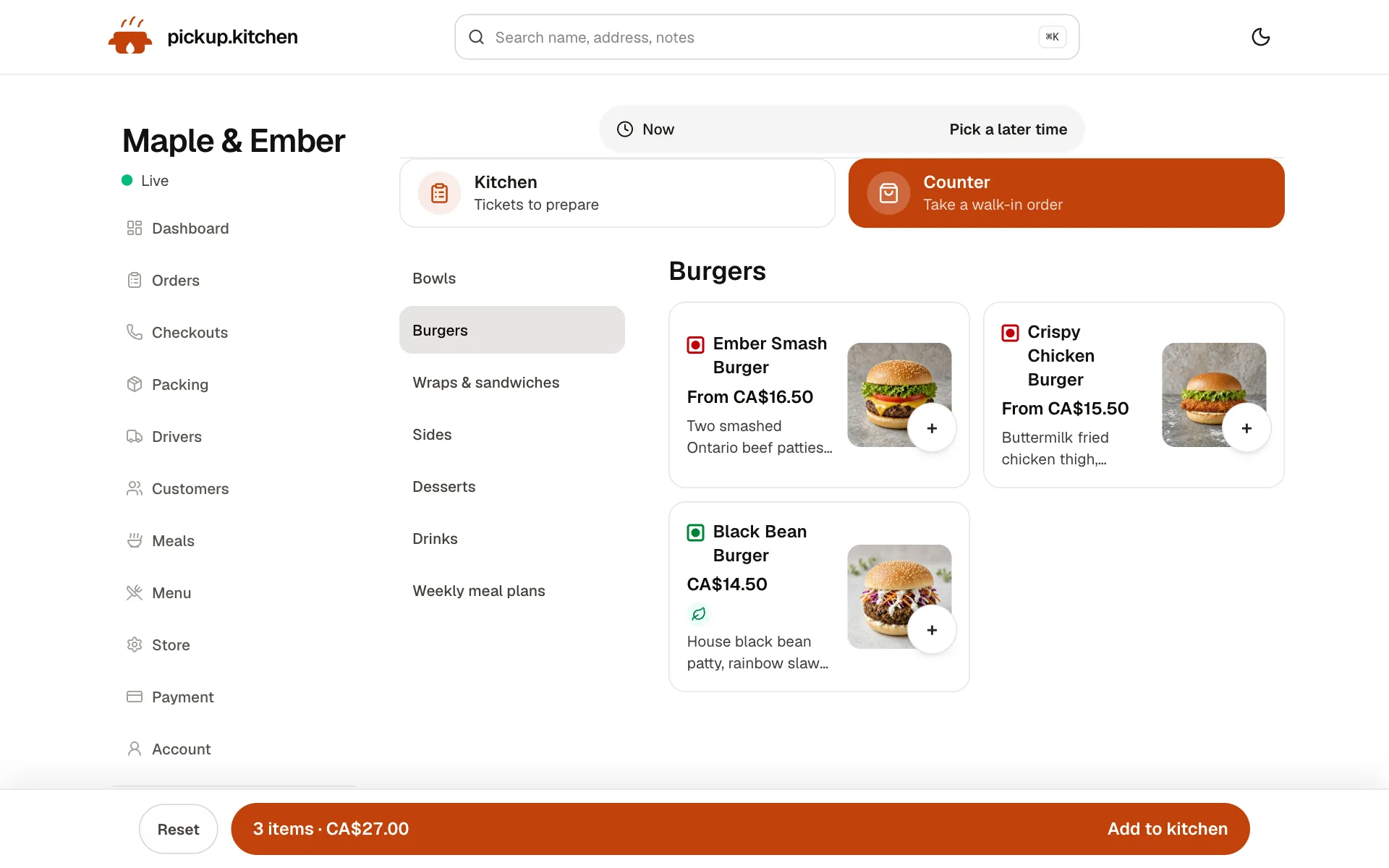
2Your counter
Ring up walk-ins at the counter
Tap the dishes, take cash or card, and the ticket joins the same board as the online orders.
See how it works3Your kitchen
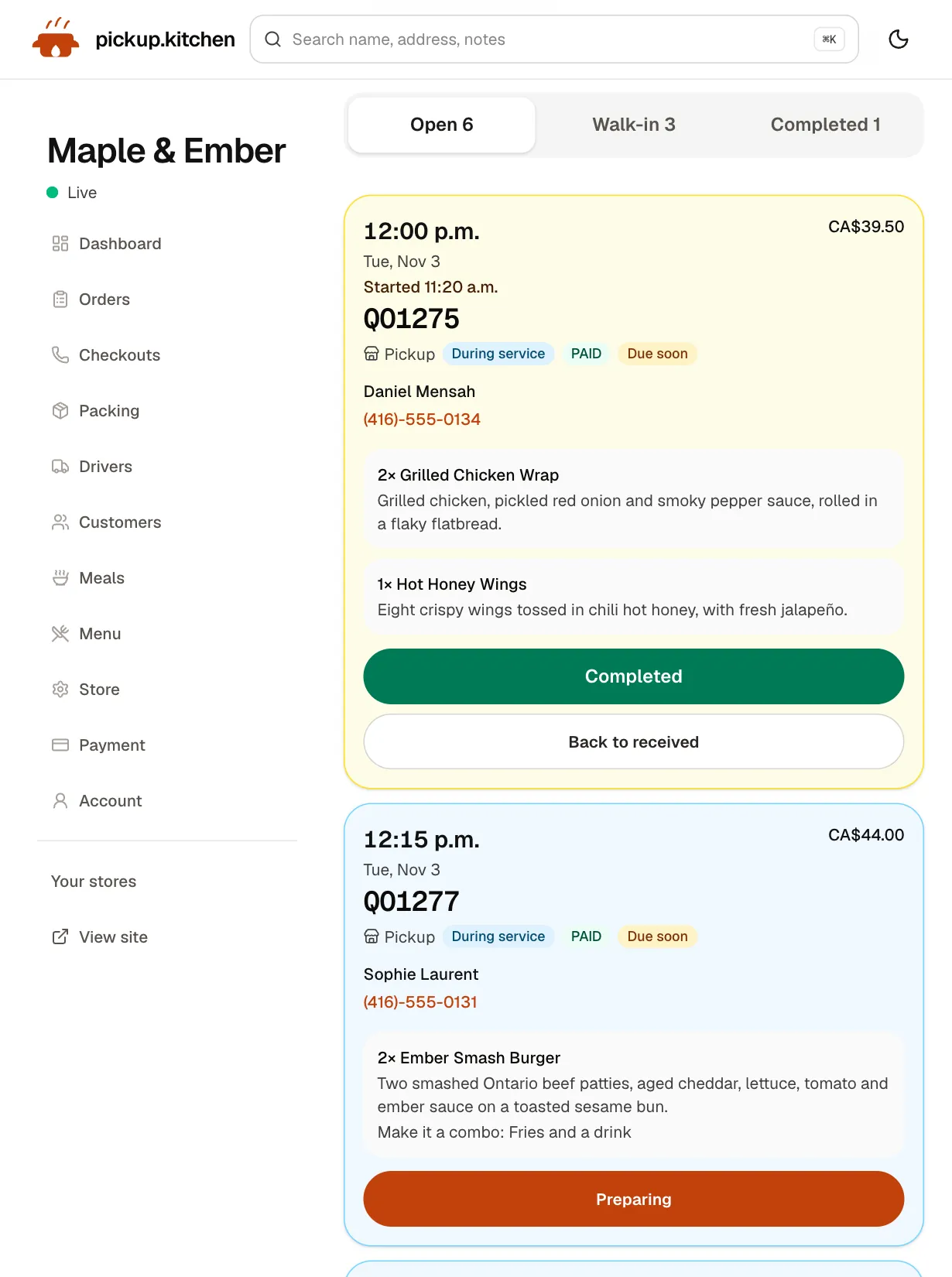
Tickets on the kitchen screen
Online orders, walk-ins and finished tickets in their own lanes, each with its QO number and the time it is due.
See how it works
In one login
What you get
- Same menuItems, options, prices and stock shared by the counter and online ordering.Learn more
- Pickup slotsSlot length, orders per slot and a cutoff, so the rush spreads out.Learn more
- Item notesA note on any item, shown on the kitchen ticket.Learn more
- Cash or cardMark each counter order paid by cash or card before it goes to the kitchen.Learn more
- Walk-in laneCounter orders show on the kitchen screen in their own lane.Learn more
- Stock countsTrack units for pastries and sell out at zero, on both channels.Learn more
The 7:45 a.m. problem
The line is five deep. Two guests are texting you an order for pickup. The barista is writing names on cups and trying to remember who asked for oat milk.
A cafe does not need a complicated system. It needs the walk-in order and the pre-order to land in the same place, with a name and a time on each.
Pre-orders by the slot
Regulars order from the train. They open your link, pick their drink and pastry, choose 8:10 for tomorrow or today, and pay. No app and no account.
You choose how long a slot is, from 10 minutes to an hour, and how many orders one slot holds. When 8:10 is full, it closes on the site and guests pick 8:20. That is what keeps the rush from landing all at once.
Taking an order at the counter
On the kitchen app, staff tap Counter. They tap the items, add a note to any item, and type the guest's name, which prints on the ticket. A phone number is optional, so tick No phone number when someone just wants a coffee.
Staff choose Cash or Card and tap Send to kitchen. The order lands in the Walk-in lane on the kitchen screen at once, next to your online orders.
Options are where a cafe lives
A latte is never just a latte. Each item can carry sizes and add-ons, and a note field the cook sees. The ticket shows the choices under the item, like “Size: Large · Add: extra shot”.
A highlighted Notes box holds the guest's request. “Oat milk, nut allergy” is hard to miss at 8:05.
The pastry case, counted
Turn on Track inventory for a pastry and enter how many you baked. The counter shows “4 left” or “Sold out”, and the same stock is what online guests see. At zero, nobody can order it.
Every sale and restock is logged on the item's page, so you can see why the count moved. Mark a day sold out with one tap when the case is empty.
When the rush comes from pre-orders
It is 7:50. Six guests have pre-ordered for 8:10, and the slot holds six. The seventh guest who opens your link sees 8:20 instead. Nobody is turned away, and the rush spreads over three slots.
On the kitchen screen, each ticket shows the pickup time large, the order number, the items with their options and the name to call. Tickets turn amber within 30 minutes of their time and red once late. The barista works down the list instead of up the line.
Who sees what
Staff sign in to the kitchen app with a PIN you set, not with your owner login. They can take orders and move tickets. They do not see your settings or your sales.
You sign in with your own account and see everything, including the orders list, which you can search by order number or customer.
What it costs at a cafe
Guests who pre-order by card pay the 10% at checkout, and you receive your menu price before Stripe's own card fee. For orders you enter yourself at the counter, you pay the 10%, charged weekly to the card you save.
There is no monthly fee and no per-terminal charge. Do the arithmetic first. Sixty counter orders a day at $7 is $420, so $42 a day is the 10%. If that number is high, book a call about pricing for busy kitchens.
What it does not include
The counter records whether an order was paid by cash or card. It does not include a card reader, a receipt printer or a cash drawer connection. Take cards on the terminal you already have, then mark the order Card.
It is built for orders that leave the counter: pickup and delivery. It does not handle tables, tabs or split bills, and it has no stamp cards or points.
The tools a cafe uses
Most cafes start with the counter and online pre-orders. Add the rest as you need them.
- Counter (POS): walk-in and phone orders on the same menu.
- Online ordering: your site, pickup slots, cutoffs, closed dates and order updates.
- Kitchen display system: tickets with a sound, a Walk-in lane, amber and red for late.
- Restaurant email marketing: tell the regulars about the new seasonal drink.
- Delivery software, if you run a lunch round to nearby offices.
Set up the counter before Monday
Set the kitchen PIN. Open the kitchen app on the tablet at your till and sign in. Save a card on your account, because counter orders are billed weekly and the counter asks for one first.
Add your menu from a photo or pasted text. Enter a test order, watch it land on the screen, and undo it. You can undo a counter order within 15 minutes.
Step by step
How to get started
- 1Step 1: Add your menuSend a photo of your menu or paste the text, then check each item and price.
- 2Step 2: Set slots and a cutoffChoose slot length, orders per slot, and when pre-orders stop.
- 3Step 3: Set a PIN and save a cardStaff use the PIN at the till. The card covers weekly counter fees.
- 4Step 4: Share the linkPut it in your Instagram bio and on a sign by the register.
FAQ
Questions
What is the best POS system for a cafe?
The one that fits how you sell. If your sales are counter and pre-orders, pick a system that puts both on one menu and one screen. Avoid a fee per terminal.
Is there a coffee shop POS with online pre-orders?
Yes. pickup.kitchen has a counter for walk-ins and an online ordering site on the same menu. Pre-orders go into slots that close when full.
Does it take card payments at the counter?
It records whether the order was paid by cash or card. It does not include a card reader, so use the terminal you already have and mark the order Card.
Can regulars order ahead for tomorrow morning?
Yes. Guests can book the next open days, pick a time, and pay. Days that are closed or past their cutoff do not show.
Does it have stamp cards or loyalty points?
No. It saves every guest on your customer list with their orders, and you can email them. There are no points, stamps or rewards.
Do I need special hardware?
No. The counter and the kitchen screen run in a browser on a tablet, phone or laptop.
Keep reading
- ProductRestaurant POS systemsRestaurant POS systems differ. This one takes walk-in and phone orders on your online menu and sends them to your kitchen screen. No hardware to buy.
- ProductOnline ordering system for restaurantsAn online ordering system for restaurants: your own site at yourname.pickup.kitchen, time slots that close when full, and a kitchen screen. 10% per order.
- ProductKitchen display system for restaurantsA kitchen display system that runs in the browser: tickets arrive with a sound, cooks tap Preparing and Completed, and guests hear when it is ready.
- ProductRestaurant email marketingRestaurant email marketing from the list your orders build: send menus, specials, and closed dates to your guests. Includes five email examples to copy.
- Productpickup.kitchen pricing: 10% per order, no monthly feepickup.kitchen pricing: free onboarding, no monthly fee, 10% per order. Delivery tools come with ordering. The driver app on its own is pay as you use.
Free onboarding. Pay as you use.
Run your business on pickup.kitchen
Your own ordering site, the kitchen screen, the counter, your customers, meal plans and the driver app. One login.