For bakeries
A bakery POS that takes Saturday's pre-orders on Wednesday
A bakery POS has to handle two different days: the walk-in rush at 8 a.m. and the pre-orders that tell you how much to bake. pickup.kitchen takes both on one menu, with pickup windows, an order cutoff and a stock count for every item.
- Pre-orders open days ahead, with a cutoff you choose
- Pickup windows that close when full, and stock that stops at zero
- Counter and online orders on one menu, one stock, one kitchen screen
Free onboarding. Pay as you use. No monthly fee for ordering.
Real screens
What it looks like for you
Real screens from pickup.kitchen, the same ones you and your guests use.
1Your guests
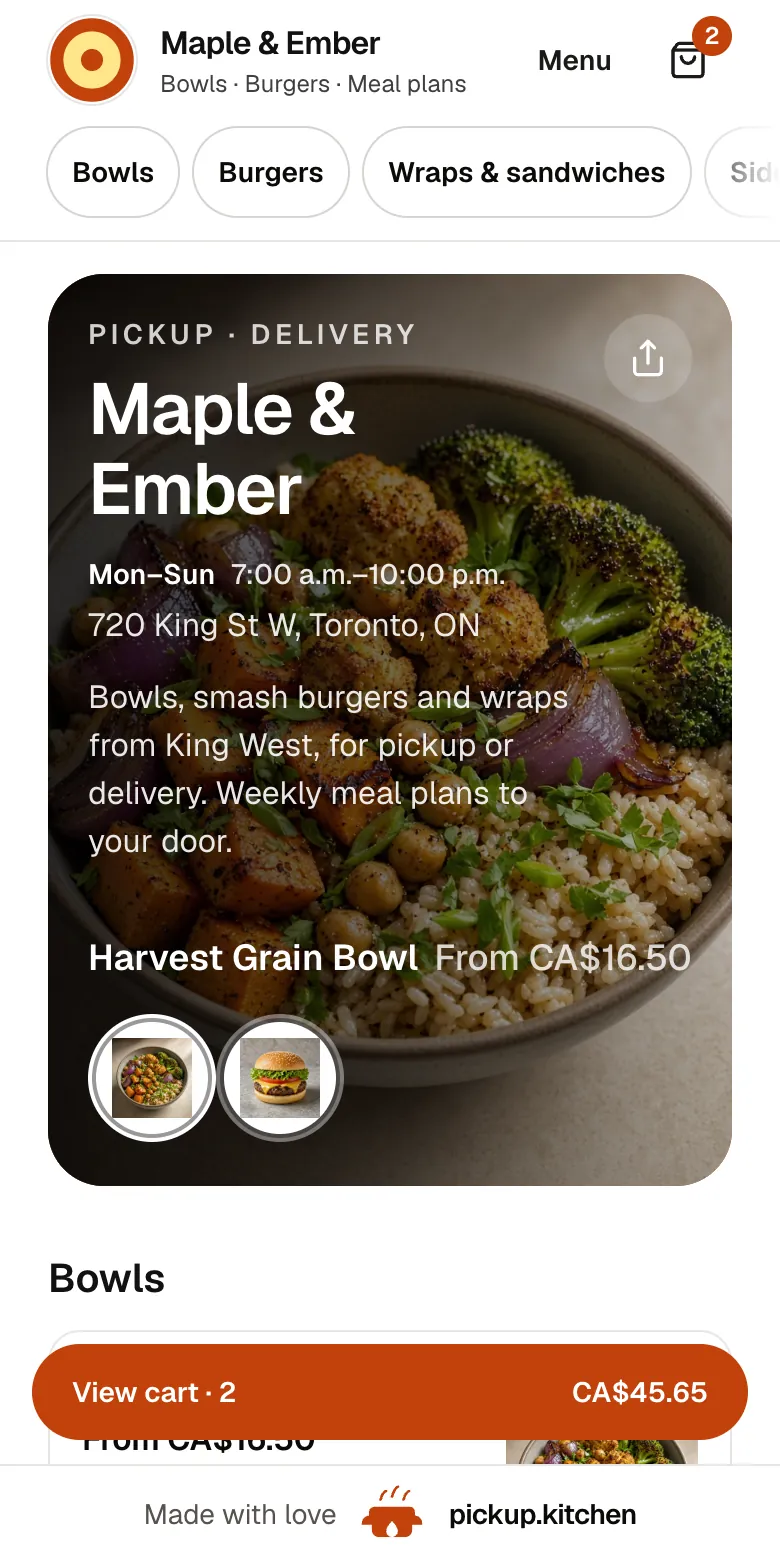
Your menu, on your own site
yourname.pickup.kitchen shows your dishes with photos and prices, and each guest picks pickup or delivery.
See how it works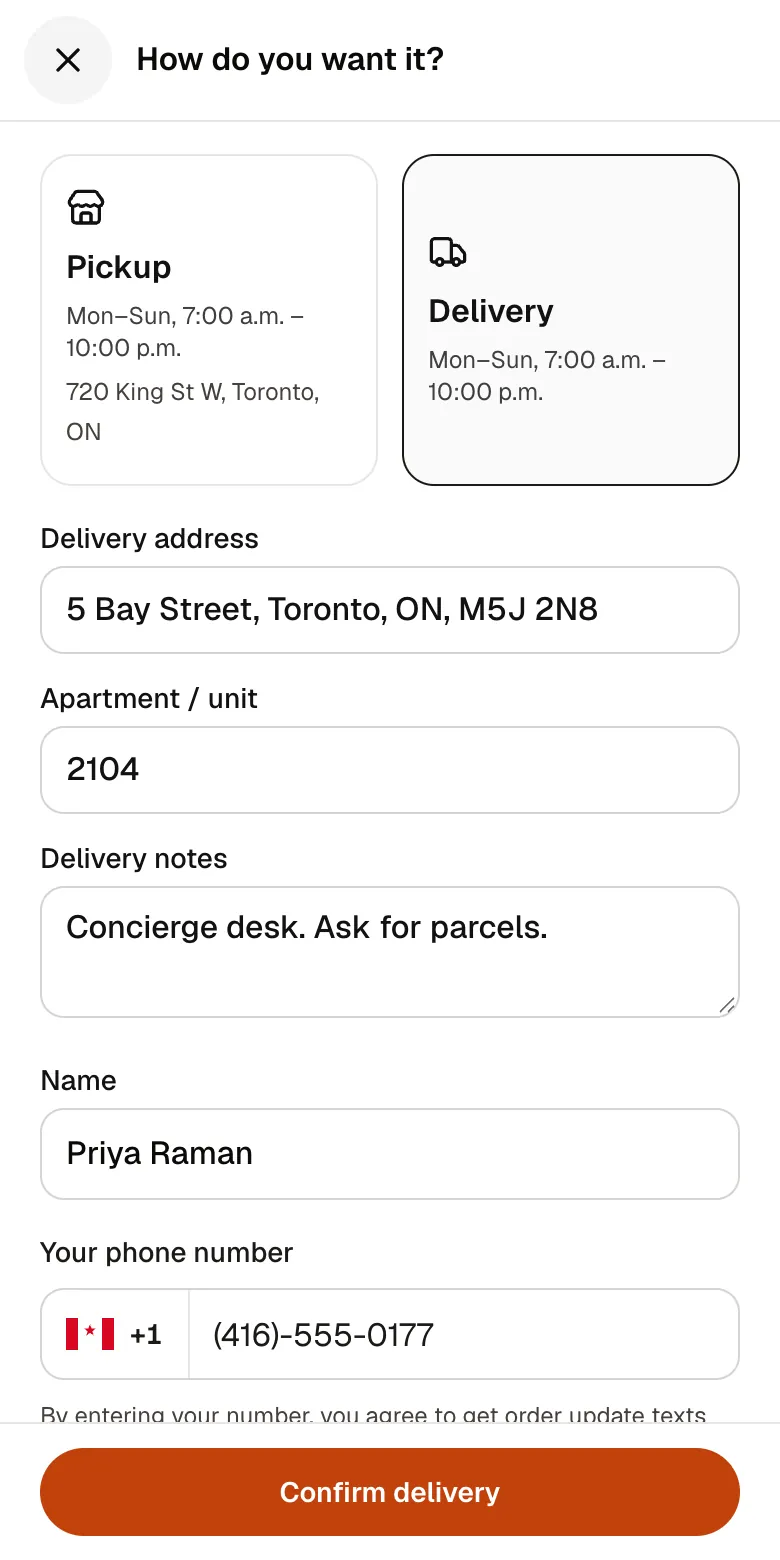
2Your guests
A checkout that takes seconds
A pickup time or a delivery address, then pay by card. No app to install and no account before paying.
See how it works3Your kitchen
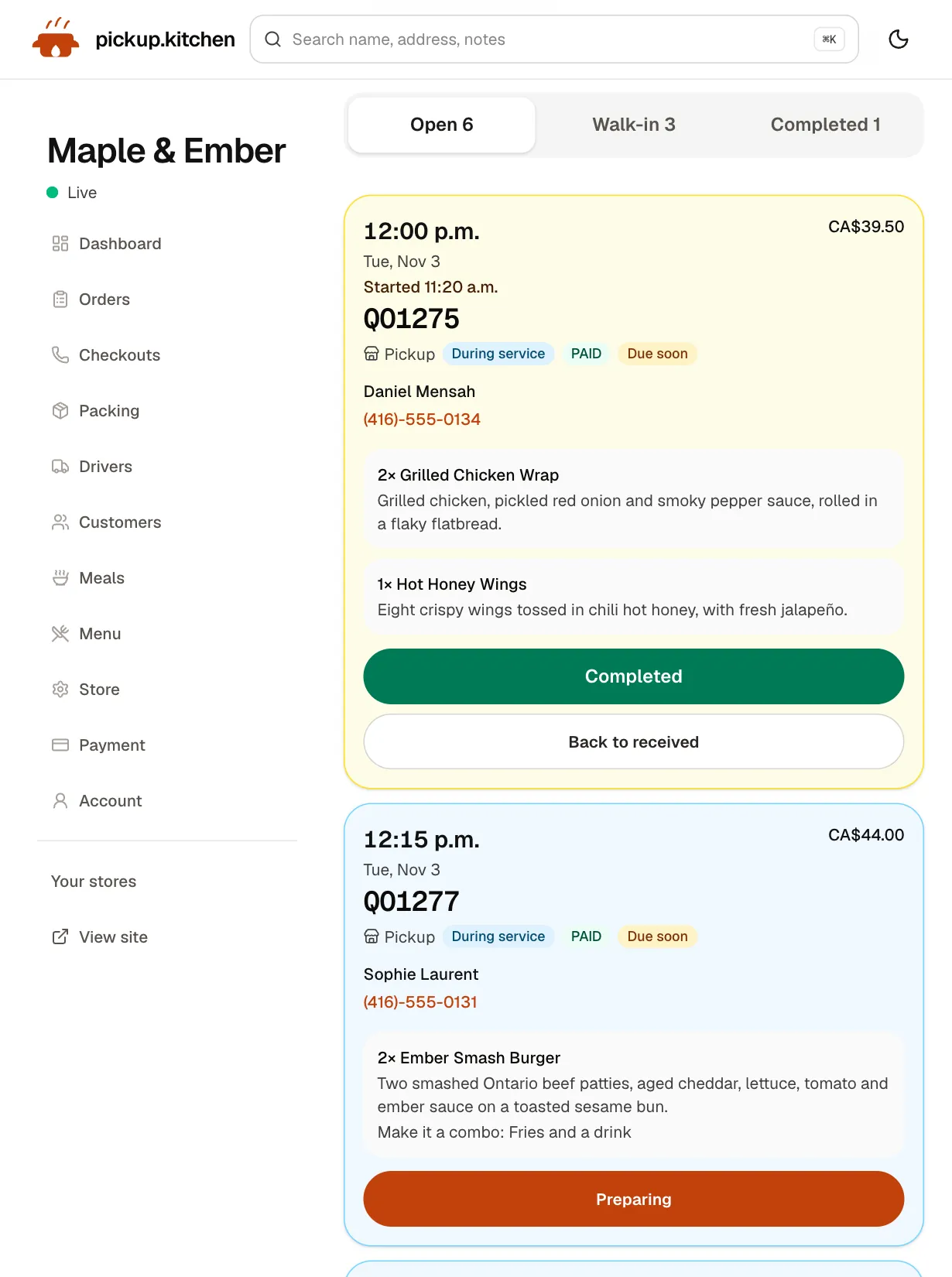
Tickets on the kitchen screen
Online orders, walk-ins and finished tickets in their own lanes, each with its QO number and the time it is due.
See how it works
In one login
What you get
- Pre-ordersGuests book the next open days with a cutoff you choose.Learn more
- Pickup windowsSlot length and orders per slot, closing when full.Learn more
- Stock per itemTrack units for each bake and stop selling at zero.Learn more
- CounterWalk-in orders on the same menu, marked Cash or Card.Learn more
- Sold-out daysOne tap closes today. Tomorrow stays open.Learn more
- Delivery toolsRoutes, Send to driver and a photo at the door.Learn more
Bake to the orders, not to a guess
Every baker knows the two bad endings. Either the case is empty at 10 a.m. and people leave, or you bin two dozen loaves at close.
Pre-orders fix half of it. Guests can book the next open days, not only today. Open Saturday on Wednesday, and by Friday night you know how much of Saturday is already sold.
A cutoff that matches your bake day
Set an order cutoff for each day, such as 8 p.m. the night before. After that time, the day disappears from checkout and no late order arrives while the oven is already loaded.
Days that are closed or past their cutoff do not show. Mark a holiday week as closed dates, and those days leave checkout too.
Pickup windows that do not make a line
Choose a slot length from 10 minutes to an hour, and how many orders one slot holds. Guests pick a window, pay, and arrive when it is ready. When a window is full, it closes on the site.
On a Saturday morning, that means the 9:00 window takes the orders you can bag, and the 9:10 window takes the next ones.
Count what you bake, not what you buy
Turn on Track inventory for an item and enter how many you baked. The count goes down with every sale, at the counter or online. A guest who asks for four when two are left sees “Only 2 sourdough left”.
Set a stock number to what the batch gave you. At zero, nobody can order it. If a house special is one you will always find a way to make, turn on Allow oversell.
This tracks finished units per item. It does not track flour, butter or supplier orders, and it does not scale recipes or plan batches.
A Saturday at the counter
It is 8:20. Staff tap two croissants and a loaf, add “sliced” as a note, type “Kenji” for the name, mark it Card, and send it. The ticket lands in the Walk-in lane while the pre-order tickets sit in Open, with their pickup times.
The count drops for everyone. The online site now shows “Only 3 croissants left” to a guest who is deciding, and sells out at zero.
A bake week
Monday: set the stock for this week's bakes and mark any closed dates. Wednesday: open Saturday, so pre-orders start to arrive.
Friday at 8 p.m.: the cutoff passes. Saturday's pre-order tickets are all in Open, each with its pickup time, and you bake to them.
Saturday: the counter takes walk-ins from the same stock. Sunday: open the dashboard, read paid orders and sales for the last 7 days, and email the regulars who ordered.
Big orders and custom cakes
pickup.kitchen is built for a menu with set prices. A tray of twelve rolls for Friday is a menu item with a quantity. A custom cake quoted one by one is not.
If custom work is most of your sales, keep your quote process and use pickup.kitchen for the standard menu. For a phone order at a set price, staff enter the order themselves with the pickup time.
A morning delivery run
If you drop orders at offices or homes, switch delivery on. Guests pick delivery, enter an address and choose a slot. You split the drops between drivers, tap Optimize and Send to driver.
Drivers photograph each handover, and guests get a live link. The delivery software page covers the day. pickup.kitchen does not supply drivers.
Tell your regulars
Every guest who orders on your site goes on your customer list. When the pumpkin loaf is back, write one email from the same login. Subject: “Pumpkin loaf is back, order by 8 p.m. Friday”. That is the whole campaign.
Start with one email a month. Add more only if guests keep ordering after each one.
What it costs and what it does not include
Guests who order by card pay the 10% at checkout. For counter orders, you pay the 10%, charged weekly to the card you save. There is no monthly fee and no per-terminal charge.
The counter records whether an order was paid by cash or card. It does not include a card reader, a receipt printer or a cash drawer connection. Use the terminal you already have and mark the order Card.
The tools a bakery uses
A bakery usually starts with the first two.
- Online ordering: your own site, pre-orders, pickup windows and a cutoff.
- Counter (POS): walk-in orders on the same menu and stock.
- Kitchen management software: slot limits, dish stock and sold-out days.
- Delivery software: a morning route and a photo at the door.
- Restaurant email marketing: a short note to everyone who has ordered.
Step by step
How to get started
- 1Step 1: Add your menuSend a photo of your menu or paste the text, then check each item and price.
- 2Step 2: Set pickup windows and a cutoffChoose slot length, orders per slot, and when pre-orders stop for each day.
- 3Step 3: Set stock for each bakeEnter how many you baked, and the item sells out at zero.
- 4Step 4: Share the linkPut it on the box, the door and your Instagram bio.
FAQ
Questions
What is the best POS for a bakery?
One that puts counter sales and pre-orders on the same menu and stock, so the case and the website never disagree. Avoid a monthly fee per terminal.
Is there a bakery POS system with online pre-orders?
Yes. pickup.kitchen has a counter and an online ordering site on one menu. Guests book open days, pick a pickup window and pay.
Is this bakery inventory management software?
It counts finished items. Turn on Track inventory, enter how many you baked, and it sells out at zero. It does not track ingredients or supplier orders.
Can I stop pre-orders the night before?
Yes. Set a cutoff such as 8 p.m. the night before. After it, that day no longer shows at checkout.
Does it plan production or scale recipes?
No. It shows what was ordered and what is left per item. You still decide the batch. It is not bakery production software.
Does it take card payments at the counter?
It records whether the order was paid by cash or card. It has no card reader, so take the card on your own terminal and mark the order Card.
Keep reading
- ProductOnline ordering system for restaurantsAn online ordering system for restaurants: your own site at yourname.pickup.kitchen, time slots that close when full, and a kitchen screen. 10% per order.
- ProductRestaurant POS systemsRestaurant POS systems differ. This one takes walk-in and phone orders on your online menu and sends them to your kitchen screen. No hardware to buy.
- ProductKitchen management softwareKitchen management software that only promises what you can cook: slot limits, sold-out days, dish stock and prep lists for weekly plans. 10% per order.
- ProductRestaurant delivery softwareRestaurant delivery software for your own drivers: plan drops, send routes to phones, follow every stop live, and pay drivers. Free with your orders.
- ProductRestaurant email marketingRestaurant email marketing from the list your orders build: send menus, specials, and closed dates to your guests. Includes five email examples to copy.
Free onboarding. Pay as you use.
Run your business on pickup.kitchen
Your own ordering site, the kitchen screen, the counter, your customers, meal plans and the driver app. One login.