Guide
How to start a bakery business from home, step by step
How to start a bakery business from home starts with one question: what does your local law let a home baker sell? Answer that first. Then pick your bakes, label them, price them and take pre-orders. This guide gives the steps and the official pages to read.
Free onboarding. Pay as you use. No monthly fee for ordering.
The short version
- Three real examples of how home baking rules differ
- A pricing formula with a worked example
- A weekly pre-order routine that tells you how much to bake
Step 1: Find out what you are allowed to sell
Many places cover home bakers with “cottage food” rules. They set what you can make, how much you can sell, how you label it and whether you must register. They differ by state and province, and they change. Here are three examples, checked November 2026.
- Ontario: a home kitchen is a food premises. You notify your local public health unit before you start, and an inspection follows. The Eastern Ontario Health Unit's low-risk list includes breads and buns without meat or cream filling, most baked goods without custard, cakes, brownies and cookies.
- California: your local environmental health department registers or permits you. Class A sells direct to the public. Class B also sells through restaurants and food markets. CDPH lists maximum annual sales of $75,000 for Class A and $150,000 for Class B. It also links an adjusted-limit page, so check which figure applies.
- Texas: the annual gross income cap is $150,000. A 2025 law widened the list of allowed foods. Refrigerated foods need registration with the state, and meat, poultry and seafood stay excluded. The state says it will adopt implementing rules.
Where to look for your own rules
Start with your local health department. FDA says to contact it to learn which state and local laws apply. It also says a private residence is not a facility that must register with FDA. State and local rules still apply.
The US Small Business Administration says local governments set registration, licensing and permit rules, and that some licences expire, so note renewal dates. Our guide to cottage food laws shows how to find your state's page. Outside Ontario, ask your provincial and local health authority.
Step 2: Pick bakes that qualify
Start with the shelf-stable bakes on your authority's list: breads, cookies, brownies, cakes without perishable filling. Read the list line by line. Low-risk lists usually say no to fillings such as custard or cream, so check any filled bake before you sell it.
Pick three to five bakes you can make well in a batch. A short menu is cheaper to make, easier to price and easier to photograph.
For every bake, ask four questions.
- Does it need the fridge?
- Does it have a cream, custard or meat filling?
- Is it on my authority's list?
- Does it contain an allergen I must label?
Step 3: Set up the kitchen the way an inspector would
The Eastern Ontario Health Unit tells home operators to check zoning with the municipality. It also says to get fire department approval if you use stoves or ovens. It says business food must be stored apart from personal food, and pets must stay out of areas where food is stored, handled or transported.
In Ontario, home premises that make only low-risk foods need no separate handwashing sink and no commercial dishwasher. Utensils must still be washed and sanitized. Regular Ontario food premises need a certified food handler on site every hour they operate. The health unit strongly recommends the certification for home bakers too. California requires cottage food operator training within three months of registration or permitting.
Step 4: Label every bake
Allergens come first. Canada names eleven priority allergens: eggs, milk, mustard, peanuts, crustaceans and molluscs, fish, sesame seeds, soy, sulphites, tree nuts, and wheat and triticale. FDA names nine: milk, eggs, fish, crustacean shellfish, tree nuts, peanuts, wheat, soybeans and sesame.
FDA says labels must name the food source of every major allergen, and the specific tree nut. Texas requires the operation's name, an address or ID number, the common name and the major allergens. It also requires a notice that the food was made in a private residence. That notice says the home is not subject to government licensing or inspection. Your authority publishes its own list. Use it.
Step 5: Price your bakes
A Johnson & Wales University pricing article gives 28% to 35% as the food cost range for profitable restaurants. It divides an item's cost by the target percentage to get the price.
Example: a batch of 12 muffins costs $9.60 in ingredients and $2.40 in packaging, so $12, or $1 each. At a 30% target, the price is $3.33. Round up to $3.50. Then add your time. An hour to bake and an hour to shop, pack and hand over is real cost.
Card fees come off the top. Stripe charges 2.9% plus CA$0.30 on domestic cards in Canada, so a $14 order loses about 71 cents.
Business basics: name, money and insurance
Pick a name that is easy to say and to spell. Check it against your local business name rules and the social handles you want.
Open a separate bank account for the business, so sales are easy to add up. Your cottage food cap is measured on sales, so keep a simple record of every order.
Ask your home insurer whether your policy covers selling food. Do not assume it does. Ask a broker about liability cover before your first sale.
Step 6: Choose how you will sell
Pre-orders for pickup on a set day are the simplest. Your rules may limit where else you sell. California's Class A allows direct sales, which include internet orders and third-party delivery. Texas allows online sales when the operator, an employee or a household member delivers personally.
Check these limits before you offer shipping, a delivery app or a market table.
Markets and farm stands may ask for your registration or permit. Ask the organizer what they need before you book a table.
Step 7: Take pre-orders instead of guessing
A weekly bake works like this. Open one or two days a week. Set a cutoff, such as 8 p.m. the night before. Set pickup windows. Enter how many of each bake you can make, and each item sells out at zero.
Set the number of orders per pickup window to what you can hand over without leaving the oven.
pickup.kitchen is one way. It gives you your own page with a weekly menu, a cutoff, pickup windows and stock counts. You choose what pickup address and note guests see, in your kitchen's details, and you can ask us for help. Onboarding is free, there is no monthly fee, and you pay 10% per order. See the home kitchens page.
Whatever you use, test it. Place an order from your phone, then ask a friend to do it without your help.
A weekly bake routine
Here is a routine that works with pre-orders.
- Monday: choose the week's bakes, update stock counts and mark any closed dates.
- Tuesday: post the menu and the cutoff.
- Wednesday and Thursday: orders arrive. Answer questions, and shop once the count is clear.
- Thursday at 8 p.m.: the cutoff passes. Check the list of orders.
- Friday: bake and pack. Label every bag.
- Saturday: hand over in the pickup windows.
- Sunday: rest, then note what sold out first. That is next week's bigger batch.
Step 8: Get your first customers
Tell your neighbours first. Post your menu with daylight photos in local groups and on Instagram. Put “Pre-order by Thursday, 8 p.m.” on every post. Offer a tasting box to one office or one school group.
Collect an email from every customer. Send next week's menu on the same day each week. A short list of people who ordered is worth more than a long list of followers.
Take a daylight photo of every batch. It shows guests what they will actually get, and it gives you something to post.
Step 9: Know when to move up
Watch your sales against your cap. Rules and caps change. Texas rewrote its list in 2025, and California links a new adjusted limit page for 2026.
Signs you are ready: bakes sell out before the cutoff, you turn customers away, or you are baking past midnight.
When you near the cap, or want fillings your list excludes, price a shared or commercial kitchen. Your ordering page, your customer list and your regulars come with you.
Real screens
Do it on pickup.kitchen
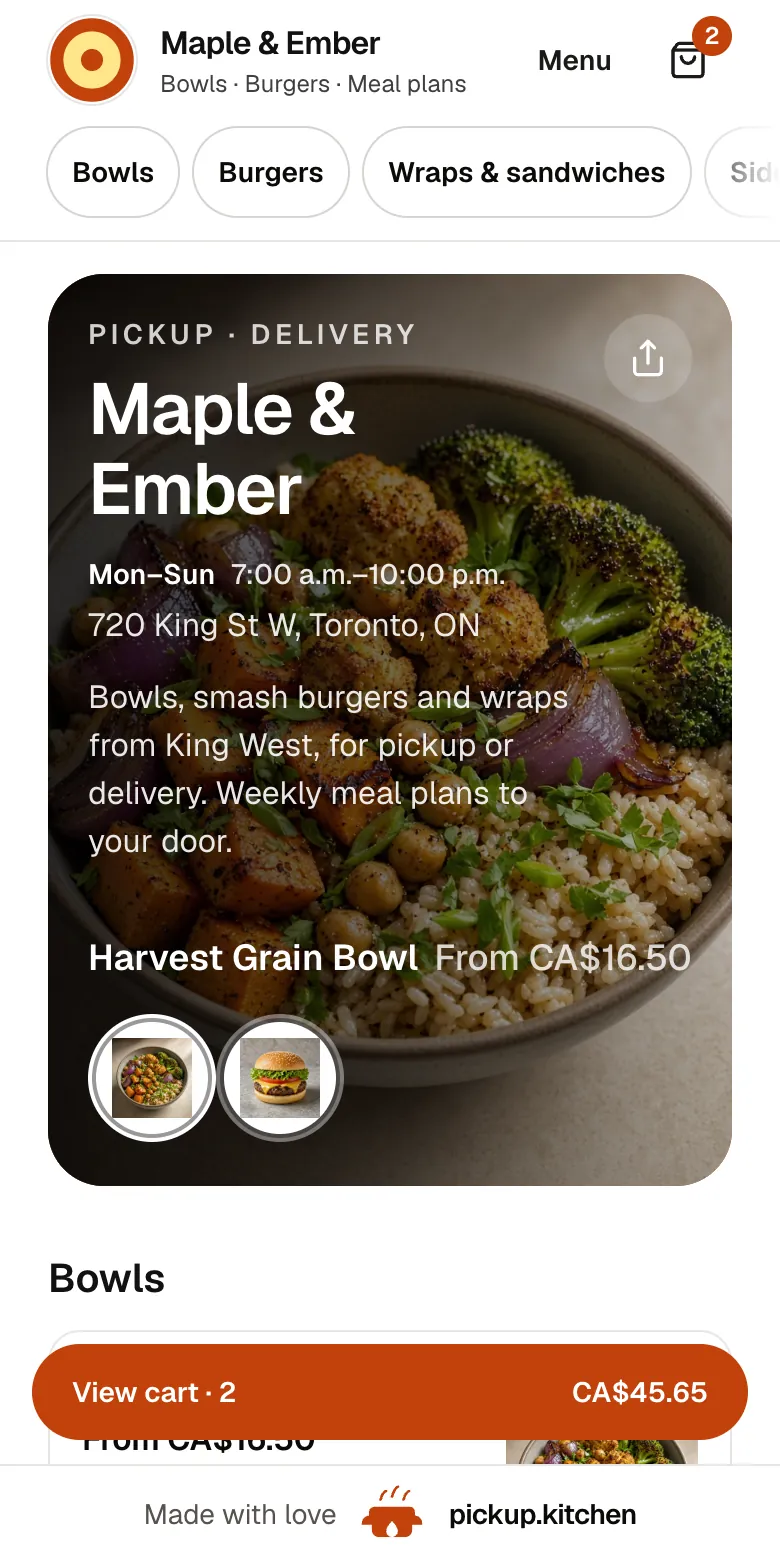
1Your guests
Your menu, on your own site
yourname.pickup.kitchen shows your dishes with photos and prices, and each guest picks pickup or delivery.
See how it works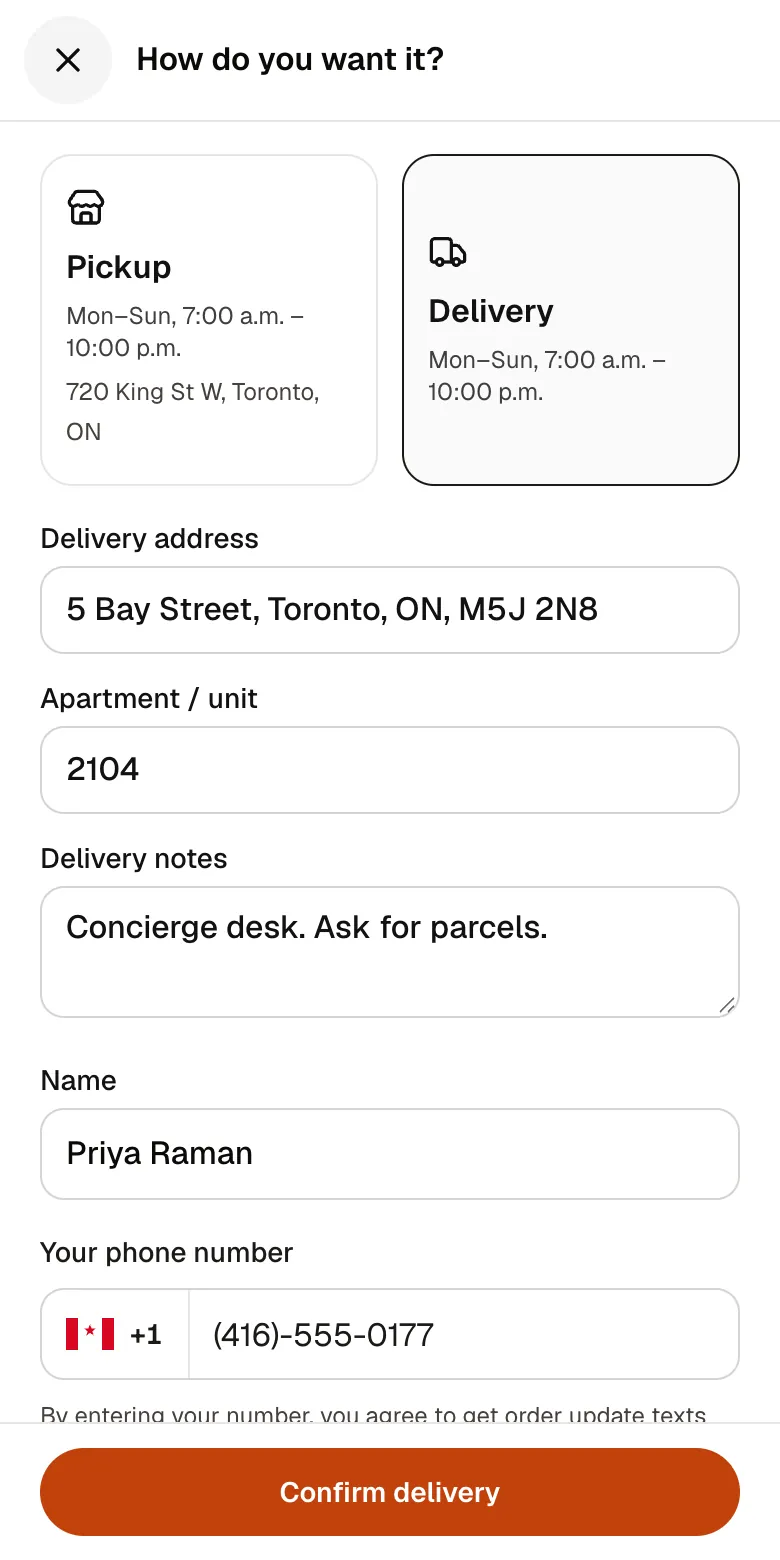
2Your guests
A checkout that takes seconds
A pickup time or a delivery address, then pay by card. No app to install and no account before paying.
See how it works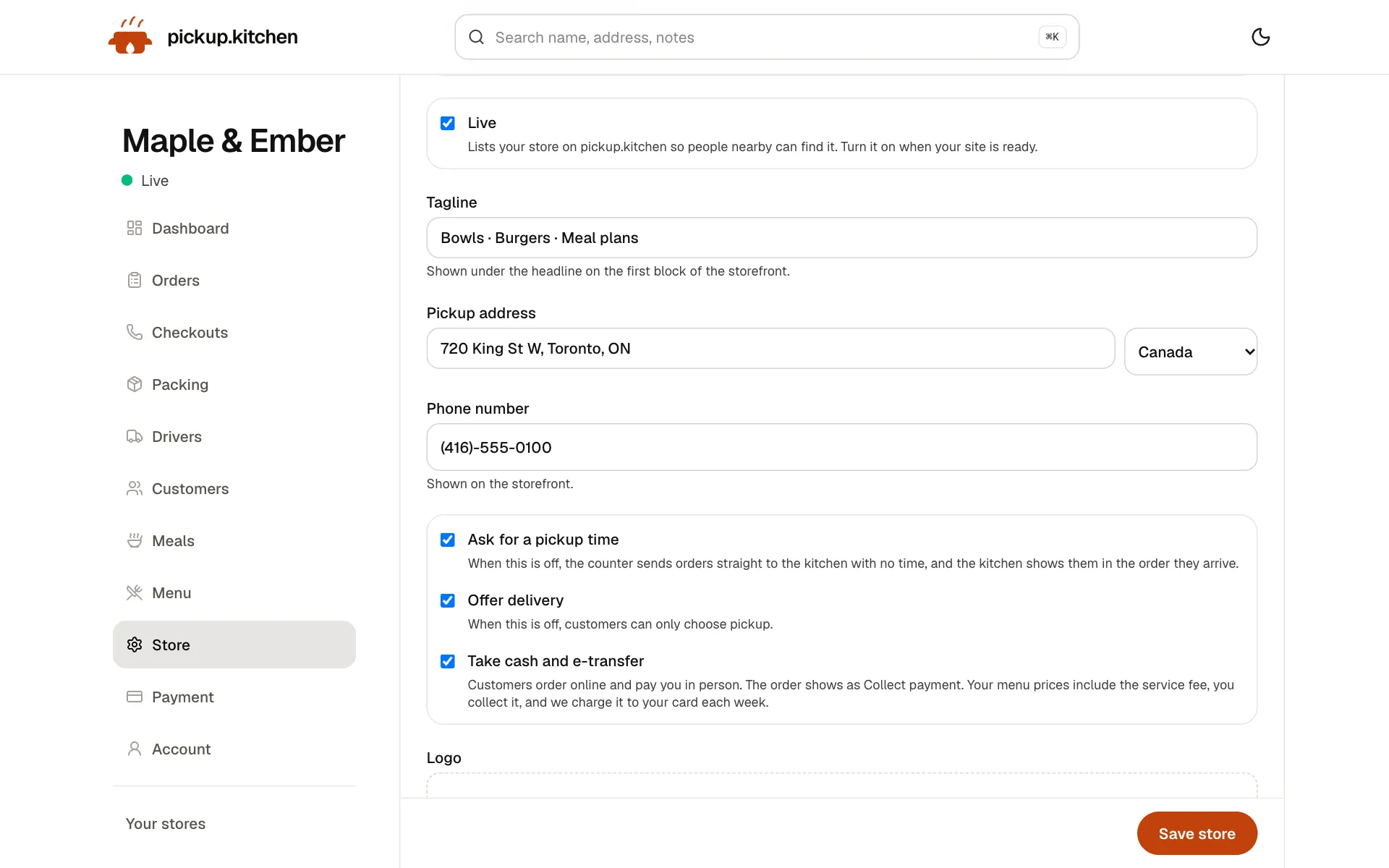
3You
Your store, your settings
Your tagline, pickup address, phone, pickup times, delivery and cash. Change any of it and your site follows.
See how it works
FAQ
Questions
Can I start a bakery from home?
Often, yes, within your local rules. They set what you can bake, how much you can sell and how to label it. Start with your local health department.
What is a cottage food business?
A food business run from a home kitchen under special rules, usually for foods that do not need refrigeration. Registration, sales caps and labels vary by place.
Do I need a permit to sell baked goods from home?
It depends on where you live. Ontario requires you to notify your public health unit. California registers or permits home bakers through the local environmental health department. Ask your local authority.
How much should I charge for home-baked goods?
Divide the cost of one item by a target food cost, such as 30%, then add your time and card fees. A $1 muffin at 30% sells for about $3.33.
Can I sell baked goods online from home?
Often, but rules differ. California treats internet sales as direct sales. Texas allows online sales when you or a household member delivers. Check yours first.
How do I get my first customers?
Post weekly menus with photos in local groups. Sell by pre-order with a cutoff, and collect an email from every customer to send next week's menu.
Keep reading
- GuideCottage food laws by state: caps, permits, online salesCottage food laws explained: what they are, the rules most states share, how to start selling from home, and a 15-state table of caps and permits.
- By businessSell food from home: your own ordering pageSell food from home with a weekly menu, an order cutoff and pickup windows on your own link. Cottage food rules explained. Free onboarding, 10% per order.
- By businessBakery POS with online pre-ordersBakery POS that takes counter sales and online pre-orders on one menu, with pickup windows, an order cutoff and a stock count for each item. 10% per order.
- ProductOnline ordering system for restaurantsAn online ordering system for restaurants: your own site at yourname.pickup.kitchen, time slots that close when full, and a kitchen screen. 10% per order.
- ProductRestaurant website builder with orderingA restaurant website builder where the menu is the checkout. Get yourname.pickup.kitchen with photos, hours, and ordering. Free onboarding, 10% per order.
Sources
- Eastern Ontario Health Unit: Home-based food premises (checked November 2026)
- California Department of Public Health: Cottage Food Operations (checked November 2026)
- Texas DSHS: Texas cottage food production (checked November 2026)
- FDA: How to start a food business (checked November 2026)
- FDA: Food allergies, major allergens (checked November 2026)
- Health Canada: Food allergies, priority allergens (checked November 2026)
- US Small Business Administration: Apply for licenses and permits (checked November 2026)
- Johnson & Wales University: how to price a restaurant menu for profitability, updated July 2026 (checked November 2026)
- Stripe Canada pricing (checked November 2026)
- Toronto Public Health: Starting a food business (checked November 2026)
- Ontario: Food handler training and certification (checked November 2026)
Free onboarding. Pay as you use.
Ready to take orders?
Your own ordering site with pickup, delivery and meal plans. No monthly fee for ordering.