Guide
What is a ghost kitchen, and how does it make money?
What is a ghost kitchen? It is a kitchen that cooks only for delivery and takeout, with no dining room and no walk-in guests. Cloud kitchen and dark kitchen mean the same thing. This guide covers how they work, what they cost, the rules to check and how to keep your own customers.
Free onboarding. Pay as you use. No monthly fee for ordering.
The short version
- Ghost, cloud and virtual kitchens explained in plain words
- One worked example of what a $30 delivery order leaves you
- A checklist of what to ask before you sign for a kitchen
Ghost kitchen meaning: three words, one idea
A ghost kitchen is a kitchen with no storefront. Orders arrive through delivery apps or a website, and the food leaves in a bag. DoorDash's merchant guide describes it as a facility built only to fill delivery orders, with no dining room and no walk-in guests.
Cloud kitchen and dark kitchen mean the same place. Nation's Restaurant News said in 2019 that ghost and cloud kitchens are close to interchangeable, and that the language was still settling.
A virtual restaurant is different. It is the brand and the menu, not the building. It can be cooked in a ghost kitchen, a shared kitchen or an existing restaurant's kitchen. Think of the kitchen as the place and the virtual restaurant as the concept.
How a ghost kitchen works, day to day
A guest finds a brand on an app, orders, and a ticket appears on a tablet. The cook makes it and bags it. A courier collects it at the door.
There is no front of house. That removes servers, a dining room and the rent on a busy street. It adds new work: packaging that survives a ride, photos that sell, and a menu short enough to cook fast.
One kitchen can serve several brands. DoorDash says operators may run three, five or more than ten concepts from one kitchen, each with its own menu and name.
Four ways to run one
Most ghost kitchens fit one of these shapes. Each trades control for cost.
- Rent a station in a shared ghost kitchen building. You share space with other brands, and DoorDash's guide notes that peak-hour scheduling can be tight.
- Rent from an operator-managed kitchen. The operator does more, and DoorDash's guide says these usually mean less control and higher monthly fees.
- Add a delivery-only brand to a restaurant you already run. NRN calls this a virtual brand. It uses a kitchen you already pay for.
- Lease your own commercial kitchen and run it for delivery only. You control the layout and carry the lease.
The ghost kitchen business model: how it makes money
A ghost kitchen earns money like any kitchen: the price, minus food, packaging, labour, rent and fees. The difference is that fees are larger and rent is smaller.
Here is one order, as an example and not a forecast. A guest pays $30 on a delivery app. Food costs 30%, or $9, inside the 28% to 35% range a Johnson & Wales University pricing article gives for profitable restaurants. Packaging is $1. An app plan at 25% takes $7.50. That leaves $12.50 before labour, rent and equipment.
At $12.50 an order, $2,000 of monthly rent alone needs 160 orders to cover. Run that math before you sign anything.
On your own site, the same dish pays card processing instead of a marketplace cut. Stripe charges 2.9% plus CA$0.30 on domestic cards in Canada, about $1.20 on this order. You also pay your own driver, so count that cost.
What a ghost kitchen costs to start
Estimates vary a lot. In 2020, NRN reported a CBRE figure of as little as $20,000 to open one, against millions for a brick-and-mortar restaurant in New York City. DoorDash's 2026 guide gives a higher range. It lists $75,000 to $200,000 to start, $1,000 to $3,000 a month for shared kitchen space, and $15,000 to $25,000 for kitchen-only equipment.
These are the guides' own estimates, and DoorDash is a delivery app. Treat them as ranges to test, not quotes.
Costs the guides do not price for you: packaging, insurance, your own labour, app promotions, and any deposit or term on the kitchen. Some operators also take a share of orders. NRN reported in 2020 that two large operators charged a flat monthly fee plus 15% of orders. Ask for the full price list in writing.
Rules and permits: ask before you sign
A ghost kitchen is still a food business. The rules come from your local health authority, not from the app. FDA tells new food businesses to contact the local health department, and says state and local governments regulate restaurants and food trucks. The US Small Business Administration says local governments set registration, licensing and permit rules.
In Toronto, anyone who intends to operate a food premises must notify the Medical Officer of Health before starting. The city reviews plans for new premises, and posts inspection results online on DineSafe. It says to check zoning and building rules before you sign a lease.
Shared kitchens add a question: who answers for what? In a 2020 NRN report, New York City's health department said the lease owner is responsible for violations in shared spaces. Ask the kitchen's owner for its health permit, and ask your health department whether you need your own.
The delivery-app trap
The apps bring orders. They also bring four problems.
- The fee. In Canada, Uber Eats lists 20%, 25% or 30% on delivery orders, depending on the plan. DoorDash lists 20%, 25% or 29%.
- The customer. Check what each app tells you about the guest. If you cannot email them yourself, you do not own the relationship.
- The menu. DoorDash's own guide warns that editing menus and prices by hand across platforms causes errors and lost orders.
- The listing. You do not control how an app shows your brand next to the next one.
Take the apps' own direct tools seriously
Both apps also sell direct ordering. DoorDash says orders through its Online Ordering are commission-free, with payment processing fees only. Uber Eats lists 2.9% for its webshop. Compare the terms you would sign, including what you give up.
Run your own ordering next to the apps
The practical move is a second channel you own. Put a link on a card in every bag. Count how many orders arrive direct each week.
Any online ordering tool needs the same basics. That means a menu with prices, hours and limits, card payments, a ticket that reaches the kitchen, and a way to deliver. Our guide to setting up online ordering walks through each one.
pickup.kitchen is one way. Each brand can have its own site and menu, managed from one account. It adds a kitchen screen, stock counts and delivery tools for your own drivers. It charges 10% per order with no monthly fee, and on card orders the guest pays the 10% at checkout. It does not import orders from the apps, so you will run two systems.
How to start a ghost kitchen: a checklist
Work through these in order. Each one costs less to check now than to fix later.
- Pick a menu that travels well and cooks fast. Cost every dish: food, packaging and your time.
- Call your local health department before you sign a lease or a kitchen contract.
- Ask the kitchen operator for its permit, its fee list in writing, and its rules for peak hours.
- Write your break-even: monthly rent and fixed costs, divided by what one order leaves after food, packaging and fees.
- Check zoning and any business licence with your city.
- Plan who delivers. Apps bring couriers. Your own site needs your own drivers.
- Photograph every dish in daylight and name it the way guests search for it.
- Open one brand first. Add more only when the first one runs smoothly.
- Track orders each week by channel, app and direct.
Is a ghost kitchen right for you?
It suits a cook with a delivery-friendly menu and tight costs. It suits a restaurant that wants a second brand without a second lease. It suits less well food that loses quality in a bag, or a business that needs a dining room to sell.
If you are unsure, test cheaply. Run a delivery-only brand from a kitchen you already have for a month, and read the numbers.
Whatever you choose, keep one number on the wall: how many orders each channel brought this week. It tells you where the next hour of effort pays.
Real screens
Do it on pickup.kitchen
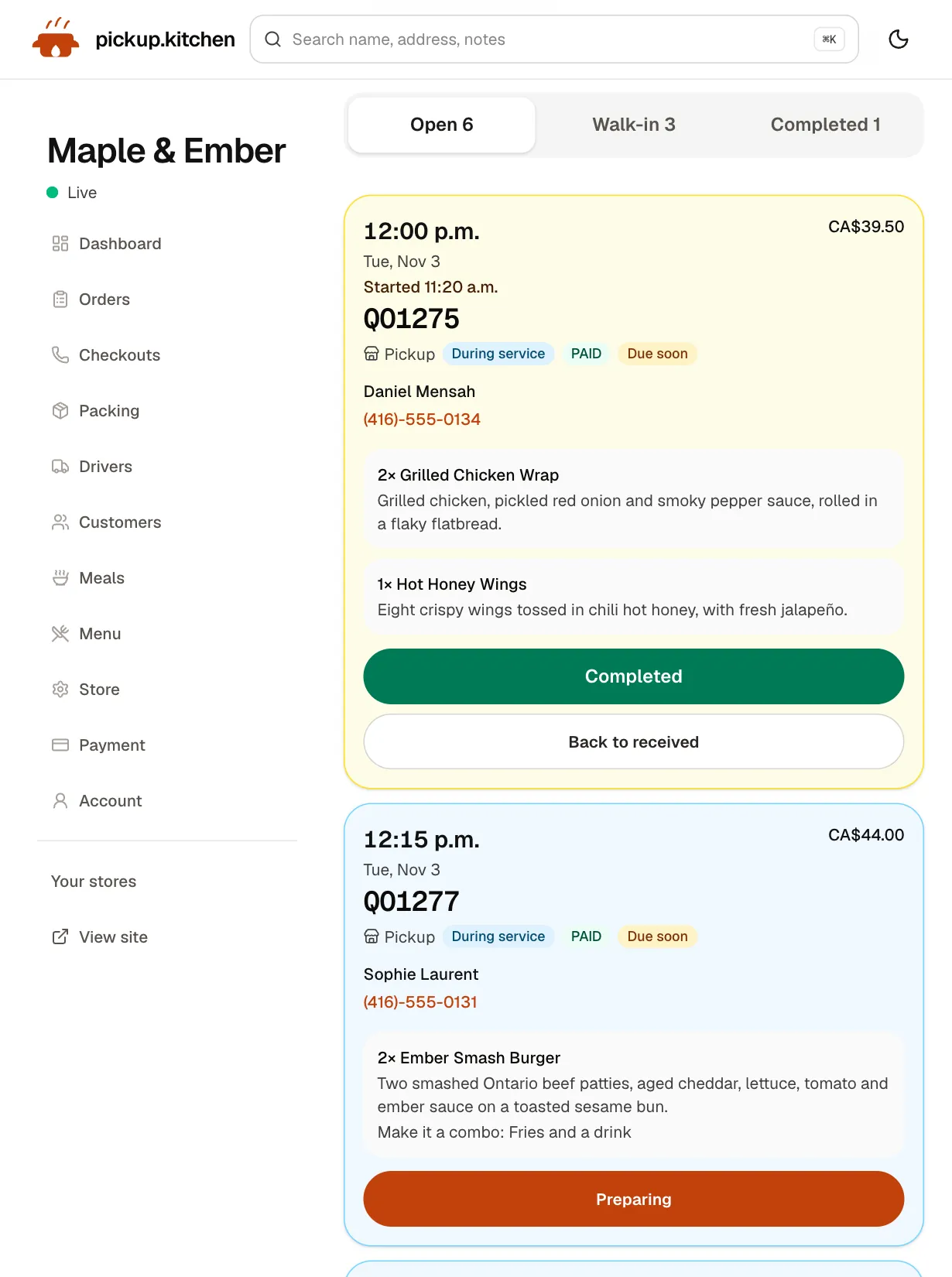
1Your kitchen
Tickets on the kitchen screen
Online orders, walk-ins and finished tickets in their own lanes, each with its QO number and the time it is due.
See how it works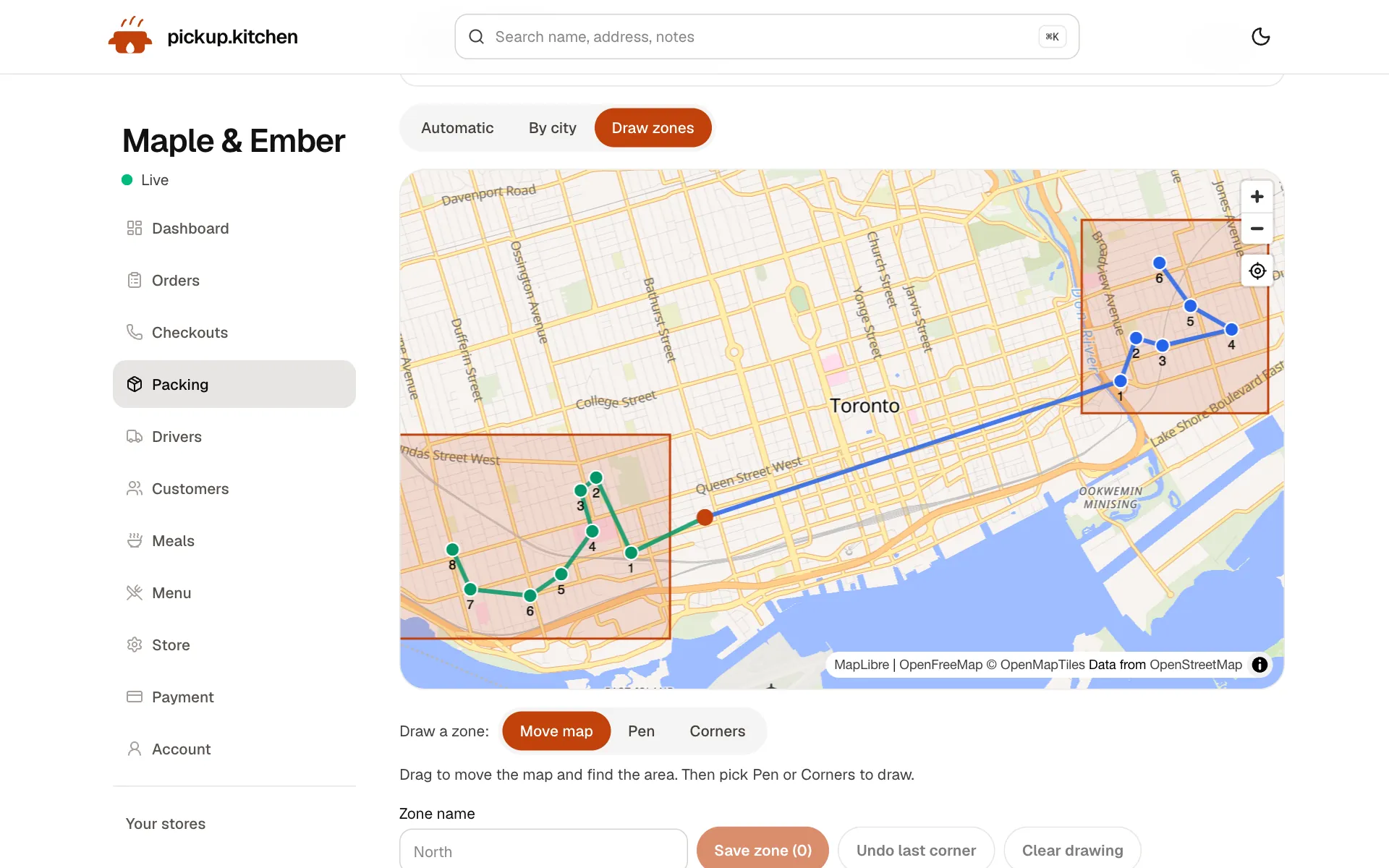
2Delivery
Your routes on a map
Stops come from your orders, or you add them by hand. Optimize puts them in order for the roads.
See how it works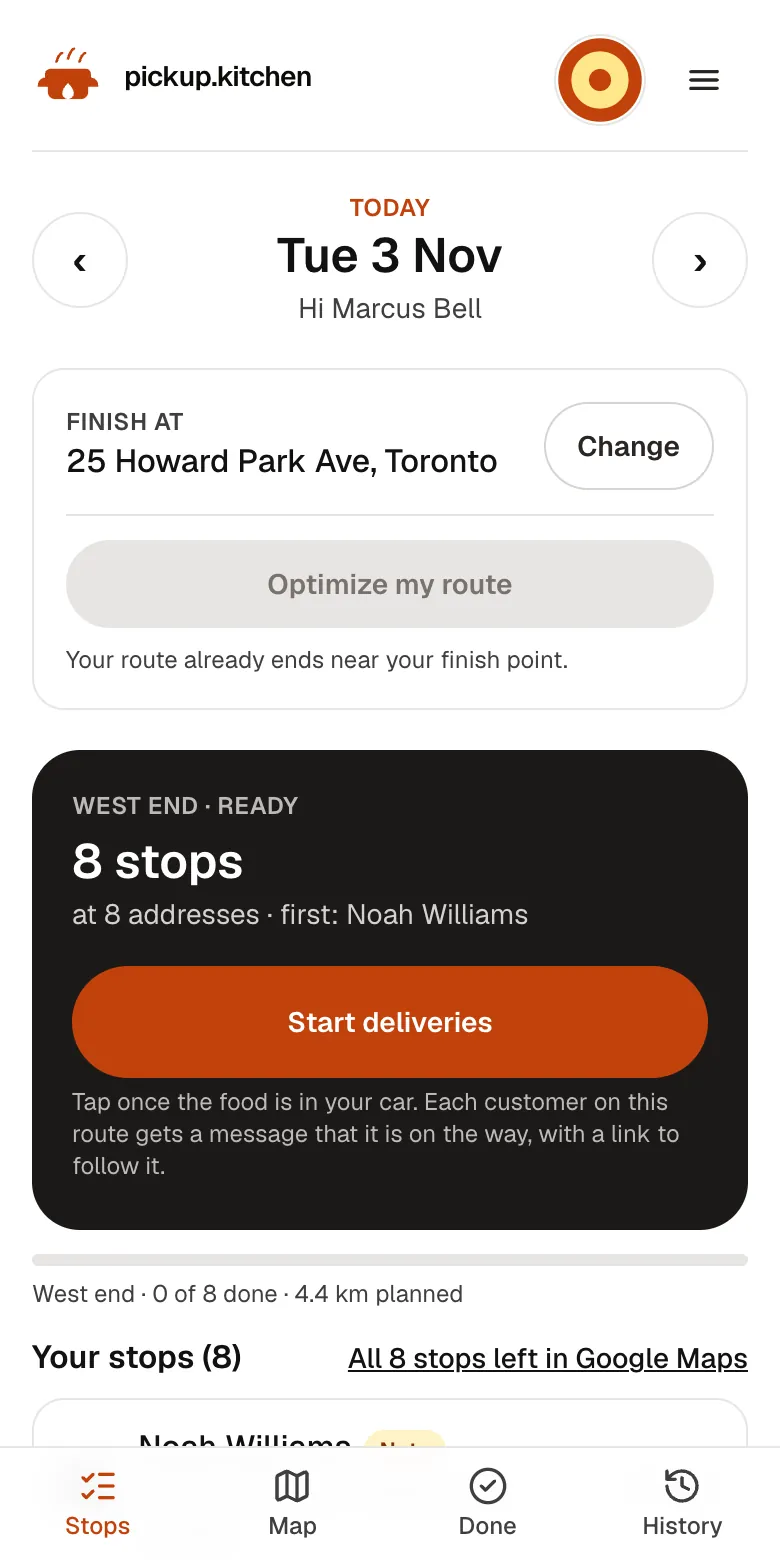
3Your driver
The route, in order
Your driver sees every stop numbered for the roads, with Navigate and the next stop always on top.
See how it works
FAQ
Questions
What is a ghost kitchen in simple terms?
A kitchen that cooks only for delivery and takeout. It has no dining room and no walk-in guests, so orders come from delivery apps or a website.
What is the difference between a ghost kitchen and a cloud kitchen?
None in everyday use. Both mean a delivery-only kitchen. A virtual restaurant is the brand and menu served from it.
How do ghost kitchens make money?
From delivery and takeout orders. The margin is the price minus food, packaging, labour, rent and app fees, so the fee on each order matters a great deal.
Are ghost kitchens legal?
A ghost kitchen is a food business and must follow your local food rules. Contact your local health department before you sign a lease.
How much does it cost to start a ghost kitchen?
Published estimates range from about $20,000 to $200,000. They come from a 2020 trade report and a 2026 delivery-app guide, so test them against real quotes.
How do ghost kitchens get customers without the apps?
They send guests to their own ordering site with a link on every bag, an Instagram bio and a card in the delivery. Guests who order direct can be emailed.
Keep reading
- By businessGhost kitchen software for your own ordersGhost kitchen software for orders on your own site, plus the kitchen board, stock and delivery to your own drivers. Free onboarding, 10% per order.
- ProductKitchen management softwareKitchen management software that only promises what you can cook: slot limits, sold-out days, dish stock and prep lists for weekly plans. 10% per order.
- ProductRestaurant delivery softwareRestaurant delivery software for your own drivers: plan drops, send routes to phones, follow every stop live, and pay drivers. Free with your orders.
- CompareDoorDash fees for restaurants, explainedDoorDash fees for restaurants in Canada and the US, plan by plan, with a $40 order worked out. See what you keep and how to move regulars to direct orders.
- ProductOnline ordering system for restaurantsAn online ordering system for restaurants: your own site at yourname.pickup.kitchen, time slots that close when full, and a kitchen screen. 10% per order.
Sources
- Nation's Restaurant News: difference between a ghost kitchen and a virtual restaurant, Dec 2019 (checked November 2026)
- Nation's Restaurant News: Who regulates ghost kitchens, Feb 2020 (checked November 2026)
- DoorDash Merchants: ghost kitchen guide, dated Oct 30, 2026; figures are its estimates (checked November 2026)
- Uber Eats Canada merchant pricing (checked November 2026)
- DoorDash Canada merchant plans (checked November 2026)
- Toronto Public Health: Starting a food business (checked November 2026)
- FDA: How to start a food business (checked November 2026)
- US Small Business Administration: Apply for licenses and permits (checked November 2026)
- Johnson & Wales University: how to price a restaurant menu for profitability, updated July 2026 (checked November 2026)
- Stripe Canada pricing (checked November 2026)
Free onboarding. Pay as you use.
Ready to take orders?
Your own ordering site with pickup, delivery and meal plans. No monthly fee for ordering.