Driver app
A delivery driver app your drivers can use tonight
Your drivers, our app. You bring the drivers: your staff, family, or a driver you hire. The pickup.kitchen driver app puts the route, the address, the door note and the proof photo on one phone screen, and gives you the dispatch side too. It works with orders from pickup.kitchen or with stops you add by hand.
- Your own drivers: staff, family or a driver you hire
- Free for stops from pickup.kitchen orders. On its own: 100 stops free, then CA$0.10 a stop
- No app store: drivers add it to their Home Screen
Free onboarding. Pay as you use. No monthly fee for ordering.
Real screens
See it in the app
Real screens from pickup.kitchen, the same ones you and your guests use.
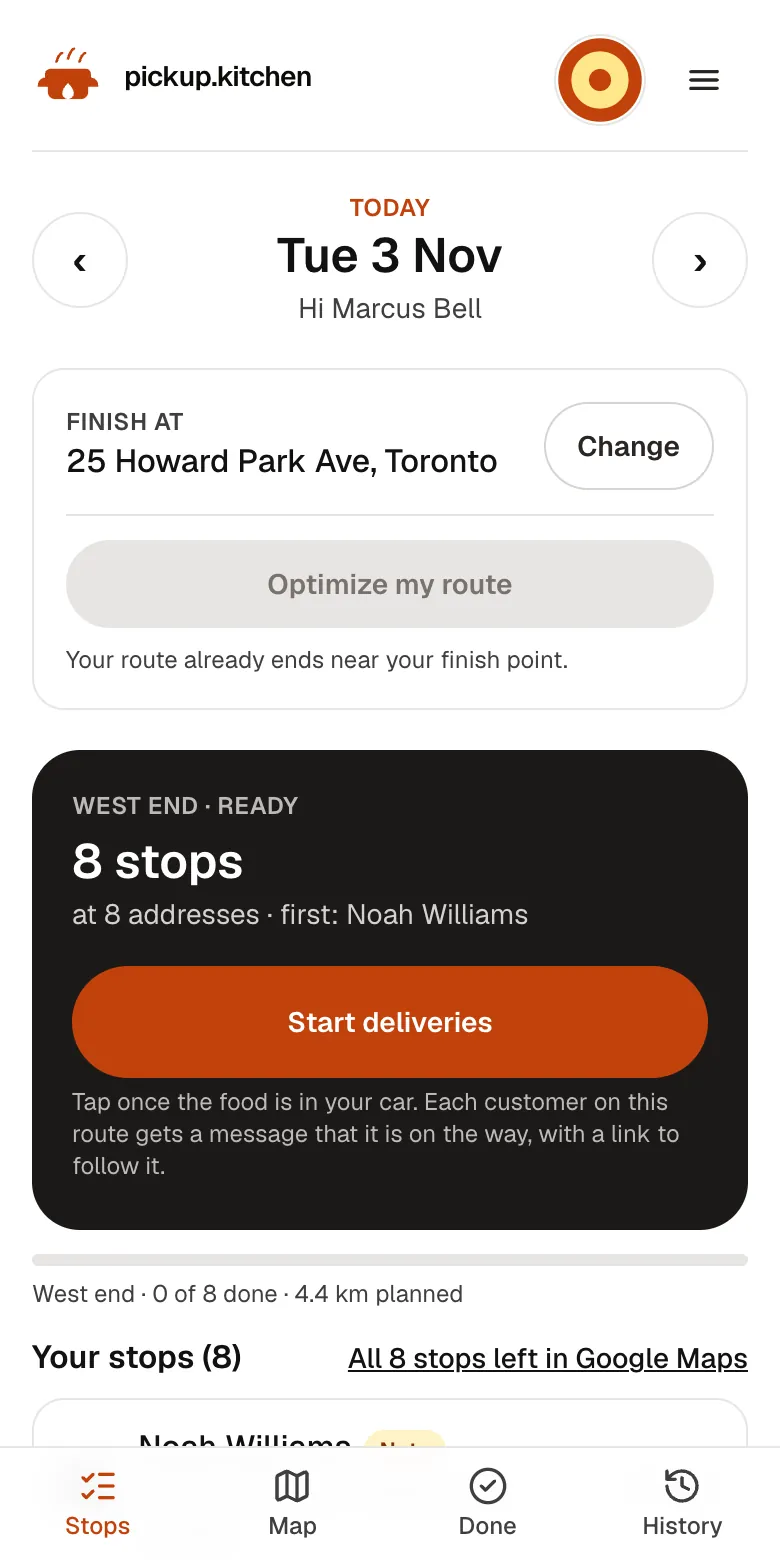
1Your driver
The route, in order
Your driver sees every stop numbered for the roads, with Navigate and the next stop always on top.
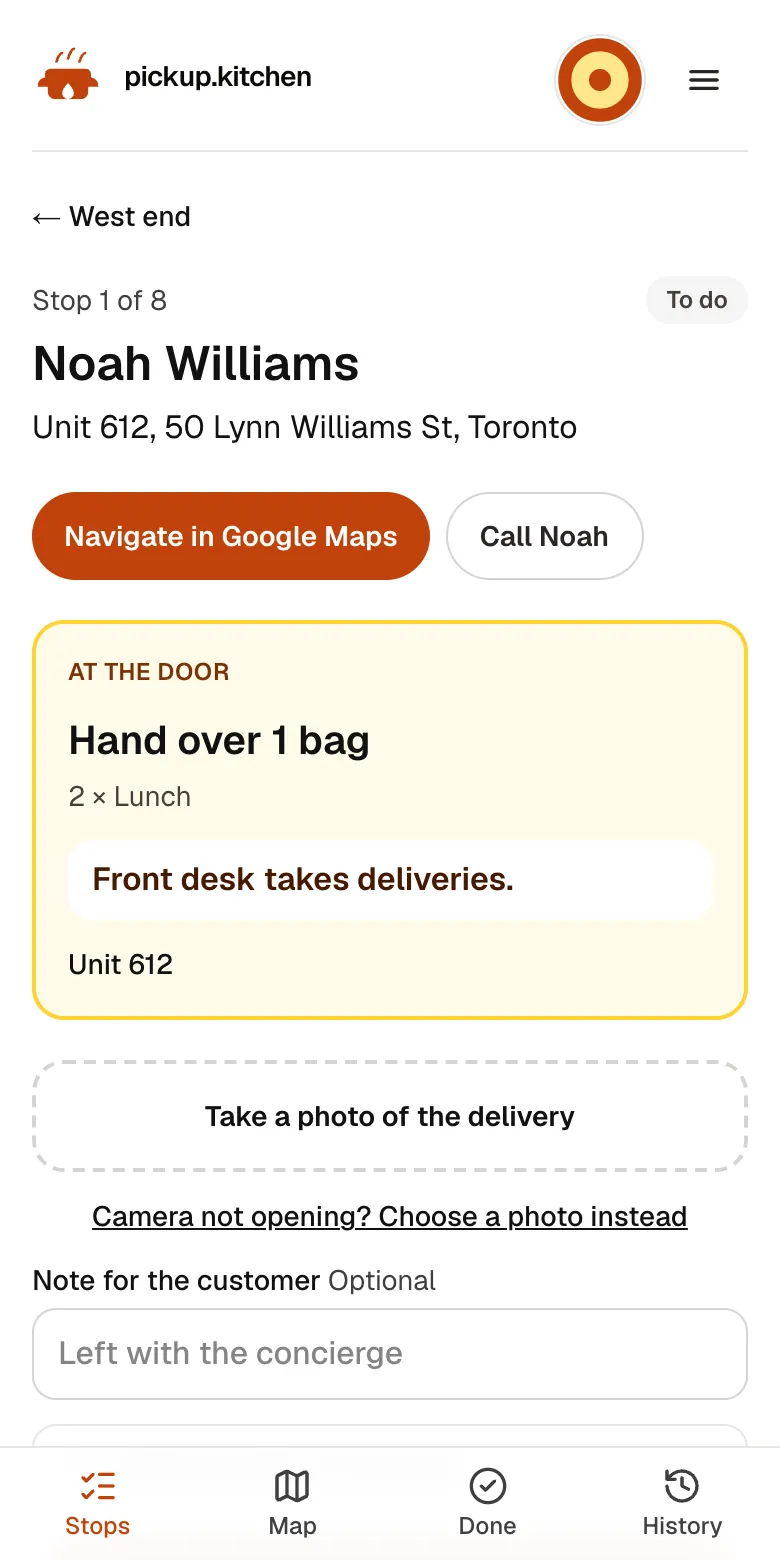
2Your driver
Each stop on one screen
The address, the door note, what to hand over and a Call button. Nothing to remember.
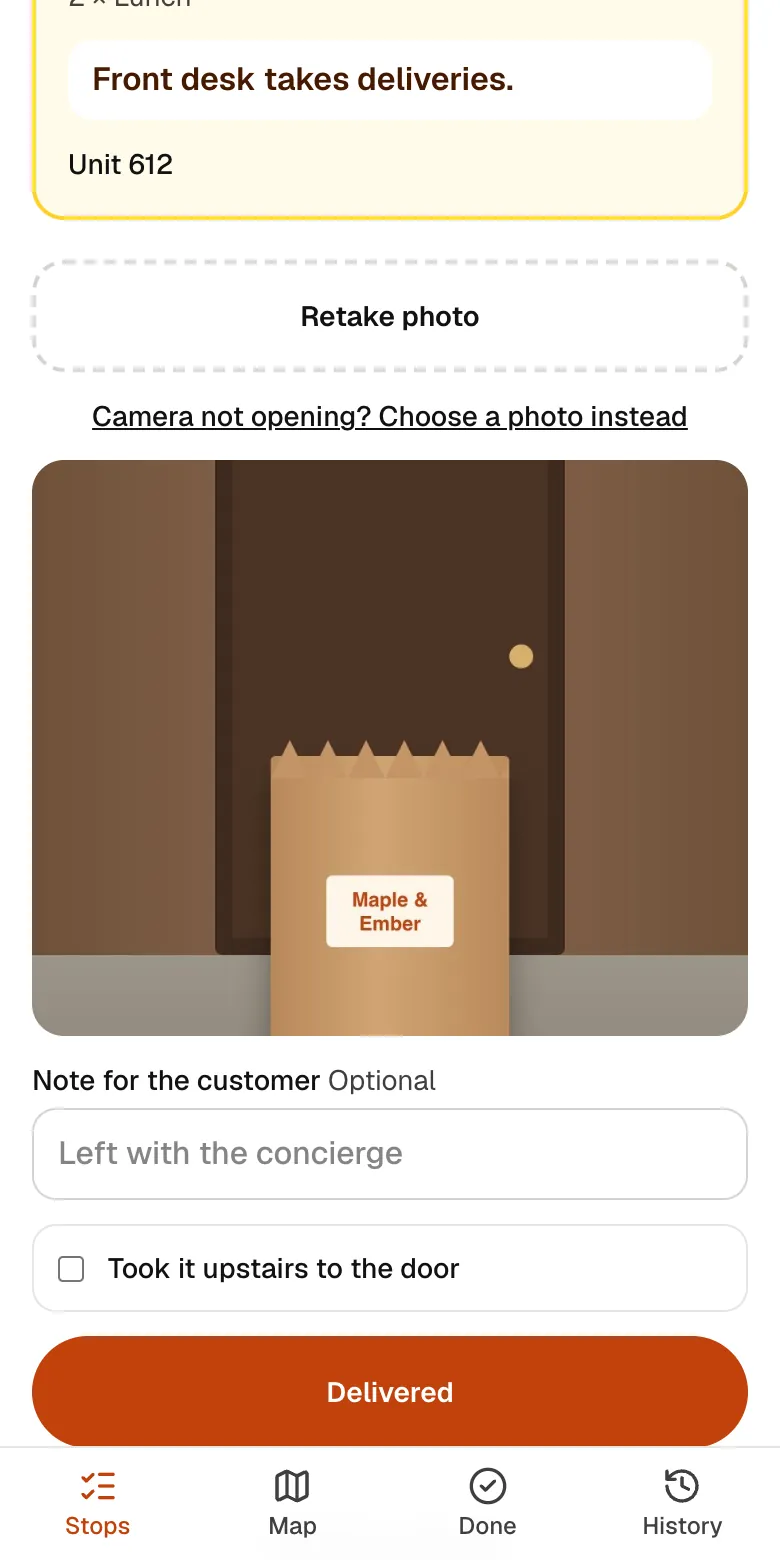
3Your driver
A photo at every door
The driver takes a photo of the drop, so you and the customer both know it arrived.
See how it works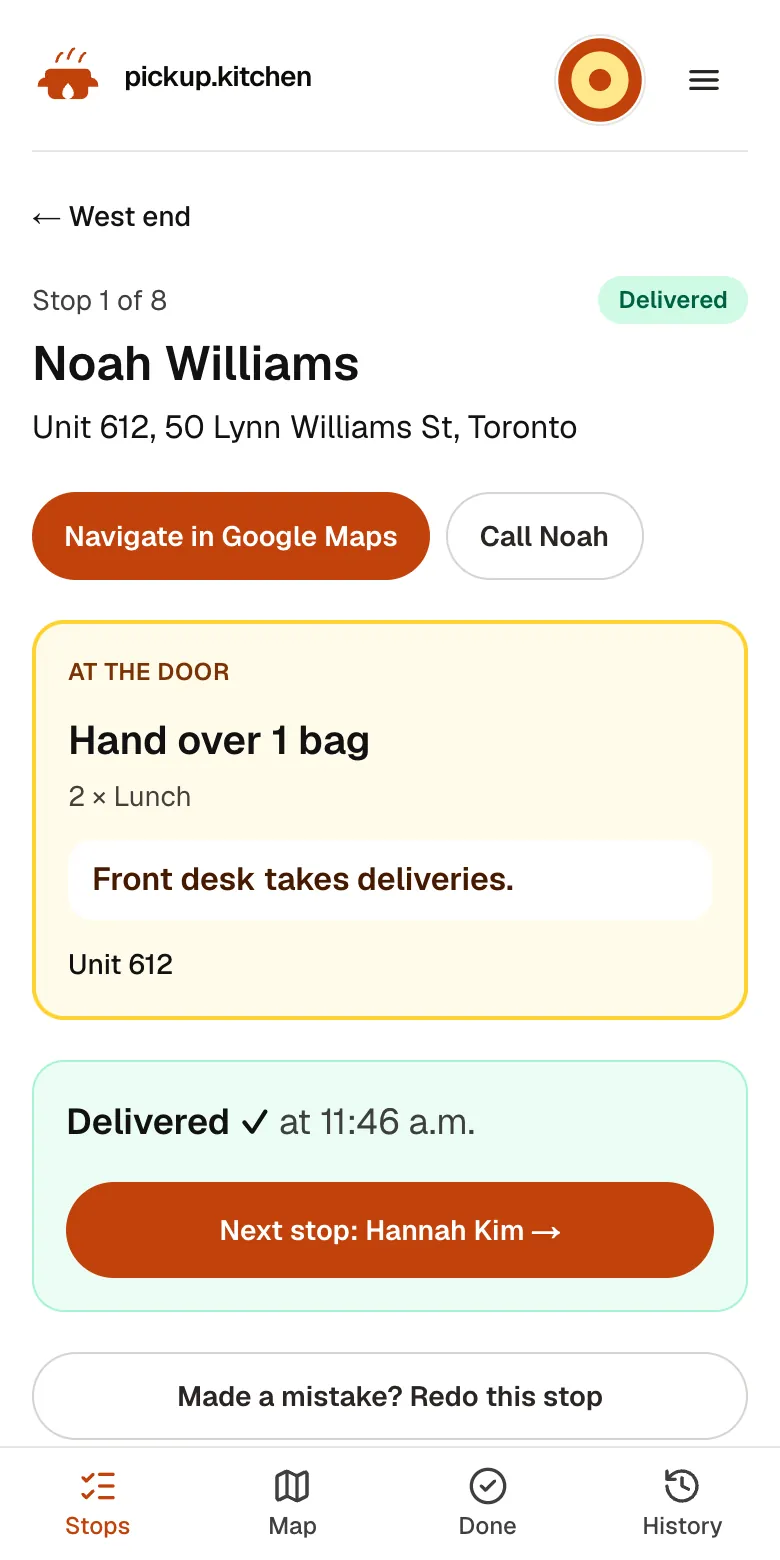
4Your driver
Delivered, then the next stop
One tap marks it delivered with the time, and opens the next address.
See how it works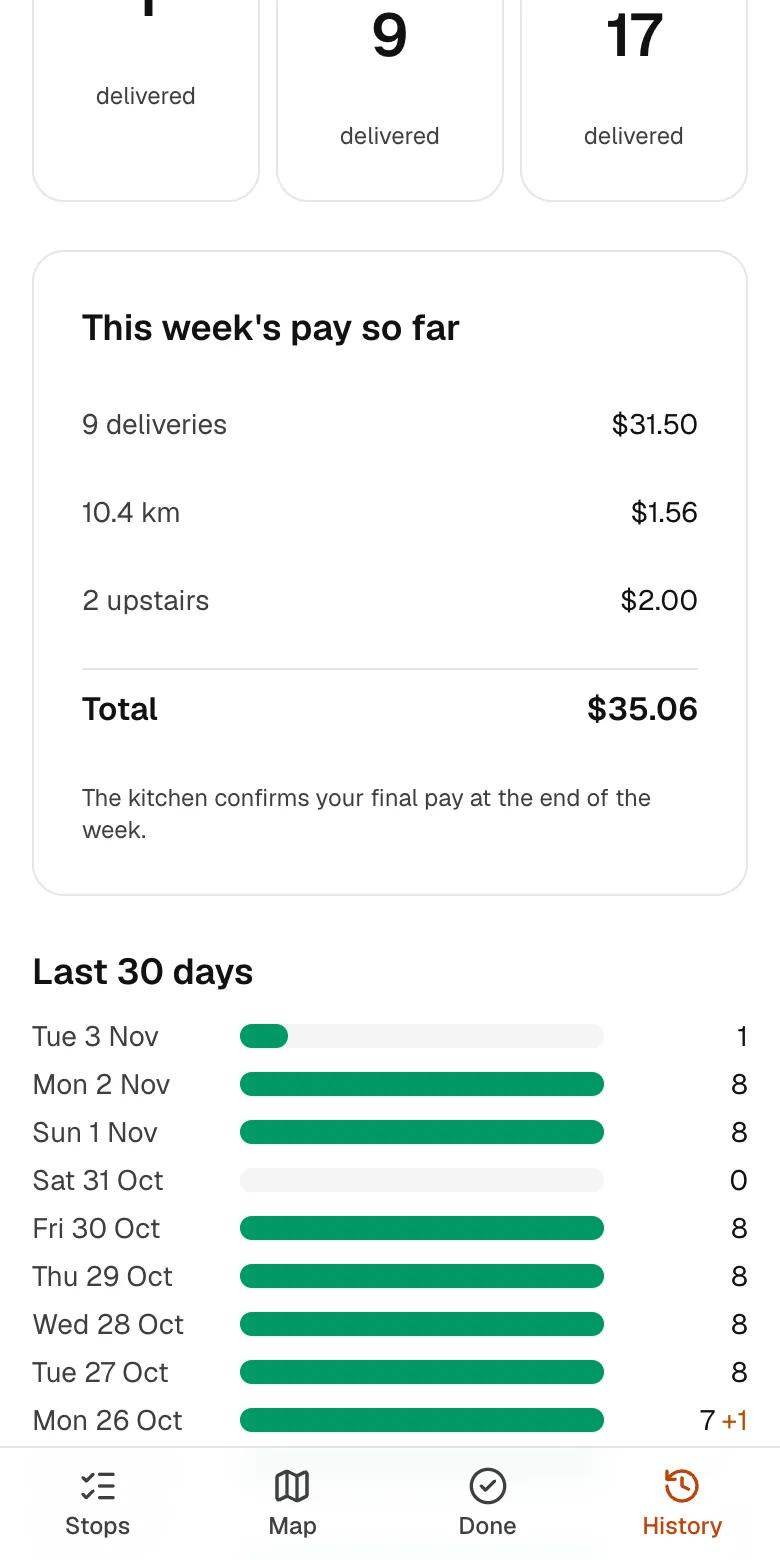
5Your driver
Pay your drivers can see
Deliveries and kilometres counted for the week, so pay is never a guess for either side.
In one login
What you get
- Route on the phoneA numbered stop list, a map tab, and a button to open Google Maps.
- Photo proofA delivery photo and optional note on every handover, kept for 90 days.
- Problem reasonsFive set reasons plus a note, and a retry at the end of the route.
- Start the night beforeThe driver starts tomorrow's route early and chooses where they finish.
- Works with weak signalStops save on the phone and send when signal returns.
- Dispatch for managersAdd drivers, send routes, follow the live board, and run pay.
Free with pickup.kitchen orders, pay as you use on its own
If your kitchen takes orders on pickup.kitchen, the driver app is included at no extra cost for stops that come from those orders. Delivery orders and meal-plan delivery days become stops for you.
If you deliver for another reason, use the driver app alone. Caterers, bakeries, and meal-prep companies can use it this way, and so can any business that delivers. You add each stop by hand: a name, an address, an optional phone number, and a note for the driver.
On its own it is pay as you use (100 stops free, then CA$0.10 a stop), with no monthly fee. The price section below has the tiers.
Either way, the driver sees the same app. The difference is where the stops come from.
What the driver sees on their phone
The driver opens a link, signs in with their own login, and adds the app to their Home Screen. There is no app store and no download.
The app opens on tomorrow's route at night and today's route in the morning. The driver can pick another day from the top bar. The stops come as a numbered list with the next one on top.
Tap Start deliveries and the day begins. Drivers can start the night before, so the first stop does not wait for a morning of planning.
At the door
Each stop shows the name, the phone number with a call button, the address, and the unit. The delivery note appears under At the door, so “gate code 4417” is where the driver looks.
When two stops share one address, the app says “Also at this address” so the driver drops both while there.
To finish a stop, the driver takes a photo. One photo can cover several boxes at the same door. They can add a note for the customer, and tick Took it upstairs if they carried it up. Then they tap Delivered.
When a stop goes wrong
A driver who cannot deliver taps Report a problem and picks what happened. The choices are can't find the address, no one answered, can't get into the building, food damaged or spilled, or customer refused. They add a note, such as “buzzer 1203 doesn't work”.
They can send the stop to the end of the route to try again. The manager sees the reason and the retry count on the live board. Anything undelivered shows under “Bring these back to the kitchen”.
Navigation, weak signal, and location
A button opens the route in Google Maps. Google Maps takes 10 stops at a time, so the app says to come back for the next batch. A map tab shows every stop as a pin, coloured by to do, delivered, and not delivered.
A stop saved with no signal stays on the phone and sends when signal returns. A day that was already loaded stays open.
Drivers can choose Share my location. The kitchen and waiting guests then see the driver's pin while the app is open. Drivers can also finish at their own address and tap Optimize my route. The route optimization page explains how that works.
What the manager does
On the dispatch side you add drivers by email, or copy a one-time password link that works for three days. You decide who drives which route and tap Send to driver, which buzzes their phone.
You can hand a route to another driver mid-day, and the stops the first driver finished stay theirs. You can reopen a stop or send the route again after a change.
The Drivers page shows who has notifications turned on, and a weekly or monthly pay report with your rates. The delivery software page covers the full day from the manager's side.
What the driver sees about pay
A History tab shows the driver's deliveries for the last 30 days, with green for delivered and orange for failed stops. It shows this week's pay so far and any extra pay you added. The kitchen confirms the final amount at the end of the week.
Driver app price, spelled out
The stand-alone driver app is pay as you use. A stop is one drop-off address. Stops you add by hand are priced this way even if you also take orders here.
- The first 100 stops each month are free.
- After that, CA$0.10 a stop (about US$0.07) up to 1,000 stops in the month.
- After 1,000 stops, CA$0.06 a stop (about US$0.04).
- Examples: 300 stops cost CA$20. 1,000 stops cost CA$90. 3,000 stops cost CA$210.
- Stops that come from pickup.kitchen orders cost nothing extra.
How the price compares at 1,000 stops a month
At 1,000 stops a month, pay as you use comes to CA$90, about US$65. Here is what other driver tools list for the same volume, from their own pricing pages (checked November 2026).
Each of them also does things pickup.kitchen does not. Routific plans around delivery time windows, for example, and these tools have no marketplace and no online ordering. Pick on the features you need.
- Wodely: Starter is US$49 a month with 400 tasks, then US$0.08 for each extra task. That is about US$97 at 1,000.
- Spoke Dispatch: Starter is US$125 a month and includes 1,000 stops.
- Routific: US$150 a month flat for up to 1,000 orders, with 100 orders a month free.
Step by step
How to get started
- 1Step 1: Add the driverEnter a name, email, and phone. They get an email invite and set a password.
- 2Step 2: Put the app on their phoneThey open the link and add it to the Home Screen, then turn on notifications.
- 3Step 3: Add the stopsOrders arrive on their own. Anything else, add by hand with a note.
- 4Step 4: Send the routeTap Send to driver. They start when they are ready to go.
FAQ
Questions
Does pickup.kitchen provide the drivers?
No. You use your own drivers: your staff, family, or a driver you hire. pickup.kitchen gives them the app, with the route in order, each address and door note, Navigate, and a photo at every door, and gives you the dispatch side. We don't supply drivers or take a cut of their pay.
What is the best delivery driver app for a food business?
One your drivers will actually open at the door. Look for a stop list, a door note, a required photo, and a way to report a failed stop. Then check how it connects to your orders.
Can I use the driver app without pickup.kitchen ordering?
Yes. It is pay as you use (100 stops free, then CA$0.10 a stop): the first 100 stops each month are free, then CA$0.10 a stop, and CA$0.06 a stop after 1,000. Stops you add by hand do not send texts or emails to the customer.
Is the driver app included when I take orders on pickup.kitchen?
Yes, for stops that come from your pickup.kitchen orders. They cost nothing extra, and routes, the live board, and driver pay come with ordering.
Do drivers need to download an app from an app store?
No. They open a link and add it to their Home Screen on iPhone or Android. On iPhone it must be opened in Safari to turn on notifications.
Is there driver management software in the app?
Yes. You manage drivers, routes, and pay from the Drivers and Deliveries pages: invites, who is driving, pay rates, and a printable pay statement.
Can a catering delivery driver app handle one big order?
Yes. Add the stop with the address and a note, such as the loading dock and who to ask for. The driver takes a photo when the order is handed over.
Keep reading
- ProductRestaurant delivery softwareRestaurant delivery software for your own drivers: plan drops, send routes to phones, follow every stop live, and pay drivers. Free with your orders.
- ProductDelivery route optimizationDelivery route optimization for food businesses: split drops between drivers, order stops by drive time, and re-optimize before they go. Free with orders.
- ProductProof of delivery appA proof of delivery app for food businesses: drivers take a photo at the door, you see it live, and guests get it by text or email. Free for your orders.
- CompareWodely alternative (formerly WooDelivery)A Wodely alternative for food businesses: Wodely's US$49 and US$159 plans against 100 free stops, then CA$0.10 a stop. Where Wodely wins and we differ.
- Productpickup.kitchen pricing: 10% per order, no monthly feepickup.kitchen pricing: free onboarding, no monthly fee, 10% per order. Delivery tools come with ordering. The driver app on its own is pay as you use.
Free onboarding. Pay as you use.
Put your kitchen on pickup.kitchen
No monthly fee for ordering. Send us your menu and we set it up with you, then you pay as you use.