For home kitchens
Sell food from home with a weekly drop your guests can order
To sell food from home you need two things: permission under your local rules, and a way for people to order. This page covers the second. pickup.kitchen gives you a weekly menu, a cutoff and pickup windows on your own link, and points you to the official rules for the first.
- A weekly menu with a cutoff, so you cook for a count
- Pickup windows and sold-out days you control
- Free onboarding, no monthly fee, 10% per order
Free onboarding. Pay as you use. No monthly fee for ordering.
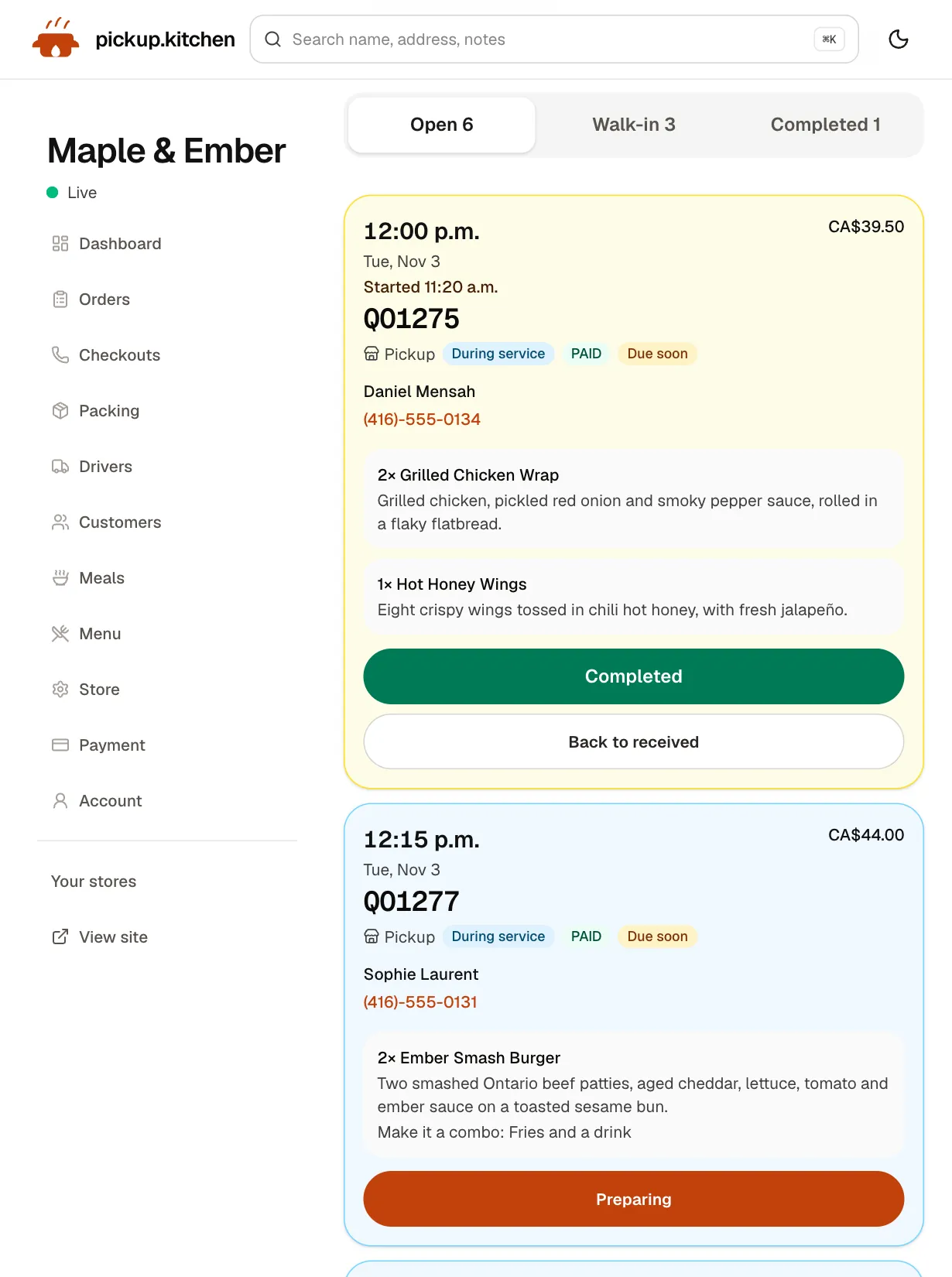
Real screens
What it looks like for you
Real screens from pickup.kitchen, the same ones you and your guests use.
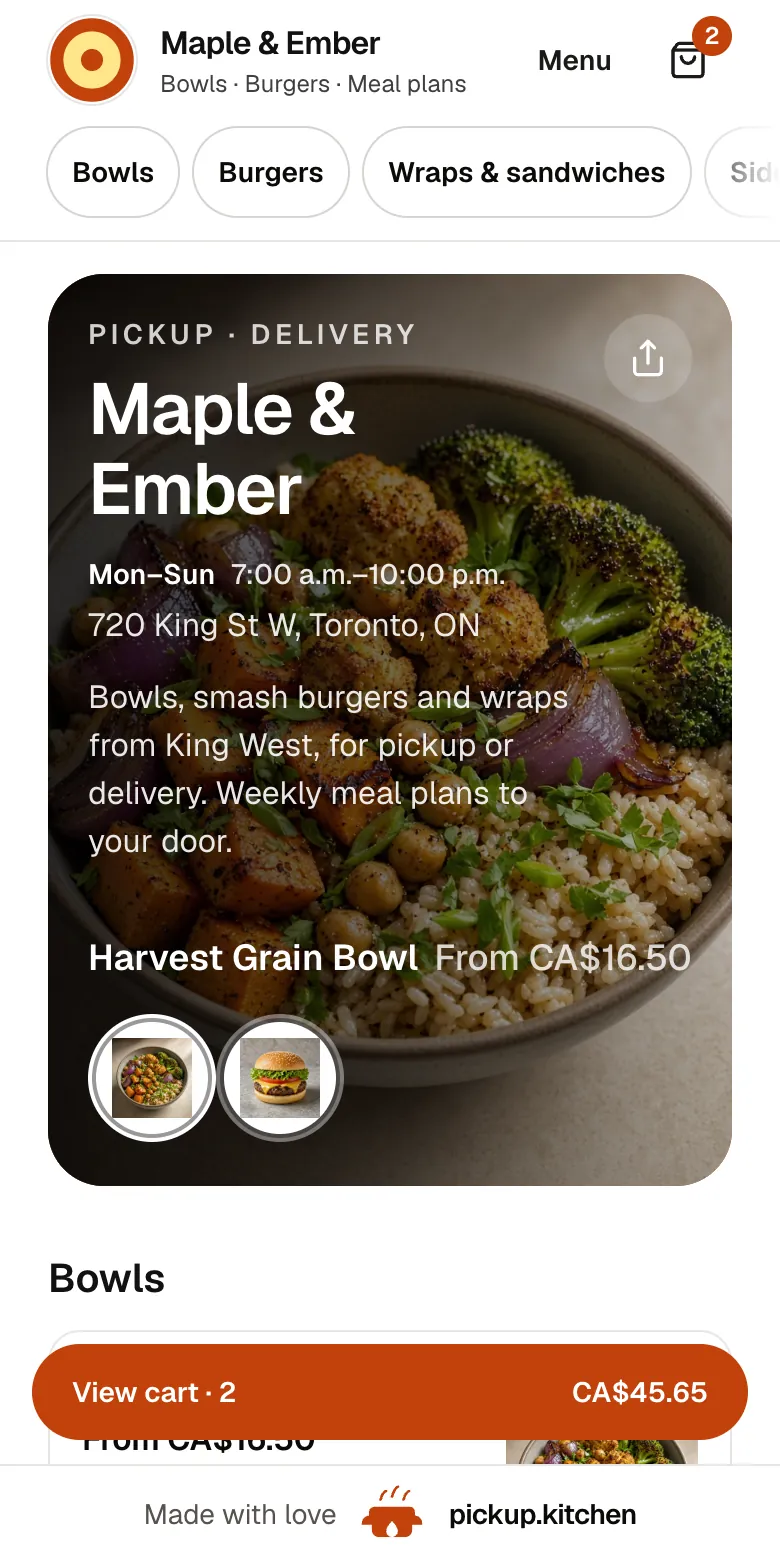
1Your guests
Your menu, on your own site
yourname.pickup.kitchen shows your dishes with photos and prices, and each guest picks pickup or delivery.
See how it works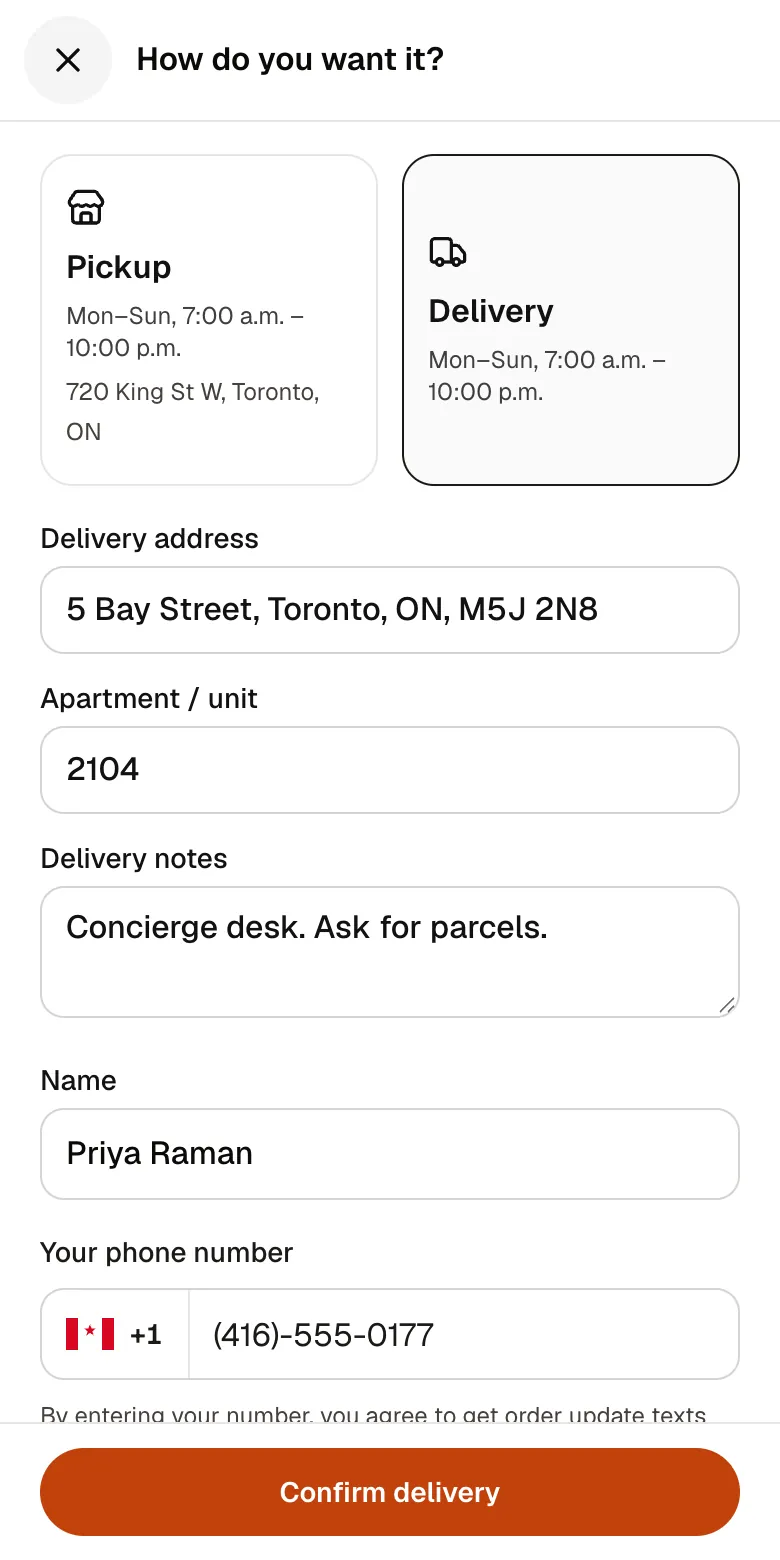
2Your guests
A checkout that takes seconds
A pickup time or a delivery address, then pay by card. No app to install and no account before paying.
See how it works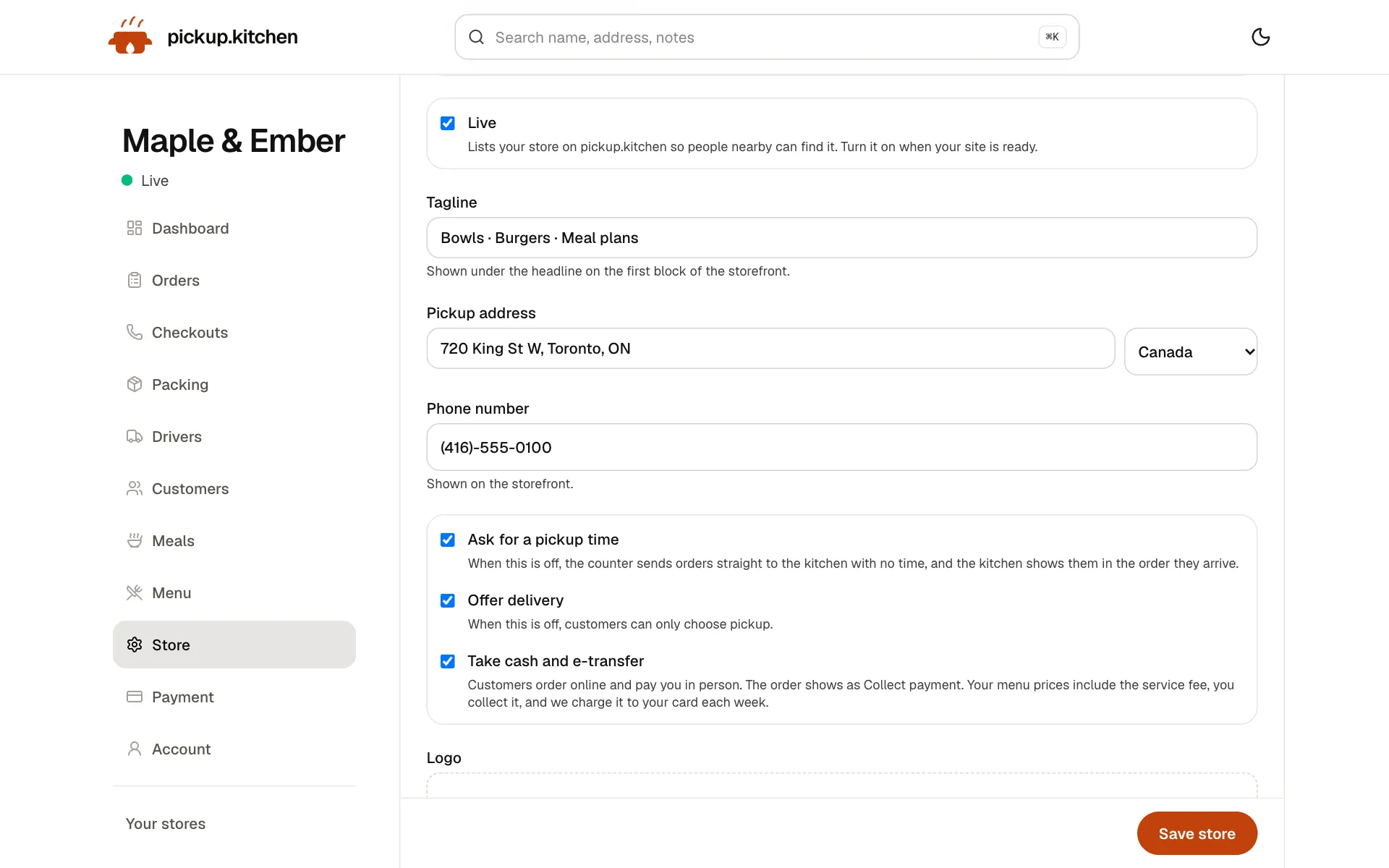
3You
Your store, your settings
Your tagline, pickup address, phone, pickup times, delivery and cash. Change any of it and your site follows.
See how it works
In one login
What you get
- Weekly menuOpen the days you cook, with hours for each day.Learn more
- Order cutoffStop taking orders at a time you choose, such as the night before.Learn more
- Stock per dishEnter how many you can make. The dish sells out at zero.Learn more
- Your own pageYour name, photos, menu and checkout at yourname.pickup.kitchen.Learn more
- Pickup address and noteYou choose what address and note guests see, in your kitchen's details.Learn more
- Customer listEvery guest saved, ready for next week's menu.Learn more
Start with the rules, not the website
Selling food from home is legal in many places, with conditions. The conditions depend on where you live, what you make and how much you sell. A site cannot tell you what you are allowed to do.
In Toronto, a home kitchen used for commercial purposes counts as a food premises, and the operator must notify Toronto Public Health before starting. In the United States, FDA says a private residence is not a facility that must register with FDA. State and local rules still apply (both checked November 2026).
Read our guide to cottage food laws first. It explains how those rules differ and where to find your own. Then come back and set up your page.
The weekly drop
A weekly drop is how many home kitchens run. You cook once or twice a week. Guests order before a cutoff. They collect in a window you set.
Open only the days you cook. Each open day has its own hours. Set a cutoff, such as 8 p.m. the night before, so no late order arrives when you have shopped and prepped.
Cook for a count, not a hope
Turn on Track inventory for each dish and enter how many you can make. Every sale lowers the count. At zero, nobody can order it. A guest who asks for four when two are left sees “Only 2 lasagna left”.
Tap Sold out today when the batch is gone. Tomorrow stays open. Mark a trip or a busy week as closed dates, and those days leave checkout.
A week with one drop
Monday: add the weekend menu and set the stock for each dish. Tuesday to Thursday: orders arrive, each with its pickup window. Thursday at 8 p.m.: the cutoff passes and no more orders arrive.
Friday: cook to the count. Saturday: guests collect in their windows, and you mark each ticket Picked up as the bag leaves your hands. Sunday: send next week's menu to everyone who ordered.
Guests order without an app
Share your link in your Instagram bio, a neighbourhood group or a note in the bag. A guest opens it, taps a dish, picks a pickup window and pays by card. No app. No account.
They get an order page and an email, then a message when the order is ready for pickup. If they agreed to texts at checkout, the same updates arrive by text.
Your address and your front door
Your site shows the pickup address and note you choose. It is a setting in your kitchen's own details, so you can show a street corner, a porch instruction or an exact address. Ask us if you want help with it.
If you deliver, you or a helper can use the driver app. The driver sees the address and the door note, takes a photo at handover, and the guest gets a link to it. See the delivery software page.
Labels are your job
pickup.kitchen prints packing labels for meal plans, with a name, the meal, any allergy and the address. Those are not product labels. They do not carry your ingredients, your name or the notices your cottage food rules may require.
Ask your local authority what a label must say, and make that label separately.
What it costs when you are starting
Onboarding is free and there is no monthly fee. Guests who order by card pay the 10% at checkout, and you receive your menu price before Stripe's own card fee. A week with no orders costs nothing.
Cash and phone orders you enter yourself pay the 10% too, charged weekly to the card you save. The pricing page has the whole picture.
When a cottage food business gets busy
Every guest who orders on your site is saved on your customer list. Email them the next menu from the same login. That one list does more than any post.
Sales limits and rules can change as you grow. Check your cottage food limits each year. If you move to a commercial kitchen, your ordering page stays the same.
What it does not do
It does not check that you are allowed to sell, and it does not file anything for you. It has no card reader or receipt printer, and it does not take tables or tabs.
It is a way to take orders, cook to a count and hand them over. The legal side stays with you and your local authority.
The tools a home kitchen uses
Most home kitchens use the first two and add more when the weekly drop grows.
- Online ordering: your link, a cutoff, pickup windows and sold-out days.
- Restaurant website builder: your name, photos and menu on one page.
- Kitchen management software: stock per dish and capacity limits.
- Delivery software: a route for the weekend drop.
- Restaurant email marketing: next week's menu to everyone who ordered.
Step by step
How to get started
- 1Step 1: Check your local rulesStart with the cottage food guide and your local health authority.
- 2Step 2: Add your menuSend a photo of your menu or paste the text, then check each dish and price.
- 3Step 3: Set days, windows and stockOpen the days you cook, set a cutoff, and enter how many you can make.
- 4Step 4: Share your linkPut it in your bio, your group chat and the bag.
FAQ
Questions
Can I sell food from home?
In many places, yes, with conditions on what you make, how much you sell and how you label it. The rules differ by state and province. Our cottage food laws guide shows where to look.
What is a home based food business?
A business that prepares food in a home kitchen and sells it to the public. Local rules decide what you can make and whether you must notify or register.
How do I take orders for a cottage food business?
Put a menu with prices on one link, set a cutoff and pickup windows, and cook to the orders. pickup.kitchen does that on your own page.
Can I start a bakery business from home?
Often yes, if you stay within your local rules for baked goods. Our guide to starting a bakery from home walks through the steps.
Will guests see my home address?
They see the pickup address and note you choose. It is a setting in your kitchen's details. Ask us if you want help setting it.
What does it cost?
Onboarding is free and there is no monthly fee. You pay 10% per order. A week with no orders costs nothing.
Keep reading
- GuideCottage food laws by state: caps, permits, online salesCottage food laws explained: what they are, the rules most states share, how to start selling from home, and a 15-state table of caps and permits.
- GuideHow to start a bakery business from homeHow to start a bakery business from home: check your cottage food rules, pick bakes that qualify, label and price them, take pre-orders. Steps and sources.
- ProductOnline ordering system for restaurantsAn online ordering system for restaurants: your own site at yourname.pickup.kitchen, time slots that close when full, and a kitchen screen. 10% per order.
- ProductRestaurant website builder with orderingA restaurant website builder where the menu is the checkout. Get yourname.pickup.kitchen with photos, hours, and ordering. Free onboarding, 10% per order.
- Productpickup.kitchen pricing: 10% per order, no monthly feepickup.kitchen pricing: free onboarding, no monthly fee, 10% per order. Delivery tools come with ordering. The driver app on its own is pay as you use.
Free onboarding. Pay as you use.
Run your business on pickup.kitchen
Your own ordering site, the kitchen screen, the counter, your customers, meal plans and the driver app. One login.