Compare · Square Online
A Square Online ordering alternative, and when to stay with Square
A Square Online ordering alternative has to beat a very good free plan. On Square's Canadian pricing page, Square Online costs $0 a month and 2.8% plus 30 cents per payment. On total fees per order, that is cheaper than our 10%. What pickup.kitchen adds is a marketplace listing, a kitchen screen, meal plans and your own drivers.
- Square Online's Free, Plus and Premium plans, checked November 2026
- A $40 card order on both, with the guest's total shown
- Where Square is stronger, and who should stay
Free onboarding. Pay as you use. No monthly fee for ordering.
pickup.kitchen and Square Online
Side by side
Each line uses Square Online's own published numbers, checked November 2026.
| What | pickup.kitchen | Square Online |
|---|---|---|
| Monthly fee | pickup.kitchenNone for ordering. Free onboarding. | Square OnlineFree $0. Plus $36 billed annually. Premium $99 billed annually. |
| Fee per order | pickup.kitchen10% per order. On card orders the guest pays it at checkout. | Square OnlineNo commission. Card fee 2.8% plus 30 cents (Premium 2.5% plus 30 cents). |
| You keep on a $40 card order | pickup.kitchenAbout $38.42 after Stripe's card fee | Square Online$38.58 on Free and Plus. $38.70 on Premium. |
| The guest pays on a $40 dish | pickup.kitchen$44 | Square Online$40 |
| Marketplace listing | pickup.kitchenA free listing on pickup.kitchen | Square OnlineNone listed. Order with Google and social buttons. |
| Time slots and cutoffs | pickup.kitchenSlots that close when full, a cutoff, closed dates, Sold out today | Square OnlinePre-orders and item quantity limits on Plus and above |
| Meal plans | pickup.kitchenWeekly menus, skips, pauses, packing lists and labels | Square OnlineSubscriptions for recurring items on Plus and above |
| Delivery | pickup.kitchenYour own drivers: routes, driver app and photo proof, included for orders from pickup.kitchen | Square OnlineDelivery by your own staff, or third-party local delivery |
| Counter and kitchen screen | pickup.kitchenCounter and kitchen screen in a browser, no hardware to buy | Square OnlineSquare POS, with Square for Restaurants Free or $60 a month per location |
| Table service and reservations | pickup.kitchenNot offered | Square OnlineSquare for Restaurants Plus covers table management. OpenTable integration listed. |
Real screens
What your guests and kitchen see instead
Real screens from pickup.kitchen, the same ones you and your guests use.
1Your guests
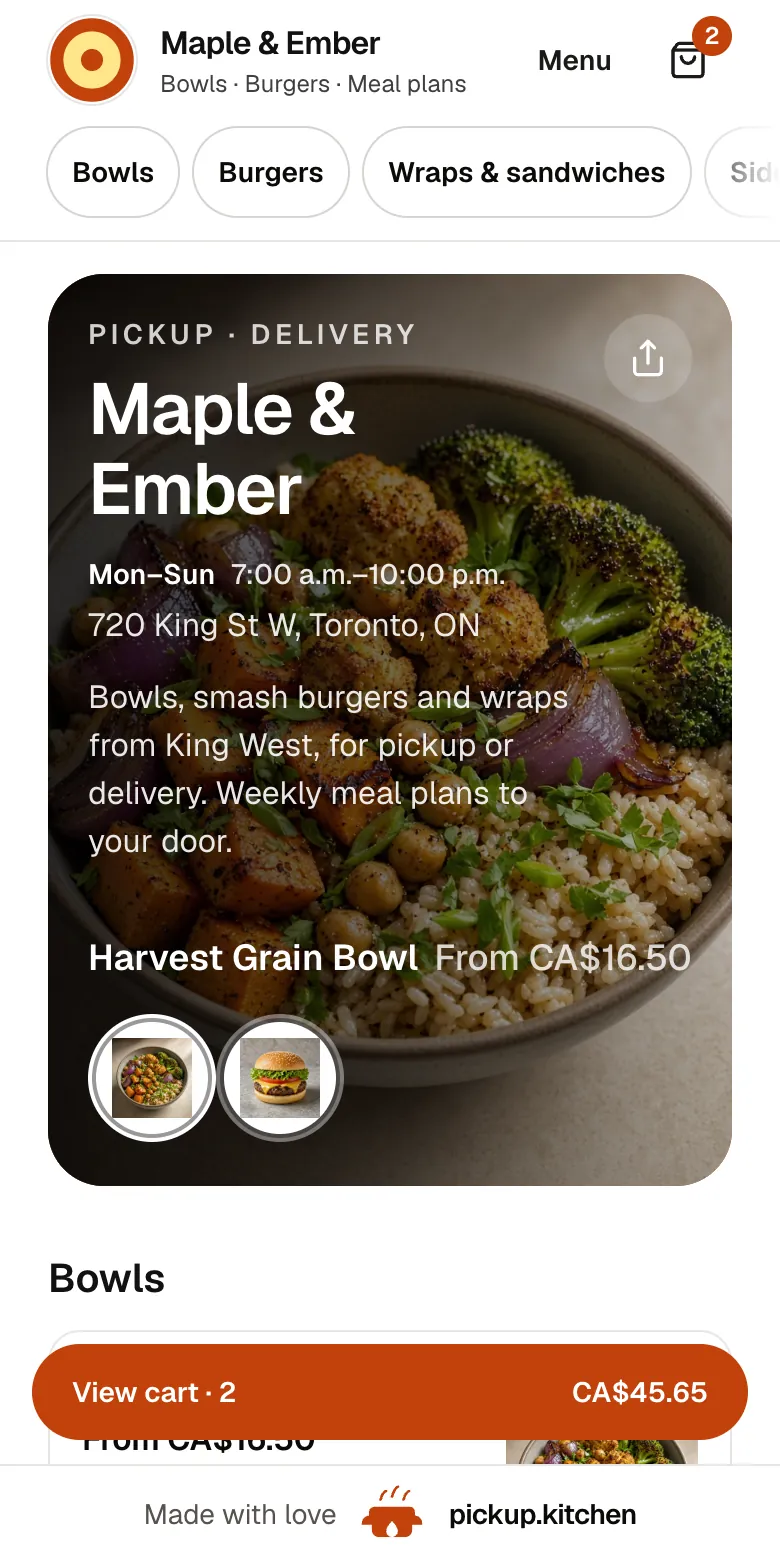
Your menu, on your own site
yourname.pickup.kitchen shows your dishes with photos and prices, and each guest picks pickup or delivery.
See how it works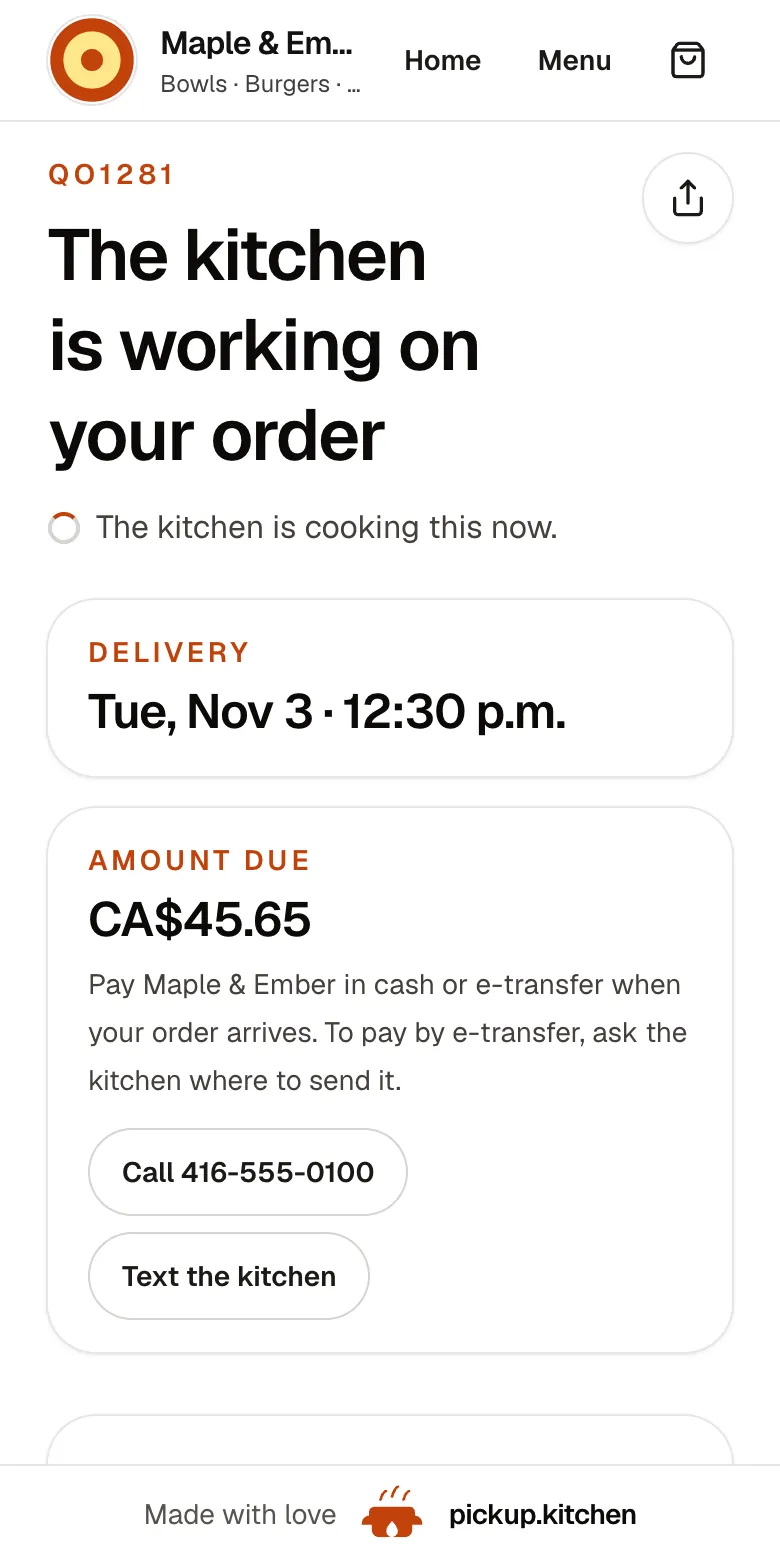
2Your guests
Every order gets a QO number
The guest sees their order number the moment they order, and the same number is on the kitchen's ticket.
See how it works3Your kitchen
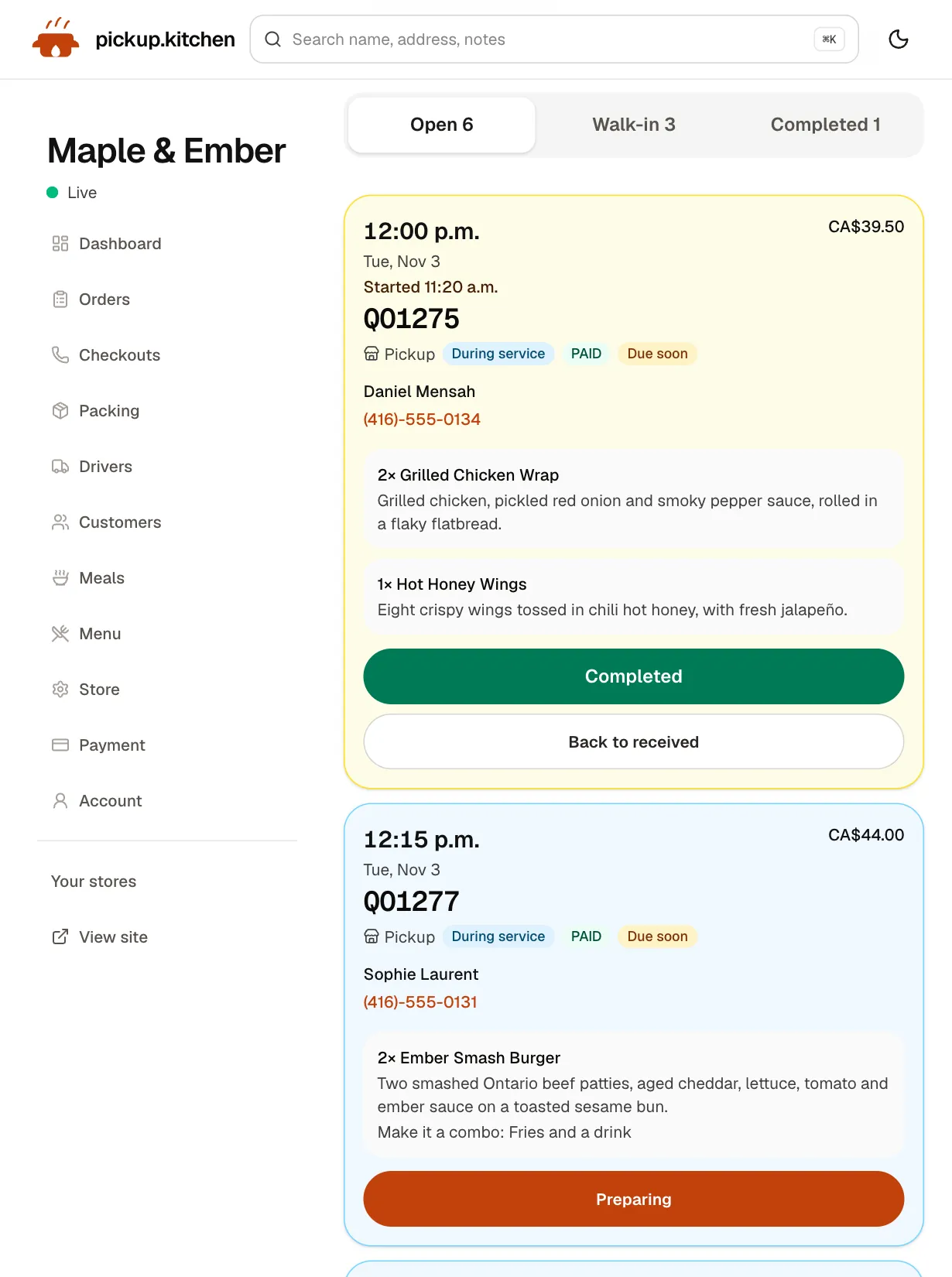
Tickets on the kitchen screen
Online orders, walk-ins and finished tickets in their own lanes, each with its QO number and the time it is due.
See how it works
Square Online's plans, as Square publishes them in Canada
Square Online has three plans. Free is $0 a month with no monthly fees and 2.8% plus $0.30 per transaction. Plus is $36 a month billed annually, at the same 2.8% plus $0.30. Premium is $99 a month billed annually, at 2.5% plus $0.30, with 24/7 phone support. Square's Canadian pages show these as dollar amounts, and we read them as Canadian dollars.
Free includes a website builder with SEO tools, pickup, local delivery, shipping and customer accounts. It also lists Order with Google and an Order Food button for Instagram and Facebook. Plus adds a custom domain, QR code ordering, pre-orders, item quantity limits, order status text alerts and subscriptions.
Square also sells Square for Restaurants. Its Free plan charges card processing only. Plus is $60 a month per location, with a 30-day trial. Square describes its online ordering as having no monthly fees or commissions.
A $40 card order on each
Take an order with $40 of food on it, paid by card.
- Square Online Free or Plus: the card fee is 2.8% plus 30 cents, which is $1.42. You keep $38.58, and the guest pays $40.
- Square Online Premium: 2.5% plus 30 cents, which is $1.30. You keep $38.70.
- pickup.kitchen: the guest sees $44, because our 10% is in the menu price. You keep $40 less Stripe's card fee, about $38.42.
What that table says
On a card order you keep almost the same on both. The difference sits with the guest, who pays $4 more on pickup.kitchen. If all you need is a checkout page on your site, Square's free plan is hard to beat. We say so plainly.
The 10% pays for things a checkout page does not include. The sections below say what they are.
Total fees on 100 card orders
Run the month. Say you take 100 card orders of $40, which is $4,000 of food. On Square's Free plan the card fees come to $142, all paid by you.
On pickup.kitchen the guests pay $400 for our 10%. You pay about $158 in Stripe fees on $4,400 of charges. Across both sides that is about $558 against Square's $142. That gap buys the listing, the kitchen screen, the meal plans and the drivers. Decide whether you will use them.
What Square does better, and who should stay
Square is a full commerce system. If you already run Square POS, Square Online syncs with it, so in-store and online orders, items and inventory stay in step. If you also ship products or sell retail, Square handles that and pickup.kitchen does not.
Square for Restaurants goes further than we do. Its Plus plan covers table management, and Square lists an OpenTable integration for reservations. It also lists Uber Eats and DoorDash integrations. pickup.kitchen is not built for table service or reservations, and it does not pull in app orders.
You can also load a menu into Square from a PDF, like ours. Stay with Square if you use its hardware, run table service, sell retail, or just want the lowest fee on a checkout page.
Where pickup.kitchen differs
A marketplace listing. Square's online store pages list Order with Google and social buttons. pickup.kitchen lists you for free on pickup.kitchen, where people nearby find you and still order on your own site.
Limits built for a kitchen. Set a slot length and how many orders a slot holds. Add a cutoff such as 8 p.m. the night before, closed dates, and a Sold out today button. When a slot is full, it closes at checkout. Square Plus has pre-orders and item quantity limits, which are a different tool.
Meal plans. Square Plus lists subscriptions for recurring items. pickup.kitchen's plans are for kitchens: a weekly menu, a start and end date, the days you pack, skips, pauses, packing lists and labels.
Your own drivers. Square lists delivery by your own staff or third-party local delivery. pickup.kitchen builds the route, sends it to the driver's phone, and keeps a photo of each handover. It is included for orders taken on pickup.kitchen. We supply no couriers.
Who should pick which
Pick Square if you use Square hardware, take bookings, sell retail, or want the cheapest possible checkout. Pick pickup.kitchen if you cook to a limit, sell meal plans or deliver with your own drivers. It also fits if you want a listing that sends you new guests, with no monthly fee.
Step by step
How to get started
- 1Step 1: Send your menuSend a photo or PDF of your menu and check each dish. Your site goes up at yourname.pickup.kitchen.
- 2Step 2: Set your limitsChoose open days, slot length, orders per slot and a cutoff.
- 3Step 3: Connect StripeCard payments go to your own Stripe account.
- 4Step 4: Place a test orderOrder from your phone and watch the ticket arrive on the kitchen screen.
FAQ
Questions
What is the best Square Online ordering alternative?
It depends on what you need. For the cheapest checkout page, Square's own free plan is hard to beat. For a marketplace listing, kitchen limits, meal plans and your own drivers, pickup.kitchen has no monthly fee and charges 10% per order.
Is Square Online free?
Yes. On Square's Canadian pricing page, the Free plan is $0 a month with 2.8% plus 30 cents per transaction. Plus is $36 a month billed annually, and Premium is $99 a month billed annually (checked November 2026).
Does Square Online charge commission?
Square describes online ordering as having no monthly fees or commissions. Card processing fees apply: 2.8% plus 30 cents on Free and Plus, and 2.5% plus 30 cents on Premium.
Does Square Online have a marketplace?
Square's online store pages list Order with Google and social buttons, not a marketplace. pickup.kitchen has a free listing on pickup.kitchen where people nearby find you and order on your own site.
Can I sell meal plans with Square Online?
Square Plus lists subscriptions for recurring items. pickup.kitchen has meal plans built for kitchens, with a weekly menu, start and end dates, skips, pauses, packing lists and labels.
Can Square Online run my own delivery drivers?
Square lists delivery by your own staff or third-party local delivery. It does not describe routes or a driver app for your own drivers in the pages we checked. pickup.kitchen includes both for orders taken on pickup.kitchen.
Keep reading
- ProductOnline ordering system for restaurantsAn online ordering system for restaurants: your own site at yourname.pickup.kitchen, time slots that close when full, and a kitchen screen. 10% per order.
- ProductRestaurant POS systemsRestaurant POS systems differ. This one takes walk-in and phone orders on your online menu and sends them to your kitchen screen. No hardware to buy.
- CompareToast alternative for takeout and delivery kitchensA Toast alternative for takeout, delivery and meal-plan kitchens: Toast's Canadian POS plans against 10% per order, no hardware, and where Toast wins.
- CompareGloriaFood alternative: move before April 30, 2027GloriaFood ends April 30, 2027. A GloriaFood alternative checklist: menu from a photo or PDF, links, Google listing, customers, Stripe and a move plan.
- Productpickup.kitchen pricing: 10% per order, no monthly feepickup.kitchen pricing: free onboarding, no monthly fee, 10% per order. Delivery tools come with ordering. The driver app on its own is pay as you use.
Free onboarding. Pay as you use.
Keep more of every order
Keep the apps for new guests if they work for you, and let your regulars order on your own site.