Restaurant website
A restaurant website builder where the menu takes the order
A restaurant website builder should give you a page guests can order from, not a brochure with a button to somewhere else. pickup.kitchen builds yourname.pickup.kitchen from your menu: dishes, photos, hours, and checkout on one page. You can be live in a day.
- Your name in the address bar, your dishes on the page
- Checkout is built in: pickup or delivery, card payment
- Free onboarding. No monthly fee. 10% per order.
Free onboarding. Pay as you use. No monthly fee for ordering.
Real screens
See it in the app
Real screens from pickup.kitchen, the same ones you and your guests use.
1You
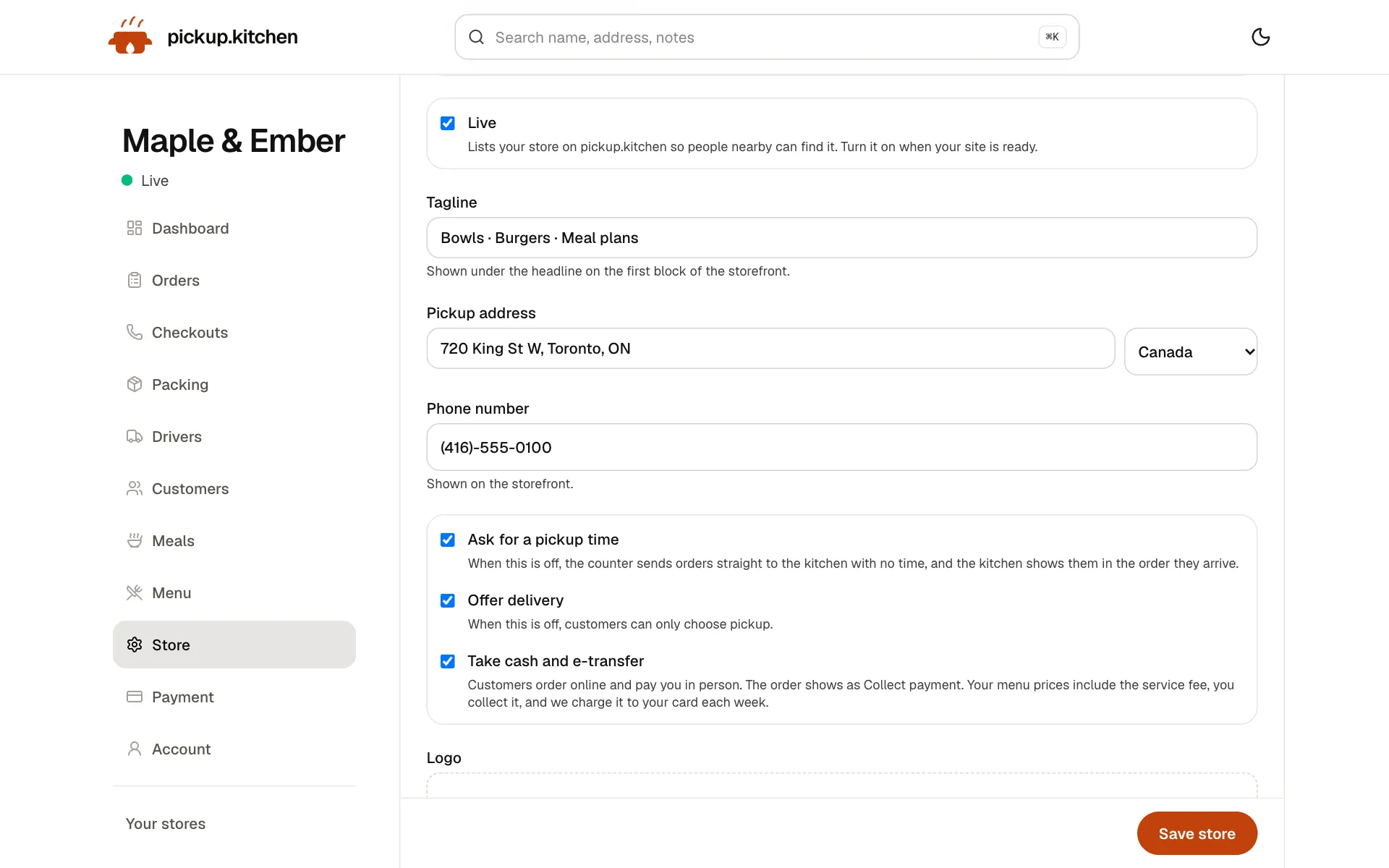
Your store, your settings
Your tagline, pickup address, phone, pickup times, delivery and cash. Change any of it and your site follows.
2Your guests
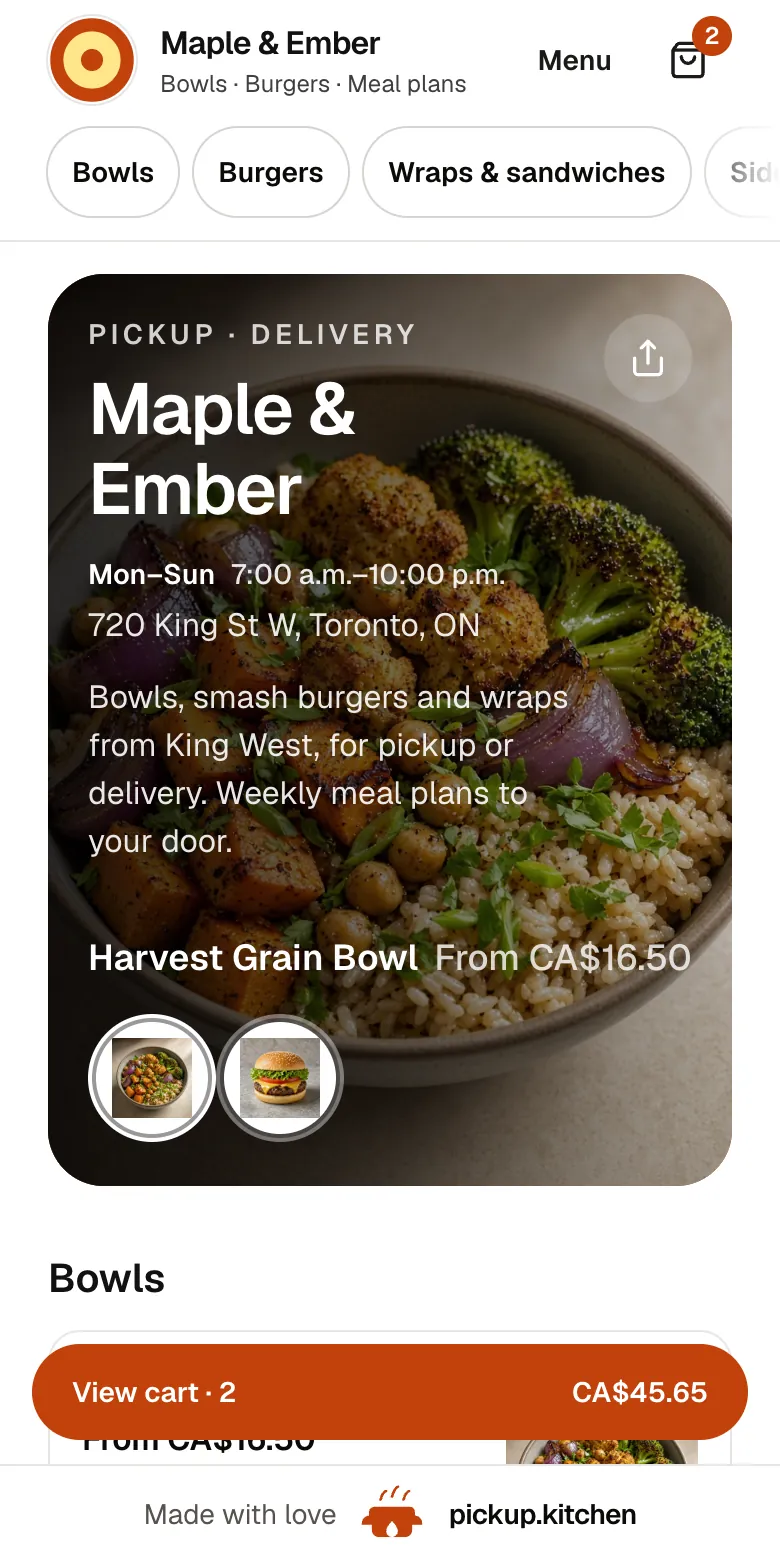
Your menu, on your own site
yourname.pickup.kitchen shows your dishes with photos and prices, and each guest picks pickup or delivery.
See how it works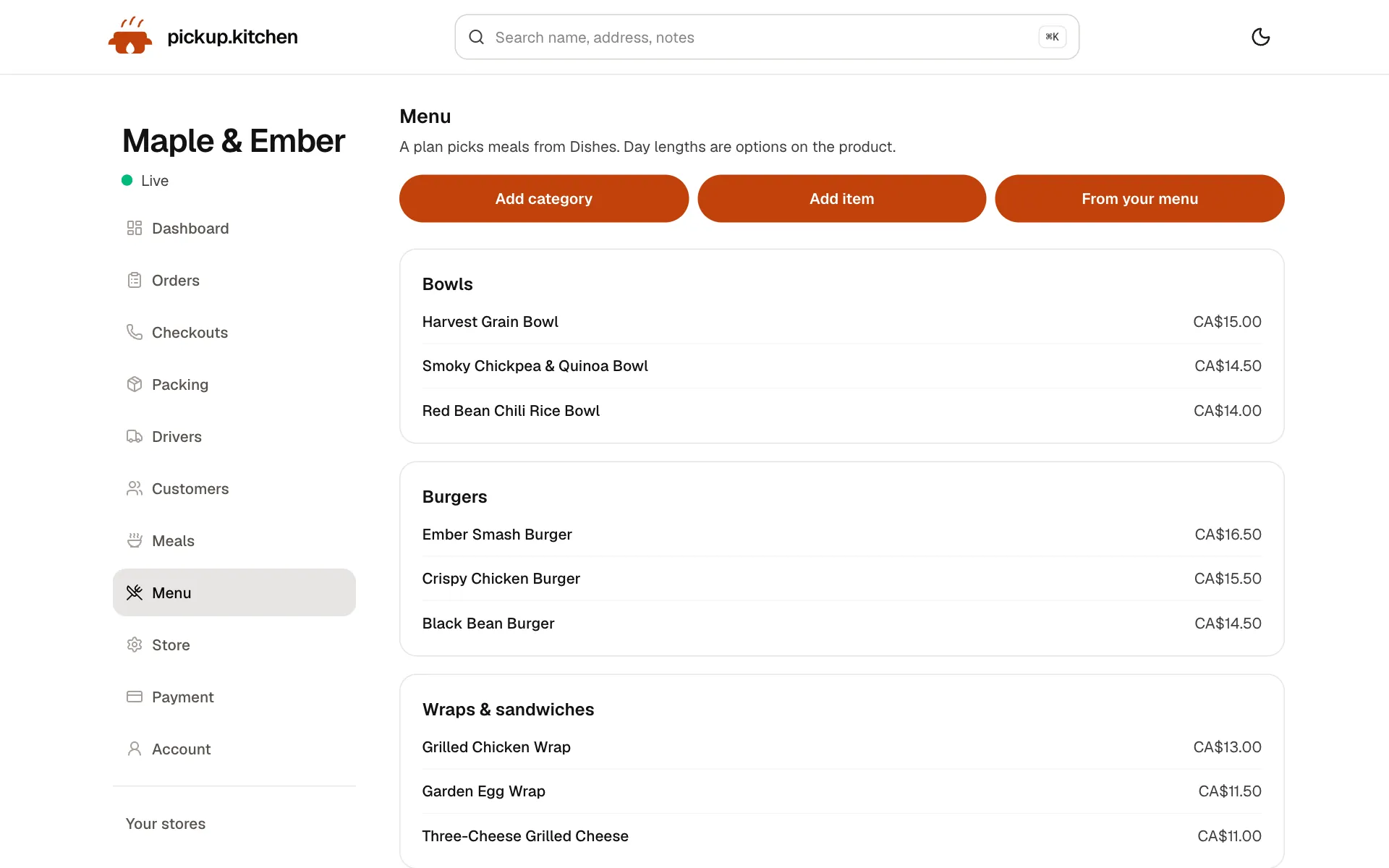
3You
Change the menu any time
Dishes, prices, photos and sold-out in one place. Your site changes the moment you save.
4Your guests
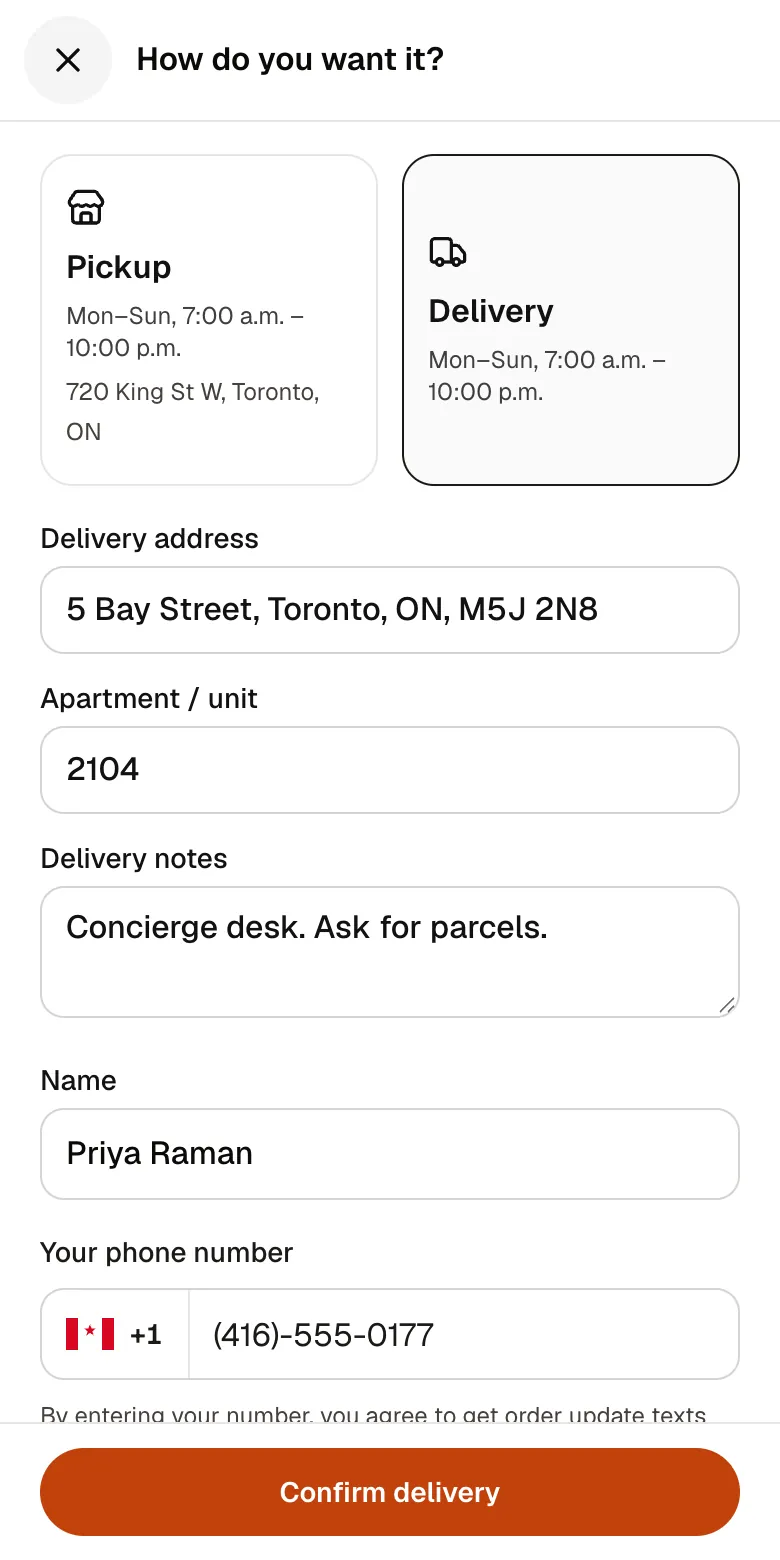
A checkout that takes seconds
A pickup time or a delivery address, then pay by card. No app to install and no account before paying.
See how it works
In one login
What you get
- Menu importRead dishes and prices from a photo or pasted text, then check them.
- Photos and optionsDish photos, sizes, add-ons, and a note field for the cook.
- Your brandingLogo, colour, about line, address, and hours on your own page.
- Built-in checkoutPickup or delivery, a time slot, and card payment on the same page.
- Free listingPeople nearby find you on pickup.kitchen and order on your site.
A site and a checkout are one thing
Most restaurant sites are a homepage, a PDF menu, and a phone number. The guest who wanted to pay gets a picture of a dish and a number to call.
On pickup.kitchen the menu is the ordering page. Each dish has a real price. The guest picks pickup or delivery, chooses a time, pays, and your kitchen screen gets a ticket. There is no second tab and no form that emails you an order you then have to type in.
What goes on your site
You do not design anything from a blank page. Your site is built from the details you already have.
- Your name, logo, and a colour you pick for buttons and headers.
- A short about line, your address, and your hours.
- Menu categories with dishes, prices, photos, and options like size or add-ons.
- Vegetarian and non-vegetarian marks on dishes.
- Buttons to call or text the kitchen for what the menu cannot answer.
- A share button that copies your link, so you can paste it into Instagram.
What a good restaurant homepage needs
A guest should know four things in five seconds: what you cook, where you are, when you are open, and how to order. Put your name, a line about your food, your address, and your hours at the top. Put the menu right below.
Skip the long story. Skip the slideshow of the dining room, if most of your sales are takeout. Show food.
Photos that sell
Shoot in daylight, close to a window. One dish per photo, from above or at a slight angle. Aim for six to eight good photos, starting with your best sellers.
Your page rotates through dish photos at the top, so the first thing a guest sees is food. Dishes with photos get tapped more than dishes without. Add a photo to every dish you want to sell more of.
Build it without a developer
Start with the menu you already have. Send a photo of it, or paste the text, and pickup.kitchen reads the dishes and prices into a list. You check each line, fix what it got wrong, and add what is missing.
After that you edit the menu yourself. Change a price and the next order uses it. Add a dish, hide a dish, or mark one sold out. Nobody has to republish anything.
If you would rather hand it over, send us the menu and we load it for you.
How to make a restaurant website for free
Create the account with your kitchen's name, and the site is made at yourname.pickup.kitchen. You do not buy a domain or install a theme. Add your dishes and prices, a photo for each if you can, and your hours.
Connect Stripe so guests can pay by card, choose the pickup and delivery times you can keep, and go live. There is no monthly fee and no setup fee. Each order carries 10%, which the customer pays at checkout on card orders.
Free restaurant website templates, and what they leave out
A free template is a layout: a homepage, a menu block and a phone number. It still needs hosting, a domain and a form that emails you the order, and that last step is where online ordering breaks.
Before you pick any template or builder, check four things.
- Can a guest pay on the page, with no app and no account?
- Does the kitchen get a ticket, or only an email?
- Can you close a full time slot, or mark the day sold out?
- Is the menu something you edit, or a picture you replace?
What you do not have to buy
A template site still needs hosting, a domain, a plugin for ordering, and someone to wire it to your payments. Each of those is a monthly bill or a weekend of work.
Here we host the site, take the card payment through your own Stripe account, and show the order on your kitchen screen. If you already own a domain, we can point it at your site so your own name stays in the address bar.
Make it easy to share
Your link opens straight on the menu. Paste it in your Instagram bio, a story, a WhatsApp status, or on a sticker by the till.
When someone shares it in WhatsApp, Facebook, or iMessage, the preview shows your name and an image, not a bare address.
You also get a free listing on pickup.kitchen. People nearby can find you there and still order on your own site.
Check it before you share it
Before you post the link, open it on your phone. Check your hours, your address, and your phone number. Make sure every dish has a price and a photo. Place a test order and watch the ticket arrive on the kitchen screen. Then share the link.
Ask a friend to place an order from their phone without your help. If they get stuck anywhere, your guests will too. Fix that step first.
Five questions to ask any restaurant website builder
Ask these of every builder, including this one, before you pay for a year.
- Can a guest pay on the page with no app and no account?
- Does the kitchen get a ticket with a sound, or only an email?
- Can you close a full slot or mark the day sold out?
- Is the menu something you edit, or a PDF you replace?
- What does it cost when an order comes in: a monthly fee, a cut of 15% or more, or a flat 10% you can see?
Add weekly plans only if you want them
The same site can sell a meal plan with a start date, an end date, and the days you pack. If you only sell tonight's orders, ignore it. Nothing changes on your menu.
Step by step
How to get started
- 1Step 1: Send your menuA photo or pasted text is enough. We read it into dishes and prices.
- 2Step 2: Check and add photosFix any price, add photos, and set your options.
- 3Step 3: Add your branding and hoursUpload a logo, pick a colour, and set the days and times you take orders.
- 4Step 4: Connect Stripe and publishTake card payments, switch the store live, and share the link.
FAQ
Questions
What is the best restaurant website builder?
The one where a guest can order without leaving the page. Look for built-in checkout, a kitchen ticket, and a price per order you can read in one line.
Can I get a restaurant website builder with online ordering for free?
Onboarding and the listing are free, and there is no monthly fee. You pay 10% per order. On card orders the guest pays it at checkout.
Do I need to know how to code?
No. You add dishes, prices, and photos in a form. We host the site and keep it running.
Can I use my own domain?
Yes. Ask us and we point your domain at the site, so your own name stays in the address bar. Without one you get yourname.pickup.kitchen.
Is a website builder for a restaurant different from one for any food business?
The site works the same for a cafe, a bakery, a food truck, or a meal-prep company. You change the menu, the hours, and whether you offer delivery.
Are there free restaurant website templates with online ordering?
Most free templates are layouts without a checkout. pickup.kitchen is not a template file: you get a live site at yourname.pickup.kitchen with the menu, checkout and kitchen screen already working, and no monthly fee.
Keep reading
- ProductOnline ordering system for restaurantsAn online ordering system for restaurants: your own site at yourname.pickup.kitchen, time slots that close when full, and a kitchen screen. 10% per order.
- ProductKitchen display system for restaurantsA kitchen display system that runs in the browser: tickets arrive with a sound, cooks tap Preparing and Completed, and guests hear when it is ready.
- ProductRestaurant CRMA restaurant CRM that fills itself: every guest who orders on your site is saved with their orders and details, and you can email them from the same login.
- Productpickup.kitchen pricing: 10% per order, no monthly feepickup.kitchen pricing: free onboarding, no monthly fee, 10% per order. Delivery tools come with ordering. The driver app on its own is pay as you use.
- By businessRestaurant software for takeout & deliveryRestaurant software for takeout and delivery: your own ordering site, a kitchen screen, a counter, customers and drivers in one login. 10% per order.
Free onboarding. Pay as you use.
Put your kitchen on pickup.kitchen
No monthly fee for ordering. Send us your menu and we set it up with you, then you pay as you use.