Compare · Grubhub
Grubhub fees for restaurants: 5%, 15% or 20%, then delivery on top
Grubhub fees for restaurants start with a marketing commission of 5%, 15% or 20%, by plan. Grubhub's own delivery adds a fee that starts at 10%, and payment processing is listed separately. This page works out a $40 order on each plan and shows how to keep Grubhub for new guests while your regulars order direct.
- Grubhub's three plans and delivery fees, checked November 2026
- A $40 order worked out with Grubhub drivers and with your own
- Keep Grubhub for new guests, move regulars to direct orders
Free onboarding. Pay as you use. No monthly fee for ordering.
pickup.kitchen and Grubhub
Side by side
Each line uses Grubhub's own published numbers, checked November 2026.
| What | pickup.kitchen | Grubhub |
|---|---|---|
| Marketing commission | pickup.kitchen10% per order. On card orders the guest pays it at checkout. | Grubhub5% Basic, 15% Plus, 20% All-access |
| Delivery fee | pickup.kitchenNone. You use your own drivers. Driver app included for orders from pickup.kitchen. | GrubhubGrubhub Delivery from 10% on top. Self-delivery has no delivery fee. |
| Monthly and setup fees | pickup.kitchenNone for ordering. Free onboarding. | GrubhubNo platform, maintenance or setup fees listed |
| Payment processing | pickup.kitchenStripe's own fee, about $1.58 on a $44 charge | GrubhubNot included in the percentages. Listed separately by Grubhub. |
| You keep on a $40 order, Basic with Grubhub drivers | pickup.kitchenAbout $38.42 after Stripe's card fee | Grubhub$34.00 or less, before processing |
| You keep on a $40 order, All-access with Grubhub drivers | pickup.kitchenAbout $38.42 after Stripe's card fee | Grubhub$28.00 or less, before processing |
| You keep on a $40 order, self-delivery on Basic | pickup.kitchenAbout $38.42 after Stripe's card fee | Grubhub$38.00, before processing and your own driver cost |
| Grubhub's own direct ordering | pickup.kitchenYour site at yourname.pickup.kitchen | GrubhubGrubhub Direct: zero marketing commission on online orders, per Grubhub |
| The guest relationship | pickup.kitchenGuests order on your site. Their orders stay on your customer list. | GrubhubGuests order in the Grubhub app or on Seamless, under their account. |
Checked November 2026Sources
Real screens
What your guests and kitchen see instead
Real screens from pickup.kitchen, the same ones you and your guests use.
1Your guests
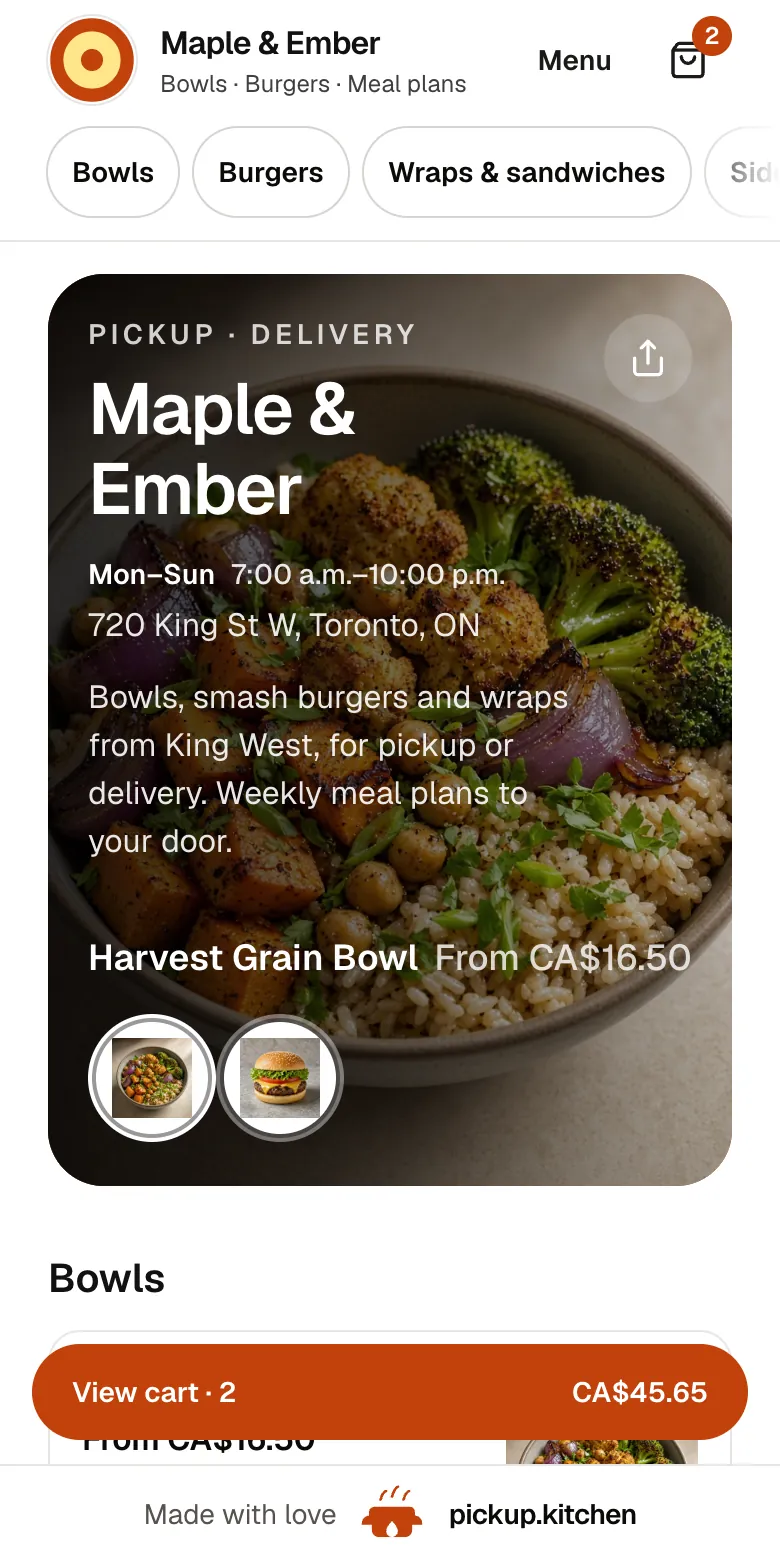
Your menu, on your own site
yourname.pickup.kitchen shows your dishes with photos and prices, and each guest picks pickup or delivery.
See how it works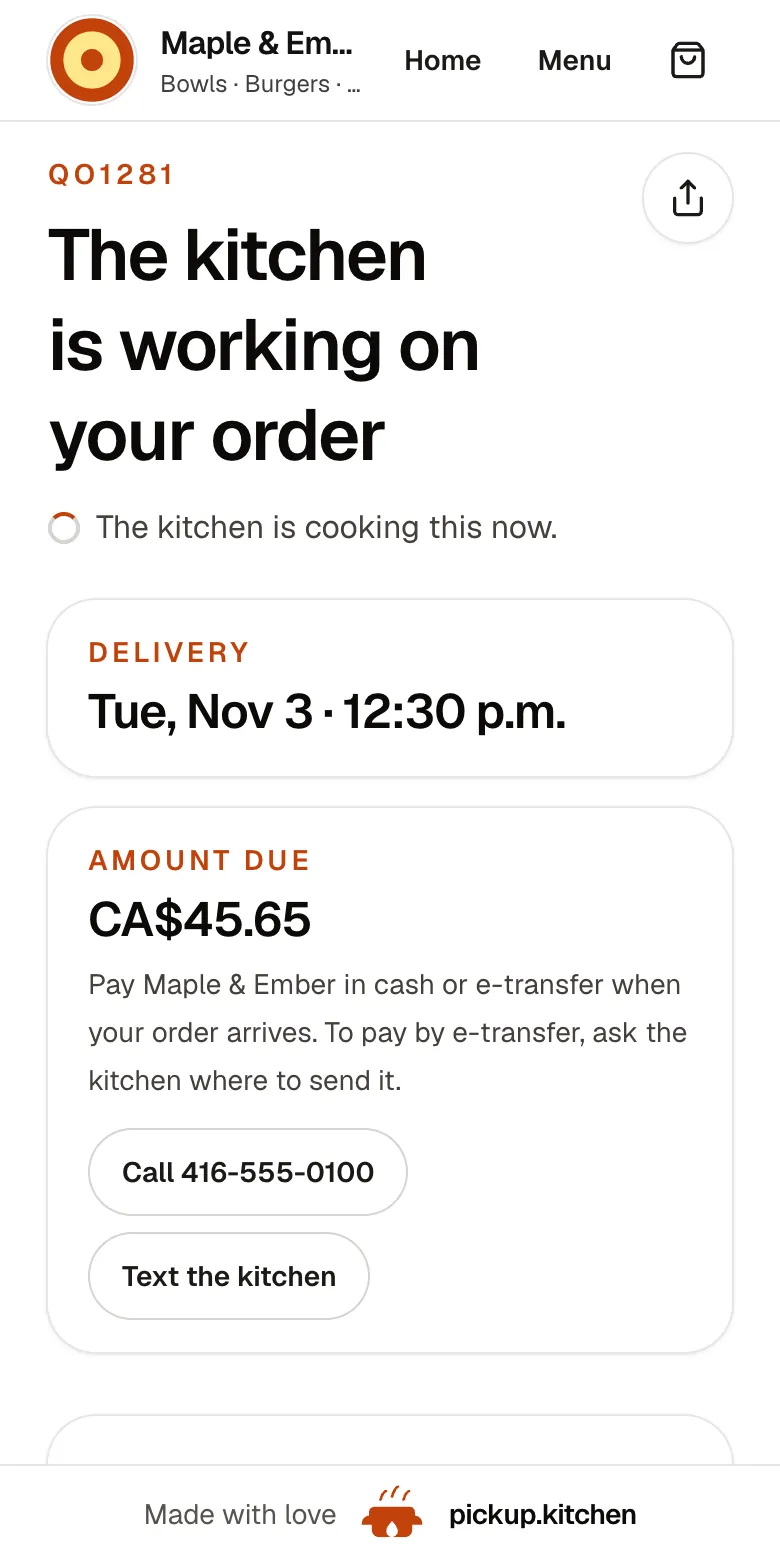
2Your guests
Every order gets a QO number
The guest sees their order number the moment they order, and the same number is on the kitchen's ticket.
See how it works3Your kitchen
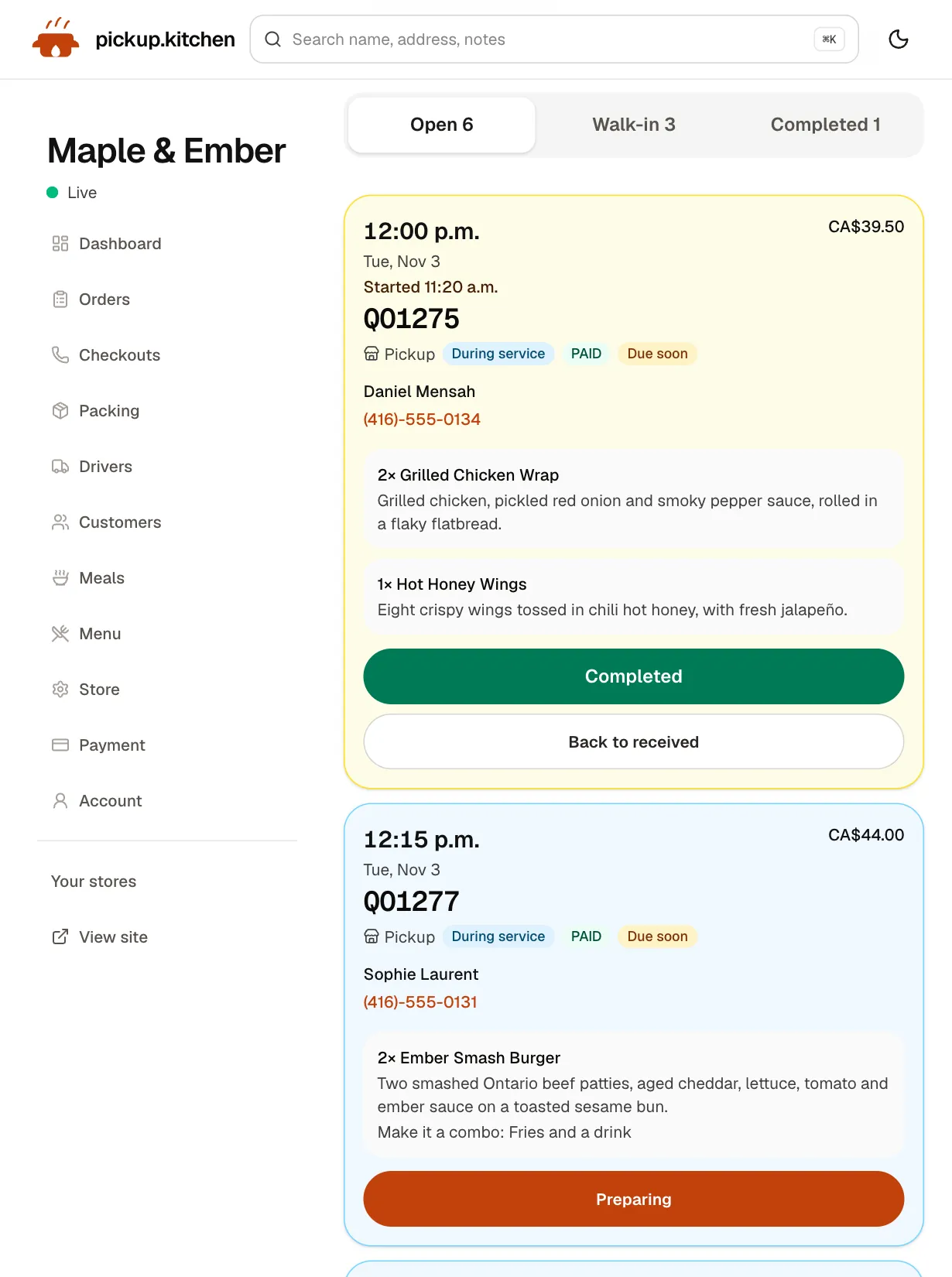
Tickets on the kitchen screen
Online orders, walk-ins and finished tickets in their own lanes, each with its QO number and the time it is due.
See how it works
The Grubhub plans, as Grubhub publishes them
Grubhub Marketplace has three plans, and Grubhub calls the percentage a marketing commission. Basic is 5%. Plus is 15%. All-access is 20%. Grubhub says there are no platform or maintenance fees. It says you pay the marketing fee per order only once it has proved it can bring you customers.
Delivery is a separate choice. Grubhub Delivery adds a fee that starts at 10%. Self-delivery, where your own staff deliver orders placed on Grubhub, has no delivery fee. Supplemental delivery uses Grubhub's drivers only when you need them, at a fee that also starts at 10%. Pickup is available with any option.
Higher plans lower the delivery fee the guest sees and add exposure. Grubhub also lists ad credit, promotions and Grubhub+ members, who get $0 delivery fees.
Grubhub's page says the percentages do not include payment processing fees, and that pricing differs in New York City and some other markets. Rules in your area can change the fees, too. Ask for the processing rate in writing.
A $40 order, plan by plan
Take an order with $40 of food on it. Grubhub's percentages are charged on that order. Delivery fees start at 10%, so these are the best case for Grubhub delivery. Payment processing is not included.
- Basic with Grubhub drivers: 5% plus at least 10%, so you keep $34.00 or less.
- Plus with Grubhub drivers: 15% plus at least 10%, so you keep $30.00 or less.
- All-access with Grubhub drivers: 20% plus at least 10%, so you keep $28.00 or less.
- Self-delivery: $38.00 on Basic, $34.00 on Plus, $32.00 on All-access, before processing and before you pay your own driver.
- Direct on pickup.kitchen, paid by card: you list $40 and the guest sees $44, with our 10% in it. You keep about $38.42 after Stripe's standard 2.9% plus 30 cents.
Read the table fairly
If you have your own drivers, Grubhub's Basic plan at 5% is a cheap way to reach new guests. Five percent is less than our 10%, and we say so plainly. The comparison changes once the guest pays. On card orders the guest pays our 10% at checkout. On Grubhub the guest pays Grubhub's own fees on top of your menu price.
Those guest-side fees are not in the table. The processing fee Grubhub charges is not priced on its plan page, so ask for the number before you decide.
What Grubhub does well, and who should use it
Grubhub brings hungry guests to a listing in its app and on Seamless, with an ordering link you can share. A low entry plan, no setup fee and the option to deliver yourself make it a gentle first step into marketplaces.
Grubhub also sells Grubhub Direct, a branded ordering site. Grubhub says it has zero marketing commission on online orders, zero set-up fees and zero platform fees. If you want to stay inside Grubhub, that is the closer fit than switching.
Pick Grubhub when you want a low-cost listing, and reaching new guests matters more than owning the relationship. Your own drivers or Grubhub's can deliver.
What a Grubhub order does not give you
A Grubhub order is placed in Grubhub's app or on Seamless, under the guest's account. Your kitchen sees the order. Check Grubhub for Restaurants for what else it shows about the guest before you count on it as an email list.
The guest's next order starts in a list of restaurants, with yours beside the others. Omar H. in your neighbourhood orders from you every Friday at $40. At the 15% Plus plan with Grubhub's own drivers at 10%, that is $10 a week, or $520 over 52 orders. Direct, Stripe's card fees on the same 52 orders are about $82, and Omar H.'s details stay on your list.
Keep Grubhub for new guests, move your regulars
You do not have to quit Grubhub. pickup.kitchen does not pull in Grubhub orders, so those stay on your Grubhub tablet or POS link. Direct orders arrive on your own kitchen screen with a sound. Your own drivers deliver them through the driver app, which is included for orders from pickup.kitchen.
- Put a card with your pickup.kitchen link in every Grubhub bag.
- Add the link to your Instagram bio and your Google Business Profile.
- Take pickup and delivery on your own site, with time slots that close when full.
- Send a short email to guests who ordered direct, from your customer list.
Where pickup.kitchen is not the answer
pickup.kitchen is not a courier network. We have no drivers to send. We are also a smaller marketplace: a free listing on pickup.kitchen helps people nearby find you, but it will not match Grubhub's audience. We charge 10% per order and no monthly fee.
Step by step
How to get started
- 1Step 1: Send your menuSend a photo or PDF of your menu and check each dish. Your site goes up at yourname.pickup.kitchen.
- 2Step 2: Connect StripeCard payments go to your own Stripe account.
- 3Step 3: Put your link in every bagA card with your link, so the guest who found you on Grubhub can order direct next time.
- 4Step 4: Add your driversInvite each driver by email. They open the route on their own phone and photograph each handover.
FAQ
Questions
What are Grubhub's merchant fees and commission rates?
Grubhub lists a marketing commission of 5% on Basic, 15% on Plus and 20% on All-access. Grubhub Delivery adds a delivery fee that starts at 10%. Payment processing is not included in those percentages (Grubhub, checked November 2026).
How much are Grubhub delivery fees for restaurants?
Grubhub says delivery fees start at 10% when you use its drivers, either for all orders or only when you need extra drivers. If your own staff deliver on Grubhub, there is no delivery fee.
Does Grubhub charge a monthly fee?
Grubhub's pricing page lists no platform, maintenance or initiation fees. The charges are per order. Check your own agreement for payment processing and any optional ads or promotions.
Can I use my own drivers for Grubhub orders?
Yes. Grubhub lists self-delivery with zero delivery fees. pickup.kitchen's driver app can run your own drivers. You add Grubhub orders by hand, because pickup.kitchen does not import them.
Is there a commission-free way to take Grubhub orders?
Grubhub sells Grubhub Direct, a branded ordering site with zero marketing commission on online orders, per Grubhub. pickup.kitchen is another option. It charges 10% per order, so it is low commission, not zero.
Can I keep Grubhub and take direct orders too?
Yes. Keep Grubhub for new guests. Move regulars to your own pickup.kitchen site with a card in every bag. The two do not connect, so you work both tablets side by side.
Keep reading
- ProductOnline ordering system for restaurantsAn online ordering system for restaurants: your own site at yourname.pickup.kitchen, time slots that close when full, and a kitchen screen. 10% per order.
- CompareDoorDash fees for restaurants, explainedDoorDash fees for restaurants in Canada and the US, plan by plan, with a $40 order worked out. See what you keep and how to move regulars to direct orders.
- CompareUber Eats for restaurants: what it costsUber Eats for restaurants: every plan and fee in Canada and the US, a $40 order worked out, and how to move regulars to your own ordering site.
- ProductRestaurant website builder with orderingA restaurant website builder where the menu is the checkout. Get yourname.pickup.kitchen with photos, hours, and ordering. Free onboarding, 10% per order.
- Productpickup.kitchen pricing: 10% per order, no monthly feepickup.kitchen pricing: free onboarding, no monthly fee, 10% per order. Delivery tools come with ordering. The driver app on its own is pay as you use.
Free onboarding. Pay as you use.
Keep more of every order
Keep the apps for new guests if they work for you, and let your regulars order on your own site.