For ghost kitchens
Ghost kitchen software for the orders you own
Ghost kitchen software has to do one thing the delivery apps will not: give you a channel you own. pickup.kitchen takes orders on your own site with no marketplace cut. It runs them through the same kitchen board and stock, and sends delivery drops to your own drivers.
- Your own site per brand, with no 15% to 30% marketplace cut
- A kitchen board, stock counts and slot limits that say no for you
- Routes, a driver app and a photo at the door for your own drivers
Free onboarding. Pay as you use. No monthly fee for ordering.
Real screens
What it looks like for you
Real screens from pickup.kitchen, the same ones you and your guests use.
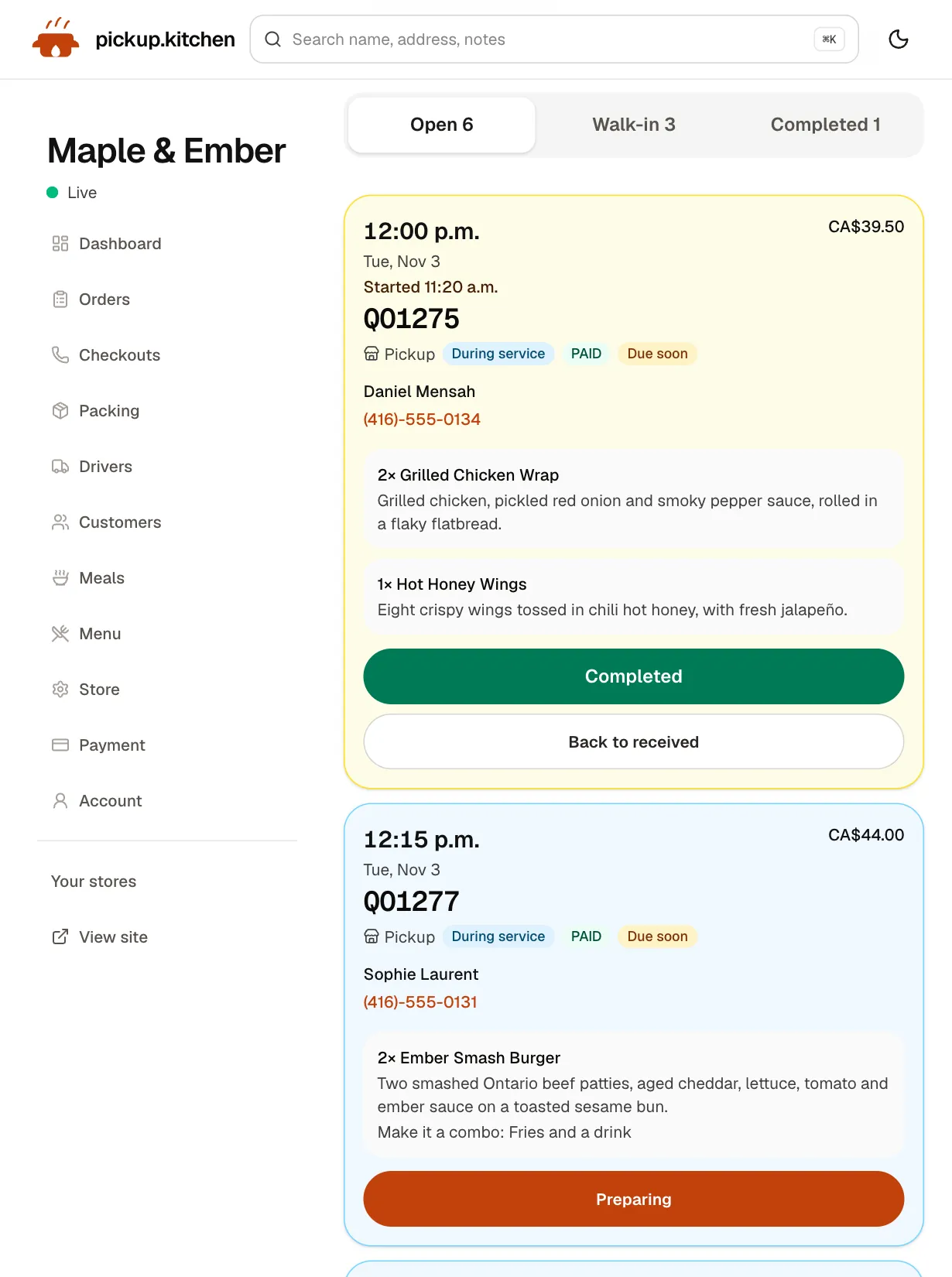
1Your kitchen
Tickets on the kitchen screen
Online orders, walk-ins and finished tickets in their own lanes, each with its QO number and the time it is due.
See how it works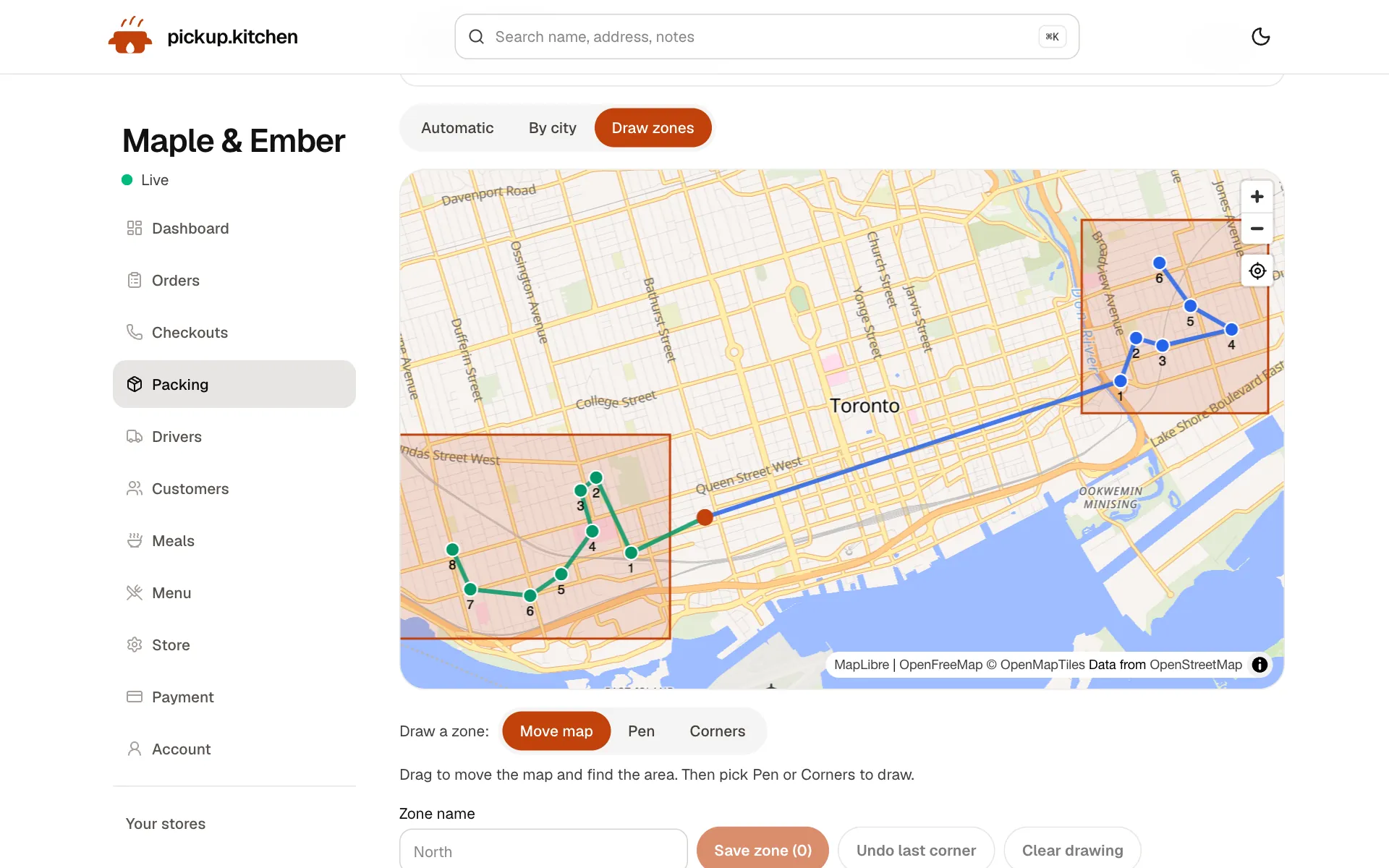
2Delivery
Your routes on a map
Stops come from your orders, or you add them by hand. Optimize puts them in order for the roads.
See how it works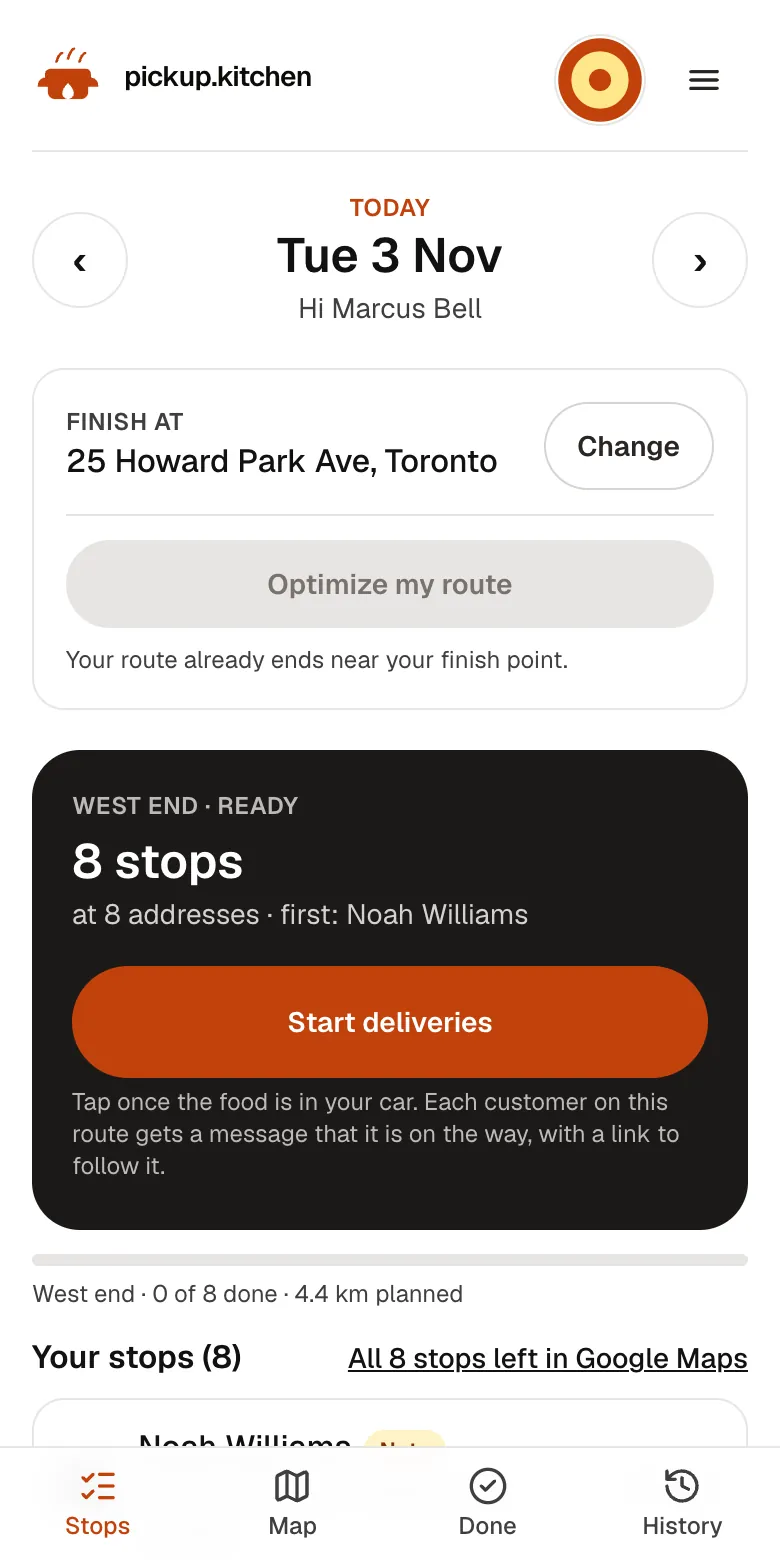
3Your driver
The route, in order
Your driver sees every stop numbered for the roads, with Navigate and the next stop always on top.
See how it works
In one login
What you get
- Your own site per brandEach brand can have its own site and menu, managed from one account.Learn more
- Slot limits and stockOrders per slot, a cutoff, and dishes that stop selling at zero.Learn more
- Delivery dropsDrops from your orders go to routes, drivers and a live board.Learn more
- Driver appYour drivers open the route on their phone and photograph each handover.Learn more
- Kitchen screenNew tickets arrive with a sound. The cook starts them and completes them.Learn more
- Guest listEvery guest who orders on your site is saved, ready for your next email.Learn more
Every guest belongs to an app
A ghost kitchen has no dining room, so the delivery app is the storefront. The app also owns the guest, sets the fee and decides who sees your brand.
In Canada, Uber Eats lists 20%, 25% or 30% on delivery orders, depending on the plan. DoorDash lists 20%, 25% or 29% (both checked November 2026). On a $30 order at 25%, $7.50 goes to the app before you pay for food, packaging and rent.
A channel you own
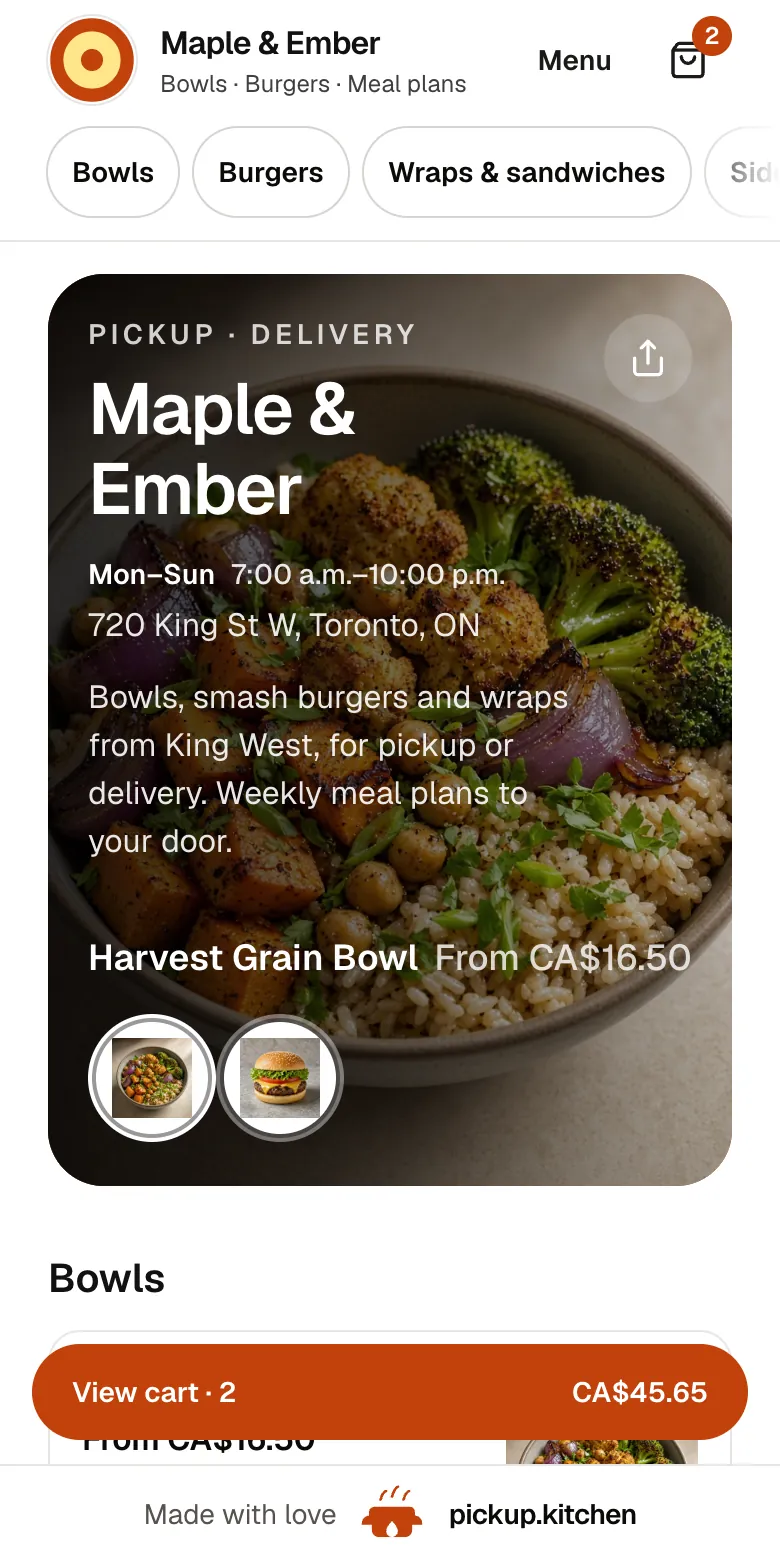
Your own site at yourname.pickup.kitchen takes orders with a menu, photos, hours and checkout. You also get a free listing on pickup.kitchen, where people nearby can find you.
pickup.kitchen charges 10% per order, with no monthly fee. On a $30 dish, the menu shows $33 and the guest pays it at checkout, so you receive $30 before Stripe's own card fee. On a $30 order at 25%, an app would take $7.50. Here the 10% is $3, paid by the guest.
Orders on your own site put the guest on your customer list. Orders through an app do not. Put your link on a card in every bag and the next order can skip the app.
Delivery first, by design
A ghost kitchen has no counter, so delivery is the main flow. Delivery orders from your site become drops on the Deliveries page. You split them between drivers, tap Optimize, check the order and tap Send to driver.
Drivers open the route on their phone, start the night before if you like, and photograph each handover. Guests get a live tracking link, then the photo. The delivery software page covers the whole day.
pickup.kitchen does not supply couriers. If app couriers deliver for you today, your own-site orders need your own drivers.
Run the kitchen the same way every time
Every paid order lands on the kitchen screen as a ticket with a chime. The cook taps Preparing, then Completed. Tickets turn amber when due soon and red when late.
You set how many orders one slot holds, a cutoff, closed dates and Sold out today. Each dish can track its own stock and stops selling at zero. The kitchen management software page covers it.
Seven p.m. on the pass
It is 7:10 on a Thursday. Four tickets from your own site are on the screen: two pickups and two deliveries. The cook works down the list by time. The two deliveries wait for a driver.
You open Deliveries, give both stops to one driver and tap Send to driver. Their phone buzzes. The app tablets sit beside the pass for their own orders. Your own orders carry the 10% the guest paid, not a marketplace cut.
Several brands, one account
Many ghost kitchens run more than one brand from the same pass. Each brand can have its own pickup.kitchen site and menu, managed from the same account.
Each brand has its own link, so the burger brand and the salad brand look like separate restaurants to a guest. The kitchen screen does not combine brands into one list, so plan your pass with that in mind.
Cloud kitchen management software or something smaller?
Cloud kitchen management software is a loose term. pickup.kitchen is narrower than some of it. It runs your own channel from order to doorstep.
That makes it a second system, not a replacement for the apps. Keep the app tablets for app orders, and use pickup.kitchen for the orders you want to keep.
What it does not do
It does not import orders from DoorDash, Uber Eats or Skip. It does not sync menus to those apps, and it does not supply couriers.
It is not a virtual restaurant software suite that creates brands for you. You bring the concept, the menu and the kitchen. It gives you the ordering, the board and the delivery tools.
A first month alongside the apps
Week one: add your menu from a photo or pasted text, set slots and connect Stripe. Place a test order from your phone.
Week two: add your link to every bag, a card, a sticker and your Instagram bio. Week three: look at the dashboard for paid orders from your own site. Week four: email the guests who ordered, with one new dish and one link.
The tools a ghost kitchen uses
Delivery matters most, so these come first.
- Online ordering: your own site and a free listing on pickup.kitchen.
- Delivery software and the driver app: routes, Send to driver, photo proof and driver pay.
- Kitchen management software: slot limits, dish stock, sold-out days and the board.
- Restaurant CRM and email marketing: the guest list the apps never give you.
- Kitchen display system: tickets with a chime and a ready message to the guest.
Step by step
How to get started
- 1Step 1: Add your menuSend a photo of your menu or paste the text, then check each dish and price.
- 2Step 2: Set slots and stockChoose slot length, orders per slot and the stock for each dish.
- 3Step 3: Add your driversGive each driver a login for the driver app.
- 4Step 4: Put your link in every bagA card or sticker with your link sends repeat guests to your own site.
FAQ
Questions
What is ghost kitchen software?
Software that runs the orders, the kitchen and the delivery of a kitchen with no dining room. pickup.kitchen handles your own site, the kitchen board, stock and delivery.
Can I run several brands from one kitchen?
Yes. Each brand can have its own pickup.kitchen site and menu, managed from the same account. The kitchen screen does not combine brands into one list.
Does it import orders from DoorDash or Uber Eats?
No. App orders stay in the apps. pickup.kitchen takes the orders that come through your own site.
Is there cloud kitchen management software with delivery built in?
pickup.kitchen has routes, a driver app, a photo at the door and driver pay, for your own drivers. It does not supply couriers.
How do I get guests to order direct?
Put your link on a card in every bag and in your Instagram bio. Guests who order on your site are saved to your customer list.
What does it cost?
Onboarding is free and there is no monthly fee. You pay 10% per order. On card orders the guest pays the 10% at checkout.
Keep reading
- ProductKitchen management softwareKitchen management software that only promises what you can cook: slot limits, sold-out days, dish stock and prep lists for weekly plans. 10% per order.
- ProductRestaurant delivery softwareRestaurant delivery software for your own drivers: plan drops, send routes to phones, follow every stop live, and pay drivers. Free with your orders.
- ProductOnline ordering system for restaurantsAn online ordering system for restaurants: your own site at yourname.pickup.kitchen, time slots that close when full, and a kitchen screen. 10% per order.
- GuideWhat is a ghost kitchen? How they work and make moneyWhat is a ghost kitchen? A plain guide to ghost, cloud and virtual kitchens: how they make money, what they cost, the app trap and how to own your orders.
- CompareDoorDash fees for restaurants, explainedDoorDash fees for restaurants in Canada and the US, plan by plan, with a $40 order worked out. See what you keep and how to move regulars to direct orders.
Free onboarding. Pay as you use.
Run your business on pickup.kitchen
Your own ordering site, the kitchen screen, the counter, your customers, meal plans and the driver app. One login.