Compare · Toast
A Toast alternative for kitchens that live on takeout and delivery
A Toast alternative depends on what you run. Toast is a full restaurant POS with hardware, table service, handhelds and a kitchen display, from CA$120 a month on its Canadian pricing page. pickup.kitchen is for kitchens that live on takeout, delivery and meal plans, with no hardware and no monthly fee.
- Toast's Canadian plans and what it does not publish, checked November 2026
- No hardware: counter, kitchen screen and driver app run in a browser
- Where Toast is stronger, and who should stay with it
Free onboarding. Pay as you use. No monthly fee for ordering.
pickup.kitchen and Toast
Side by side
Each line uses Toast's own published numbers, checked November 2026.
| What | pickup.kitchen | Toast |
|---|---|---|
| Monthly fee | pickup.kitchenNone for ordering. Free onboarding. | ToastCanada: Starter from CA$120, Essentials CA$220, or a custom quote |
| Payment processing | pickup.kitchenStripe's card fee, paid to your own Stripe account | ToastA flat rate per transaction. The rate is not shown on the pricing page. |
| Online ordering fee | pickup.kitchen10% per order. On card orders the guest pays it at checkout. | ToastDescribed as commission-free. Price by quote after a demo. |
| Hardware | pickup.kitchenNone to buy. Runs in a browser on devices you own. | ToastToast hardware, installed by Toast. Upfront cost varies. |
| Kitchen display | pickup.kitchenKitchen screen included | ToastIncluded in Essentials, an add-on to Starter |
| Table service | pickup.kitchenNot offered | ToastTable and order management, bill splitting, course firing, handhelds |
| Marketplace listing | pickup.kitchenA free listing on pickup.kitchen | ToastNot listed on its online ordering page |
| Meal plans | pickup.kitchenWeekly menus, skips, pauses, packing lists and labels | ToastNot listed on its online ordering page |
| Delivery with your own drivers | pickup.kitchenRoutes, driver app and photo proof, included for orders from pickup.kitchen | ToastNot described on its online ordering page |
| Support | pickup.kitchenFree onboarding. Talk to us. | Toast24/7 customer care included in every subscription |
Checked November 2026Sources
Real screens
What your guests and kitchen see instead
Real screens from pickup.kitchen, the same ones you and your guests use.
1Your guests
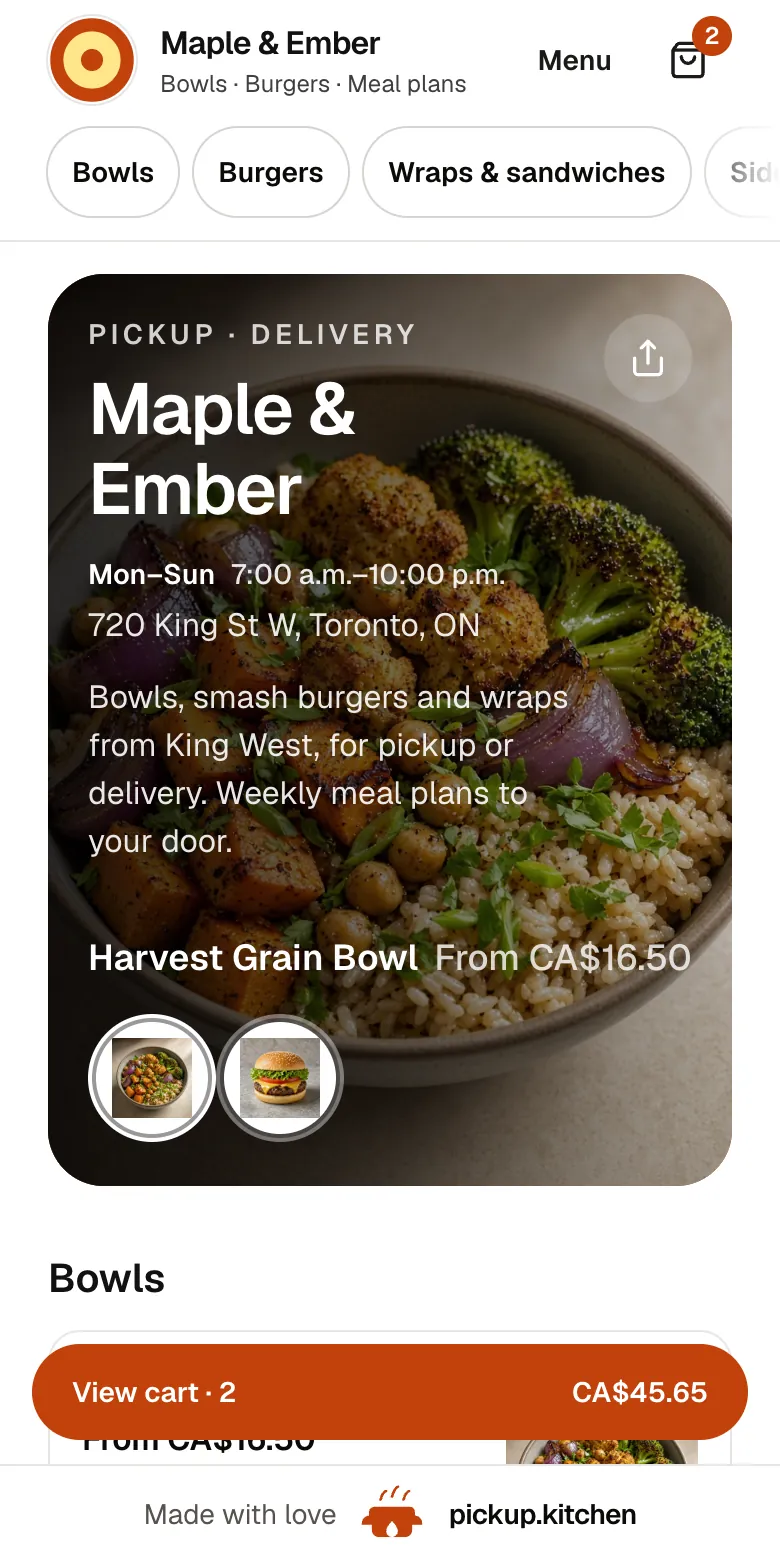
Your menu, on your own site
yourname.pickup.kitchen shows your dishes with photos and prices, and each guest picks pickup or delivery.
See how it works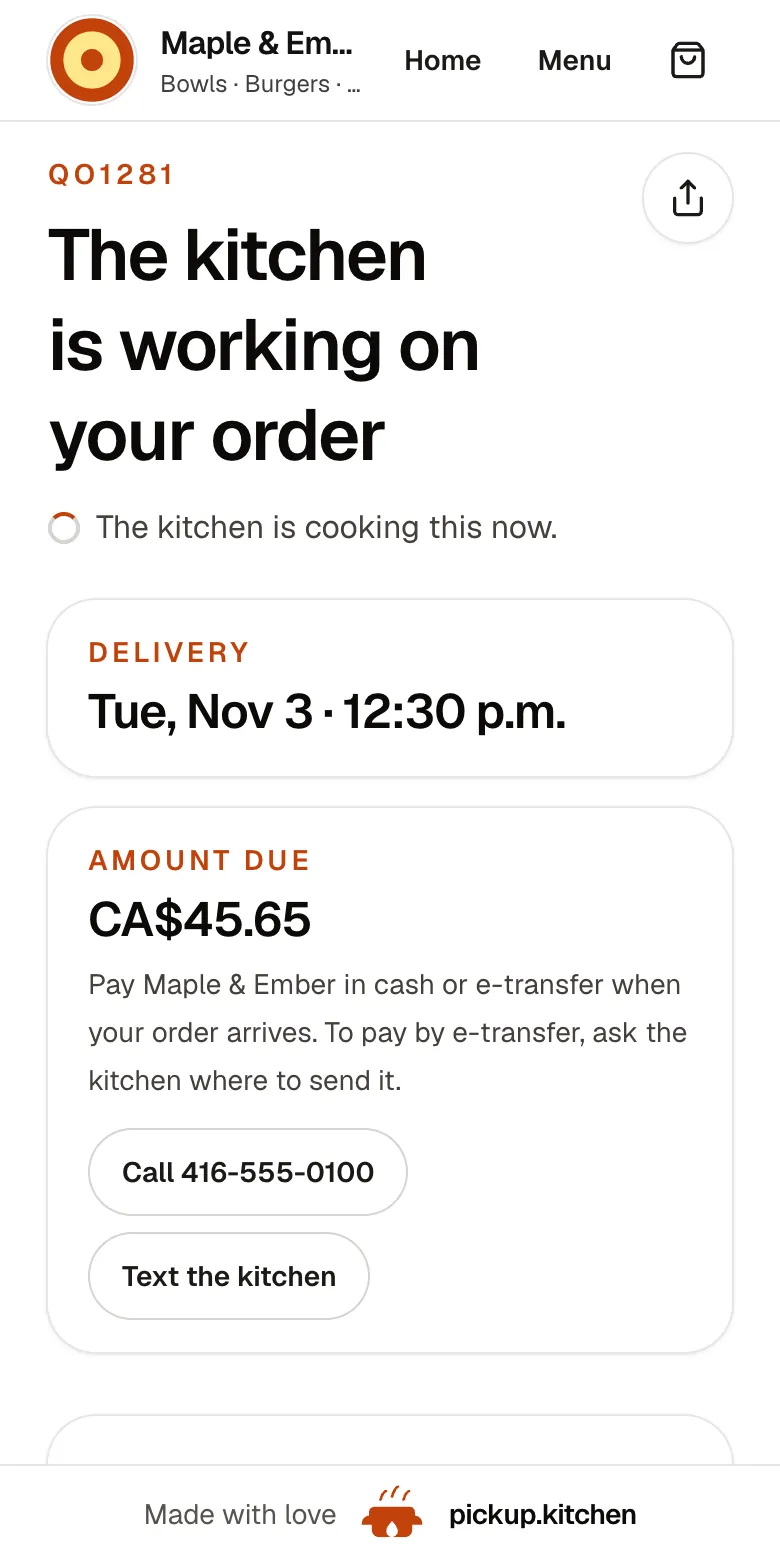
2Your guests
Every order gets a QO number
The guest sees their order number the moment they order, and the same number is on the kitchen's ticket.
See how it works3Your kitchen
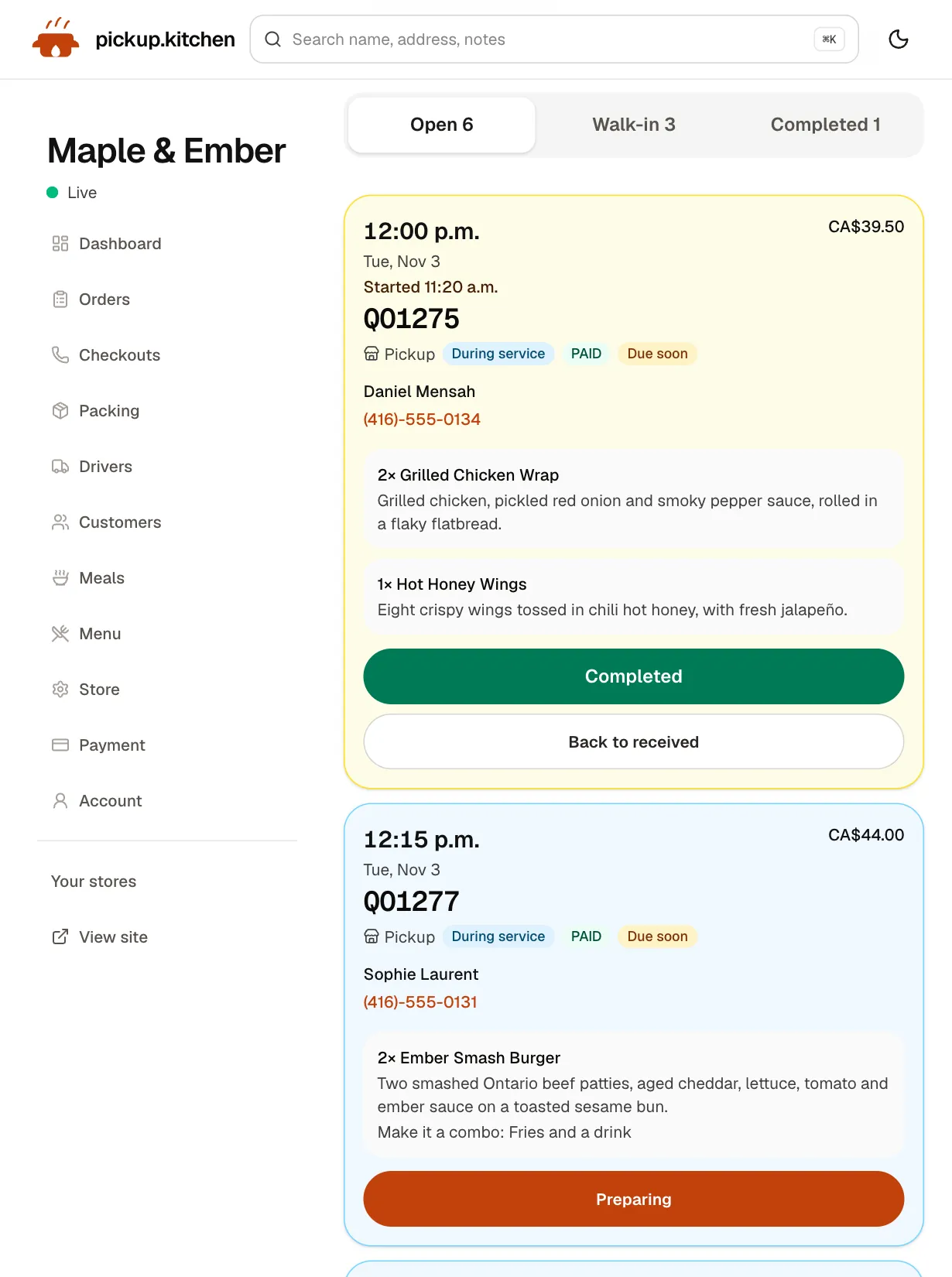
Tickets on the kitchen screen
Online orders, walk-ins and finished tickets in their own lanes, each with its QO number and the time it is due.
See how it works
What Toast publishes
On Toast's Canadian pricing page, Starter is from CA$120 a month and Essentials is CA$220 a month. A Custom plan is by quote. Toast lists no platform fee. Payment processing is a flat rate per transaction, and the page does not state the rate. Upfront costs for hardware and implementation vary with your package, and Toast says 24/7 customer care comes with every subscription.
Toast Online Ordering is described as commission-free and connected to your POS and kitchen hardware. Its Canadian online ordering page publishes no price. You ask for a demo and a quote.
We could not open Toast's US pages in November 2026, so the numbers here are Canadian. US plans differ.
What Toast does better
Toast is built for a restaurant with a dining room. Its pricing page lists table and order management, bill splitting, course firing and a handheld POS. A kitchen display system comes with Essentials and is an add-on to Starter. Toast also lists Mobile Order & Pay, so guests at a table can order and pay from their phones. It also lists hardware setup, installation and go-live support, gift cards, partner integrations, and an employee scheduling product.
Online orders go straight into the same POS and kitchen setup, so nobody re-keys a ticket. If most of your business is people sitting at tables, Toast covers that and pickup.kitchen does not.
Pick Toast when you run table service, a multi-station line or servers with handhelds, and you want hardware, support and payments from one company.
Where pickup.kitchen differs
pickup.kitchen is for takeout, delivery and meal plans. There is no hardware to buy. The counter, the kitchen screen and the driver app run in a browser on phones, tablets and screens you already own.
Orders arrive on the kitchen screen with a sound. The cook taps Preparing and Completed, and guests hear when the order is ready. Walk-in and phone orders go in at the counter, cash or card, on the same menu.
Checkout is built around the kitchen's limits: a slot length, orders per slot, a cutoff, closed dates and a Sold out today button. A full slot closes.
You also get a free listing on pickup.kitchen and meal plans with skips, pauses, packing lists and labels. For your own drivers there are routes, a driver app and photo proof. Toast's online ordering page lists none of those.
What pickup.kitchen does not cover
pickup.kitchen is not built for table service, reservations or tabs. It does not do staff scheduling, payroll or purchasing, and it does not pull in orders from delivery apps. If you need those, keep Toast, or another full POS, for the dining room.
The cost, side by side
Toast Starter at CA$120 a month equals 10% of CA$1,200 of orders. Above that, a flat monthly fee costs less than a percentage. Below it, 10% costs less. On card orders our 10% is paid by the guest, shown in the menu price.
That is not a clean comparison. Toast is also your in-store POS, with hardware and a processing rate it does not publish. pickup.kitchen starts free, but it is not a full dining-room system. Ask Toast for the processing rate and the hardware quote in writing, then add them to the sum.
When takeout is most of your business
If takeout and delivery are more than half of your sales, ask what you pay a full POS to do that you never use. Table management, course firing and handhelds are real value in a dining room. At a pickup window they sit idle.
A takeout kitchen needs other things. It needs a checkout that stops taking orders when the kitchen is full and a ticket that makes a noise at the pass. It needs a way to hand tomorrow's route to a driver. That is what pickup.kitchen is built around.
Staff take a phone or walk-in order at the counter on the same menu and mark it paid in cash or by card. It lands on the kitchen screen beside the online tickets.
Questions to ask Toast before you sign
Ask for the answers in writing. Ask pickup.kitchen the same questions.
- What is the card processing rate for in-person and for online orders?
- What does my hardware package cost up front, and is it bought or leased?
- What does online ordering cost me, per order or per month, in writing?
- How long is the contract, and what does it cost to leave?
- What does support include, and what costs extra?
Step by step
How to get started
- 1Step 1: Decide what stays on ToastList what you need at tables: handhelds, bills, courses. Keep that on a full POS.
- 2Step 2: Load your takeout menuSend a photo or PDF of the menu and check each dish and price.
- 3Step 3: Set your limits and StripeChoose slots, orders per slot and a cutoff. Connect your own Stripe account.
- 4Step 4: Place a test orderOrder from your phone and watch the ticket arrive on the kitchen screen.
FAQ
Questions
What is the best Toast alternative?
It depends on your kitchen. For table service, handhelds and a full POS, another full POS such as Square for Restaurants is closer. For takeout, delivery, meal plans and your own drivers with no hardware, pickup.kitchen has no monthly fee and charges 10% per order.
How much does Toast cost in Canada?
On Toast's Canadian pricing page, Starter is from CA$120 a month and Essentials is CA$220 a month. Payment processing is a flat rate per transaction that the page does not state, and hardware and implementation costs vary (checked November 2026). US pricing differs.
Is Toast online ordering commission-free?
Toast describes its online ordering as commission-free. Its Canadian online ordering page publishes no price for it. You request a demo and a quote.
Do I need hardware to use pickup.kitchen?
No. The counter, the kitchen screen and the driver app run in a browser on phones, tablets and screens you already own. Card payments go to your own Stripe account.
Can pickup.kitchen replace my POS?
For takeout, delivery and walk-in counter orders, yes. The counter takes cash or card orders onto the kitchen screen. It is not a table-service POS, so keep a full POS if you run a dining room.
Can pickup.kitchen run my own delivery drivers?
Yes. You build routes, tap Send to driver, and drivers open the route on their phones. They photograph each handover. It is included for orders taken on pickup.kitchen. We supply no couriers.
Keep reading
- ProductRestaurant POS systemsRestaurant POS systems differ. This one takes walk-in and phone orders on your online menu and sends them to your kitchen screen. No hardware to buy.
- ProductKitchen display system for restaurantsA kitchen display system that runs in the browser: tickets arrive with a sound, cooks tap Preparing and Completed, and guests hear when it is ready.
- CompareSquare Online ordering alternativeA Square Online ordering alternative compared: Square's free plan and card fees against 10% per order, plus meal plans, a marketplace listing and drivers.
- ProductRestaurant management systemA restaurant management system for takeout and delivery: every part in one login, from the ordering site to the kitchen, counter, customers and drivers.
- Productpickup.kitchen pricing: 10% per order, no monthly feepickup.kitchen pricing: free onboarding, no monthly fee, 10% per order. Delivery tools come with ordering. The driver app on its own is pay as you use.
Free onboarding. Pay as you use.
Keep more of every order
Keep the apps for new guests if they work for you, and let your regulars order on your own site.