Compare · Routific
Routific alternatives: what your stops cost, and what each tool does
Routific alternatives are worth comparing if you run a meal-prep or food delivery business that pays per order. Routific is free for 100 orders a month, then $150 flat to 1,000 orders. pickup.kitchen is free for 100 stops, then CA$0.10 a stop, about US$65 at 1,000, with the driver app included for orders taken on pickup.kitchen.
- Routific's pay-per-order bands, checked November 2026, at 100, 500, 1,000 and 3,000 stops
- Orders, meal plans and drivers in one login
- Where Routific is stronger: delivery windows, barcodes, Shopify sync, an API
Free onboarding. Pay as you use. No monthly fee for ordering.
pickup.kitchen and Routific
Side by side
Each line uses Routific's own published numbers, checked November 2026.
| What | pickup.kitchen | Routific |
|---|---|---|
| Pricing model | pickup.kitchenFree onboarding. 100 stops a month free, then CA$0.10 a stop, CA$0.06 after 1,000. | RoutificFree to 100 orders, $150 flat to 1,000, then per order from 15 cents down to 3 cents |
| Bill at 100 stops a month | pickup.kitchenCA$0 | Routific$0 |
| Bill at 500 stops a month | pickup.kitchenCA$40, about US$29 | Routific$150 |
| Bill at 1,000 stops a month | pickup.kitchenCA$90, about US$65 | Routific$150 |
| Bill at 3,000 stops a month | pickup.kitchenCA$210, about US$152 | Routific$430 |
| Orders flowing into routes | pickup.kitchenFrom pickup.kitchen orders and meal-plan days, with no setup. Other stops by hand. | RoutificSpreadsheet, Shopify two-way sync, Zapier, API and webhooks |
| Delivery windows and tags | pickup.kitchenNot offered | RoutificA delivery window for each stop, plus zone, vehicle and cold-order tags |
| Proof of delivery | pickup.kitchenPhoto required, with a note, the time and the driver's name | RoutificPhoto or signature, and barcode scanning |
| Meal plans, ordering and payment | pickup.kitchenIncluded: weekly menus, skips, pauses, checkout, kitchen screen | RoutificNot part of Routific. It routes orders. |
| Customer messages | pickup.kitchenLive tracking link, then the photo at the door | RoutificEmail updates and a live tracking link. SMS is an add-on. |
Checked November 2026Sources
Real screens
What your guests and kitchen see instead
Real screens from pickup.kitchen, the same ones you and your guests use.
1Your guests
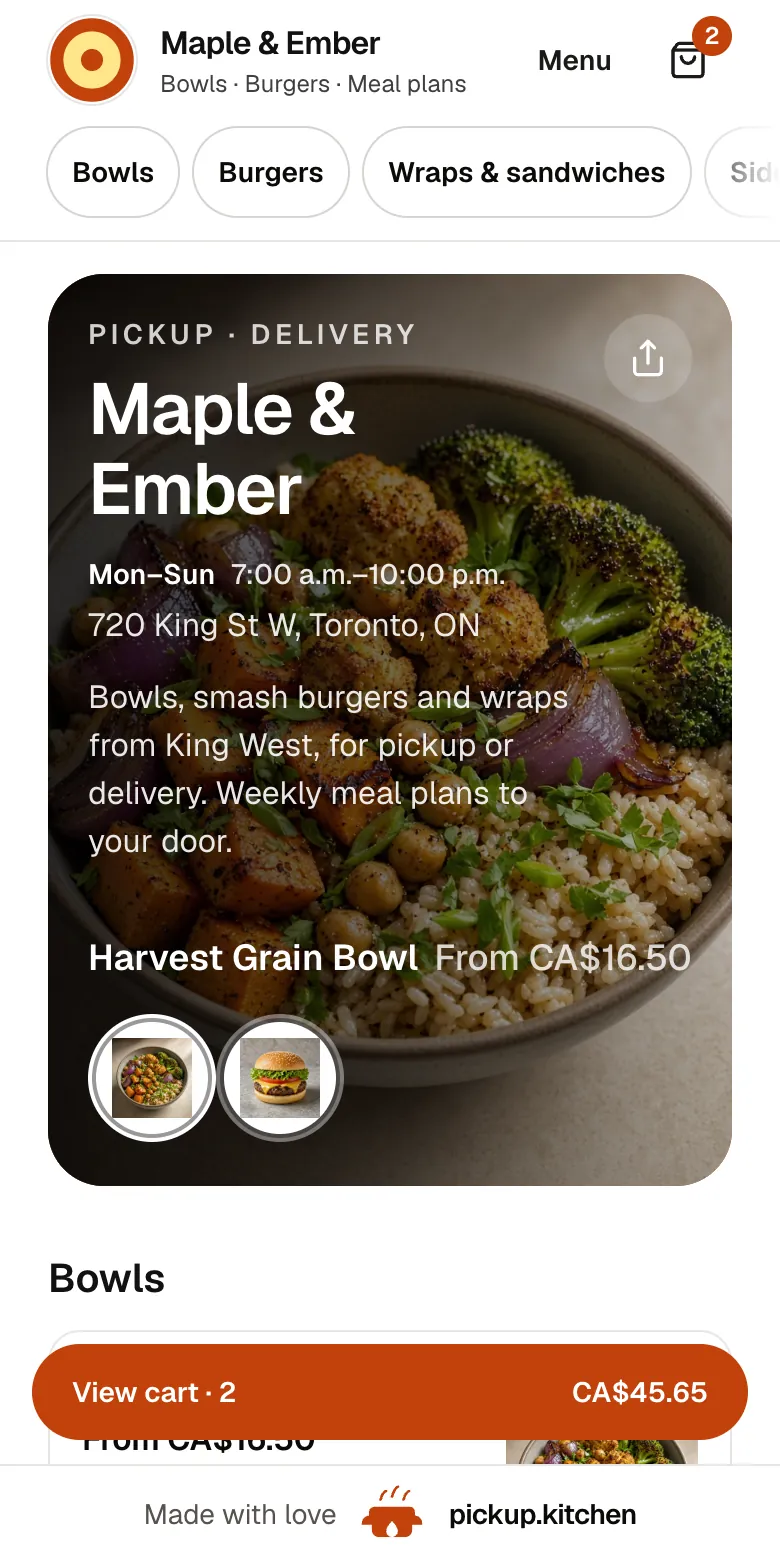
Your menu, on your own site
yourname.pickup.kitchen shows your dishes with photos and prices, and each guest picks pickup or delivery.
See how it works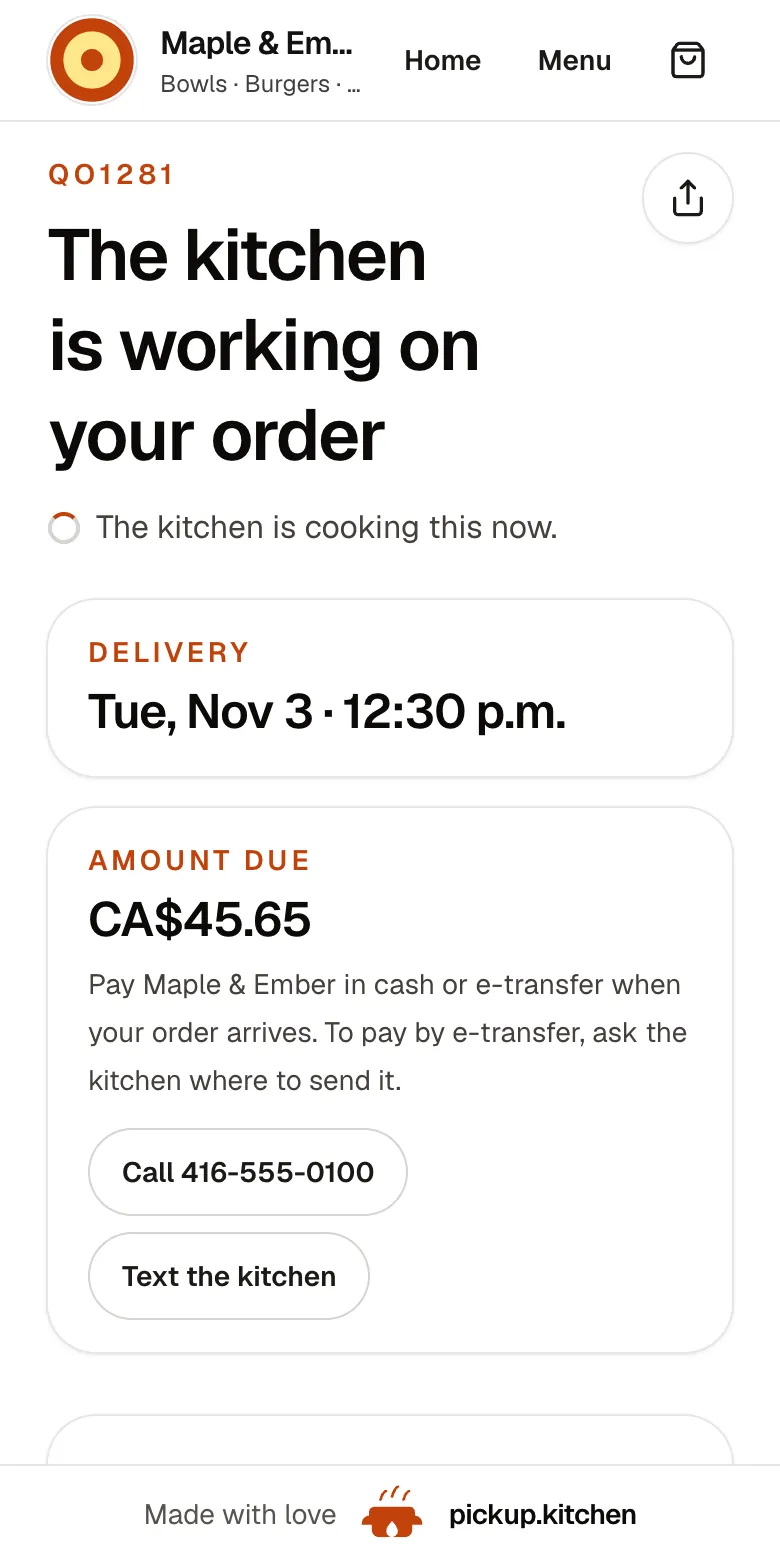
2Your guests
Every order gets a QO number
The guest sees their order number the moment they order, and the same number is on the kitchen's ticket.
See how it works3Your kitchen
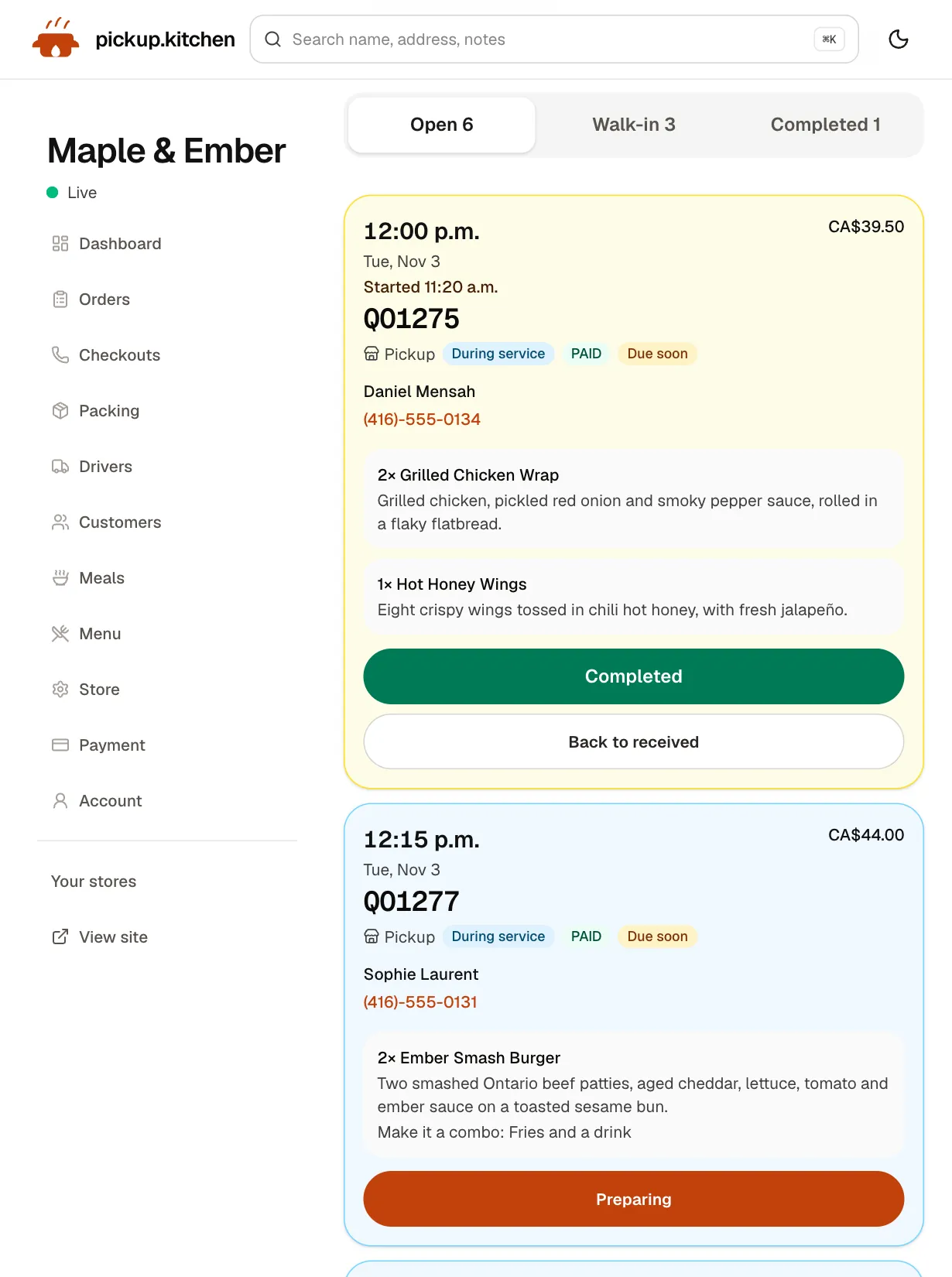
Tickets on the kitchen screen
Online orders, walk-ins and finished tickets in their own lanes, each with its QO number and the time it is due.
See how it works
Routific pricing, as Routific publishes it
Routific is route optimization software, and its meal-prep page is the best food-specific page in this market. It charges per order, not per driver. Routific counts each order once, when it is scheduled to a route, and you can re-optimize as often as you like.
Up to 100 orders a month is free. From 101 to 1,000 orders it is a flat $150 a month. Above that it is 15 cents an order from 1,001 to 2,000 and 13 cents to 3,000. Bands of 10 cents and lower follow, up to 50,000. Every plan includes every feature, unlimited drivers and dispatchers, and the driver app. The free plan leaves out SMS notifications, which are an add-on by quote. Routific's page shows dollars and does not name the currency. We read them as US dollars.
What 100, 500, 1,000 and 3,000 stops cost
We treat one stop as one Routific order. Our stop is one drop-off address, so two orders at one door count once. Dollars below are converted at CA$1.38 to US$1, which is our assumption, not a quoted rate.
- 100 stops a month: Routific $0. pickup.kitchen CA$0.
- 500 stops a month: Routific $150. pickup.kitchen CA$40, about US$29.
- 1,000 stops a month: Routific $150. pickup.kitchen CA$90, about US$65.
- 3,000 stops a month: Routific $430 ($150 plus 1,000 at 15 cents plus 1,000 at 13 cents). pickup.kitchen CA$210, about US$152, after CA$0.06 a stop past 1,000.
- Stops that come from pickup.kitchen orders cost nothing extra. Stops you add by hand are billed at the rates above.
What Routific does better
Routific is a deeper router than ours. Its meal-prep page speaks to a business that cooks to a cutoff and delivers chilled meals, and it has the tools for it.
- Delivery windows on each stop, and tags for zones, vehicles and cold orders.
- Barcode scanning at the door, so every package reaches the right house.
- Drivers can hand each stop to Google Maps, Waze or Apple Maps for turn-by-turn directions.
- Orders from a spreadsheet, a two-way Shopify sync, Zapier, an API and webhooks.
- Email updates and a live tracking link, with SMS as an add-on.
- Proof of delivery by photo or signature, and tools to draw and lock a route.
Where pickup.kitchen differs
Routific routes orders. It does not take them. Its meal-prep page says orders come in from a spreadsheet, Shopify or its API. With pickup.kitchen the guest orders on yourname.pickup.kitchen and pays by card, and the delivery lands on your board as a stop. Meal-plan delivery days become stops too.
Your cutoff sits at checkout. Set the time orders close for a delivery day, and a late order never reaches the route. Guests skip, pause or add days on the plan, so you do not edit a spreadsheet on Saturday night.
You plan routes the night before, tap Send to driver, and the driver can start tomorrow's route early and choose where to finish. The driver must take a photo before Delivered turns on. The guest sees the photo, the time and the driver's note. Pay is worked out to the last delivery.
The kitchen screen, the counter, the customer list and marketing emails are in the same login.
What pickup.kitchen does not do
We do not plan delivery time windows per stop or vehicle capacity, such as a van that holds 12 trays. We do not take signatures or scan barcodes. We have no public API. We plan one open route per driver, from your kitchen to the last stop. If your chilled boxes depend on tight windows, Routific does that and we do not.
Who should pick which
Pick Routific if your orders live in Shopify or a spreadsheet, you need delivery windows or barcodes, or you route thousands of stops. Pick pickup.kitchen if you want the ordering site, meal plans and drivers in one place. It also costs less than Routific at 500, 1,000 and 3,000 stops. The driver app is also sold on its own from 100 stops free, then CA$0.10 a stop.
Questions to ask Routific before you sign
Ask for the answers in writing. Ask us the same kind of questions.
- How much will SMS cost at my volume? Routific quotes it by country.
- Will my orders sync from my ordering tool, and who sets that up?
- What happens at order 101: does the flat $150 start straight away?
- Do I need delivery windows or barcodes? If so, pickup.kitchen is not the tool.
Step by step
How to get started
- 1Step 1: Count your stopsAdd up last month's delivery drops. Count two orders at one door once.
- 2Step 2: Add your driversInvite each driver by email. They open the route on their own phone and need no app store.
- 3Step 3: Bring in your stopsOrders from pickup.kitchen arrive on their own. Anything else, add by hand with a note for the driver.
- 4Step 4: Optimize and sendSplit the drops between drivers, check the order, and tap Send to driver.
FAQ
Questions
How much does Routific cost?
Up to 100 orders a month is free. From 101 to 1,000 orders it is a flat $150 a month. Above that it is 15 cents an order to 2,000 and 13 cents to 3,000, with lower bands after that. This is from Routific's page, checked November 2026. The page shows dollars without naming the currency.
Does Routific have a free plan?
Yes. Up to 100 orders a month is free forever, with every feature except SMS notifications. pickup.kitchen's driver app is free for the first 100 stops a month too, then CA$0.10 a stop, from 100 stops free, then CA$0.10 a stop.
What counts as an order in Routific?
Routific counts each unique order once, when it is scheduled to a route. Re-optimizing is free. pickup.kitchen counts a stop as one drop-off address, so two orders at one door count once.
Which is cheaper at 1,000 stops a month?
At 1,000 stops, Routific is $150. pickup.kitchen is CA$90, about US$65, and nothing extra for stops that come from pickup.kitchen orders. At 3,000 stops the gap grows. Prices change, so check both pages.
Can pickup.kitchen plan delivery windows like Routific?
No. pickup.kitchen does not plan time windows per stop or vehicle capacity. It plans one open route per driver. Routific has delivery windows and tags, which suit chilled meals with tight timing.
What is the best Routific alternative for meal prep?
It depends where your orders live. If they are in Shopify or a spreadsheet and you need windows, Routific is strong. If you want orders, meal plans, cutoffs and drivers in one login, pickup.kitchen is built for that.
Keep reading
- ProductDelivery route optimizationDelivery route optimization for food businesses: split drops between drivers, order stops by drive time, and re-optimize before they go. Free with orders.
- ProductDelivery driver appA delivery driver app for businesses that deliver: route on the phone, photo proof at the door, live tracking, dispatch. Free with pickup.kitchen orders.
- ProductMeal prep business softwareMeal prep business software that turns paid plans into tomorrow's pack list: skips, pauses, extra days, labels, and delivery in one login. 10% per order.
- CompareShipday alternatives for food businessesShipday alternatives for food businesses: Shipday's free, US$49 and US$99 plans against 100 free stops then CA$0.10 a stop, plus where Shipday is stronger.
- Productpickup.kitchen pricing: 10% per order, no monthly feepickup.kitchen pricing: free onboarding, no monthly fee, 10% per order. Delivery tools come with ordering. The driver app on its own is pay as you use.
Free onboarding. Pay as you use.
Keep more of every order
Keep the apps for new guests if they work for you, and let your regulars order on your own site.